5 Key Takeaways
- Spreadsheet carves break in ten predictable ways. Here is the template plus the point at which it stops being the right tool.
- A territory-planning spreadsheet can hold a roster, account attributes, formulas, and scenarios, but it becomes fragile when versions, stakeholders, exceptions, and deployments multiply.
- Maintain separate source, logic, lock, scenario, summary, account-change, approval, and deployment tabs with named owners and protected formulas.
- Spreadsheets are accessible and flexible.
- Ten predictable breakdowns include stale exports, hidden formulas, copied exceptions, inconsistent definitions, broken hierarchy, access leakage, manual deployment, and no audit trail.
Spreadsheet carves break in ten predictable ways. Here is the template plus the point at which it stops being the right tool. That position is useful only when the planning team can translate it into inputs, decisions, controls, and a result the field can understand.
BoogieBoard treats territory-planning spreadsheets as part of a governed change process. The model must connect market strategy with account-level evidence, productive capacity, explicit decision rights, and controlled activation. The objective is not to remove judgment. It is to make judgment visible and repeatable.
The central position is: Territory fatalism is a choice; 'it is what it is' is wrong. The sections below turn that position into definitions, alternatives, procedures, examples, controls, and an operating decision.
Working Definitions
- Scenario: one complete current-state or proposed territory design.
- version control: a defined input used when evaluating territory-planning spreadsheets.
- Balance Goal: a measurable objective for healthy opportunity, quality, workload, or continuity.
- Current State Analysis: a defined input used when evaluating territory-planning spreadsheets.
- Territory Logic: the rules that determine where accounts and roles belong.
BoogieBoard has observed organizations budgeting roughly $120,000 to $180,000 annually for a territory-planning specialist. That is an observed operating range, not a universal salary benchmark or an invented software ROI claim. For territory-planning spreadsheets, use that observation only for the claim and population it directly supports.
Independent evidence provides a separate check for territory-planning spreadsheets: Powell, Lawson, and Baker documented how spreadsheet errors persist in operational models and why review controls matter.
Scenario: The Decision Test
Ten predictable breakdowns include stale exports, hidden formulas, copied exceptions, inconsistent definitions, broken hierarchy, access leakage, manual deployment, and no audit trail. A practical test is to pick one surprising account and trace it end to end. Explain why it is in the segment, why it belongs in the territory, whether it is locked, which goals it affects, and what happens when the seller changes. If the answer requires several private spreadsheets, the model is not yet governed. In territory-planning spreadsheets, test the choice against version control, then record any accepted exception in the decision log.
How to Put Territory-Planning Spreadsheets Into Practice
Maintain separate source, logic, lock, scenario, summary, account-change, approval, and deployment tabs with named owners and protected formulas. How to Put Territory-Planning Spreadsheets Into Practice means producing one inspectable decision before advancing. Name the input, owner, output, and approval. Keep the current state as a baseline, and record assumptions that could change the result. This dependency order prevents a late preference from rewriting earlier definitions without anyone seeing the cost. The territory-planning spreadsheets review is complete only when Balance Goal and the affected account roster tell the same story.
The control at this stage is a decision log. Separate factual corrections from policy exceptions, preserve rejected alternatives, and attach an effective date. For the planning team, the practical test is whether another informed person could reproduce the result from the same data and rules without relying on private context. Use one current-state baseline to keep every territory-planning spreadsheets scenario comparable.
version control: The Decision Test
Spreadsheets are accessible and flexible. Those strengths become weaknesses when everyone can fork the model and no version controls the live decision. A practical test is to pick one surprising account and trace it end to end. Explain why it is in the segment, why it belongs in the territory, whether it is locked, which goals it affects, and what happens when the seller changes. If the answer requires several private spreadsheets, the model is not yet governed. Use one current-state baseline to keep every territory-planning spreadsheets scenario comparable.
Worked Example 1: A Decision You Can Reproduce
At 25 reps, thousands of account-territory combinations can sit behind one or two final scenarios. Manual copies cannot preserve that search space or decision history reliably. Assume six comparable territories cover 900 serviceable accounts. A count-only split begins at 150 accounts each. The team then measures Scenario, version control, and Balance Goal; one territory holds 28% of high-potential accounts and another carries twice the near-term workload. The worked answer is not to force identical counts. It is to publish the priority, range, and tradeoff. For territory-planning spreadsheets, name the approver, the permitted evidence, and the condition that would justify a departure from the rule.
Create three scenarios. Scenario A minimizes movement, Scenario B minimizes variance on the primary goal, and Scenario C protects continuity while improving the two largest outliers. Compare complete territories after qualifying locks return. Select the scenario whose residual imbalance leadership is prepared to explain and operate. Keep account-level results beside the territory-planning spreadsheets summary so version control remains inspectable after approval.
Decision Note: Balance Goal
A practical test is to pick one surprising account and trace it end to end. Explain why it is in the segment, why it belongs in the territory, whether it is locked, which goals it affects, and what happens when the seller changes. If the answer requires several private spreadsheets, the model is not yet governed. Keep account-level results beside the territory-planning spreadsheets summary so version control remains inspectable after approval.
Policy and Governance: Territory-Planning Spreadsheets
Use this module to make the hidden decision explicit. State the role, population, evidence, rule, exception path, and operating consequence. The objective is not a perfectly clean model; it is a model whose compromises are visible enough to approve, communicate, and improve. Give the territory-planning spreadsheets decision a source date, an owner, and a condition that would trigger revision.
A practical test is to pick one surprising account and trace it end to end. Explain why it is in the segment, why it belongs in the territory, whether it is locked, which goals it affects, and what happens when the seller changes. If the answer requires several private spreadsheets, the model is not yet governed. Before activating territory-planning spreadsheets, show managers the effect on Balance Goal and every downstream rule that depends on it.
See Scenario Planning in the Planning Workflow
The relevant product workflow is Manage Territory Scenarios in BoogieBoard. BoogieBoard Scenario Planning keeps the account-level assumptions, tradeoffs, and proposed assignments visible while the team completes that work.
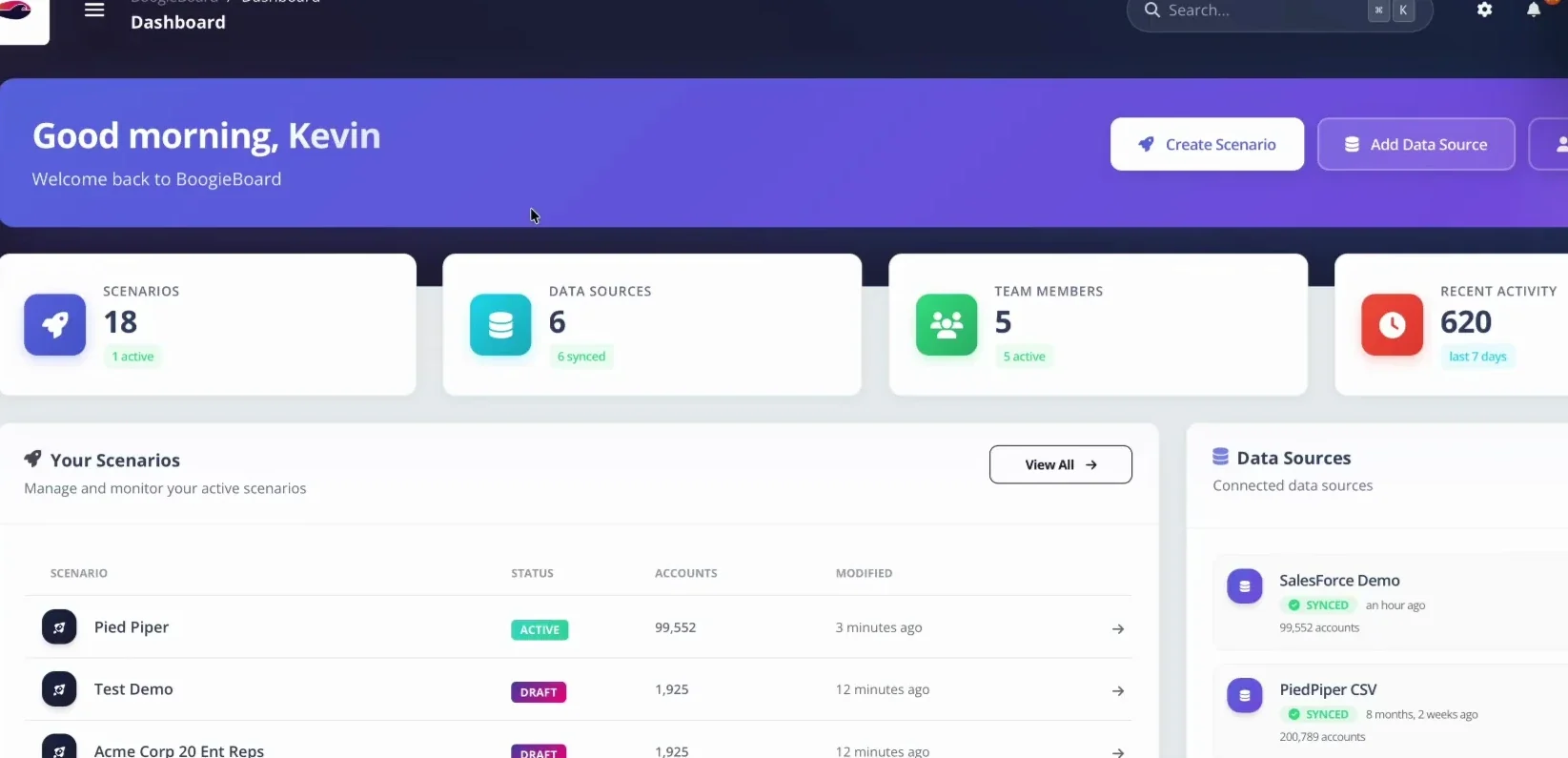
BoogieBoard keeps current and future territory scenarios separate so teams can model changes before activation.
Territory Logic: The Decision Test
A practical test is to pick one surprising account and trace it end to end. Explain why it is in the segment, why it belongs in the territory, whether it is locked, which goals it affects, and what happens when the seller changes. If the answer requires several private spreadsheets, the model is not yet governed. Before activating territory-planning spreadsheets, show managers the effect on Balance Goal and every downstream rule that depends on it.
Scenario: The Decision Test 2
Use this module to make the hidden decision explicit. State the role, population, evidence, rule, exception path, and operating consequence. The objective is not a perfectly clean model; it is a model whose compromises are visible enough to approve, communicate, and improve. For territory-planning spreadsheets, document the effect on Scenario before the model advances.
version control: The Decision Test 2
A practical test is to pick one surprising account and trace it end to end. Explain why it is in the segment, why it belongs in the territory, whether it is locked, which goals it affects, and what happens when the seller changes. If the answer requires several private spreadsheets, the model is not yet governed. In territory-planning spreadsheets, test the choice against version control, then record any accepted exception in the decision log.
From the Territory-Planning Spreadsheets Result to Action
Assume six comparable territories cover 900 serviceable accounts. A count-only split begins at 150 accounts each. The team then measures Scenario, version control, and Balance Goal; one territory holds 28% of high-potential accounts and another carries twice the near-term workload. The worked answer is not to force identical counts. It is to publish the priority, range, and tradeoff. The territory-planning spreadsheets review is complete only when Balance Goal and the affected account roster tell the same story.
Create three scenarios. Scenario A minimizes movement, Scenario B minimizes variance on the primary goal, and Scenario C protects continuity while improving the two largest outliers. Compare complete territories after qualifying locks return. Select the scenario whose residual imbalance leadership is prepared to explain and operate. Use one current-state baseline to keep every territory-planning spreadsheets scenario comparable.
Decision Note: Balance Goal 2
A practical test is to pick one surprising account and trace it end to end. Explain why it is in the segment, why it belongs in the territory, whether it is locked, which goals it affects, and what happens when the seller changes. If the answer requires several private spreadsheets, the model is not yet governed. Use one current-state baseline to keep every territory-planning spreadsheets scenario comparable.
Systems and Tooling: Territory-Planning Spreadsheets
Technology should preserve the model, not only the final owner field. Test version control, current-to-future comparison, account-level inspection, locks, scenario assumptions, approvals, effective dates, CRM deployment, and audit history. A faster spreadsheet export is not the same as a governed planning system. For territory-planning spreadsheets, name the approver, the permitted evidence, and the condition that would justify a departure from the rule.
Evaluate the operating burden as carefully as the feature list. Ask who maintains the data and logic, how managers review changes, what sellers receive, and how a correction reaches the live system. The system should make tradeoffs easier to inspect without pretending software can make the business judgment. Keep account-level results beside the territory-planning spreadsheets summary so version control remains inspectable after approval.
Practical Implications
A territory-planning spreadsheet can hold a roster, account attributes, formulas, and scenarios, but it becomes fragile when versions, stakeholders, exceptions, and deployments multiply.
Decision Worksheet
| Decision | Evidence to inspect | Control |
|---|---|---|
| Define the population | Scenario and comparable roles | Named data owner |
| Measure the current state | version control and Balance Goal | Source date and baseline |
| Choose the tradeoff | Scenario comparison and complete Territory Health | Recorded approver |
| Activate the result | Account roster, changes, quota, and transition rules | Effective date and correction path |
Operational Review Note 1
Review territory-planning spreadsheets at three levels. At the company level, reconcile market coverage, capacity, quota, and disruption. At the territory level, compare the published goals, locked-account burden, vacancies, and workload. At the account level, inspect hierarchy, fit, ownership, open work, and the reason for every exception. These views should use the same scenario and source date.
This review pass emphasizes Scenario. Require reviewers to state whether feedback is a data correction, a policy challenge, or a preference. Corrections update the evidence. Policy challenges go to the named approver. Preferences remain visible but do not silently change the model. This discipline keeps Scenario, version control, and Balance Goal coherent through approval and activation.
Operational Review Note 2
Review territory-planning spreadsheets at three levels. At the company level, reconcile market coverage, capacity, quota, and disruption. At the territory level, compare the published goals, locked-account burden, vacancies, and workload. At the account level, inspect hierarchy, fit, ownership, open work, and the reason for every exception. These views should use the same scenario and source date.
This review pass emphasizes version control. Require reviewers to state whether feedback is a data correction, a policy challenge, or a preference. Corrections update the evidence. Policy challenges go to the named approver. Preferences remain visible but do not silently change the model. This discipline keeps Scenario, version control, and Balance Goal coherent through approval and activation.
Operational Review Note 3
Review territory-planning spreadsheets at three levels. At the company level, reconcile market coverage, capacity, quota, and disruption. At the territory level, compare the published goals, locked-account burden, vacancies, and workload. At the account level, inspect hierarchy, fit, ownership, open work, and the reason for every exception. These views should use the same scenario and source date.
This review pass emphasizes Balance Goal. Require reviewers to state whether feedback is a data correction, a policy challenge, or a preference. Corrections update the evidence. Policy challenges go to the named approver. Preferences remain visible but do not silently change the model. This discipline keeps Scenario, version control, and Balance Goal coherent through approval and activation.
Operational Review Note 4
Review territory-planning spreadsheets at three levels. At the company level, reconcile market coverage, capacity, quota, and disruption. At the territory level, compare the published goals, locked-account burden, vacancies, and workload. At the account level, inspect hierarchy, fit, ownership, open work, and the reason for every exception. These views should use the same scenario and source date.
This review pass emphasizes Current State Analysis. Require reviewers to state whether feedback is a data correction, a policy challenge, or a preference. Corrections update the evidence. Policy challenges go to the named approver. Preferences remain visible but do not silently change the model. This discipline keeps Scenario, version control, and Balance Goal coherent through approval and activation.
Frequently Asked Questions
Can you plan territories in a spreadsheet?
A territory-planning spreadsheet can hold a roster, account attributes, formulas, and scenarios, but it becomes fragile when versions, stakeholders, exceptions, and deployments multiply. Spreadsheets are accessible and flexible. Those strengths become weaknesses when everyone can fork the model and no version controls the live decision. Use the published definitions and complete-territory result instead of relying on one universal benchmark.
When does a spreadsheet carve break down?
Maintain separate source, logic, lock, scenario, summary, account-change, approval, and deployment tabs with named owners and protected formulas. At 25 reps, thousands of account-territory combinations can sit behind one or two final scenarios. Manual copies cannot preserve that search space or decision history reliably. Publish the assumptions so another reviewer can reproduce the answer.
What data is required for territory-planning spreadsheets?
For territory-planning spreadsheets, assemble governed account data, current assignments, role capacity, and decision evidence for Scenario, version control, and Balance Goal. Date the sources and publish the definitions so another reviewer can reproduce the result and separate a factual correction from a policy exception.
How often should territory-planning spreadsheets be reviewed?
Review territory-planning spreadsheets on the formal planning cadence and whenever the inputs behind Scenario, version control, and Balance Goal change materially. Keep customer and pipeline ownership stable between reviews; reopen the model when strategy or new evidence changes the decision, not merely because a manager prefers a different assignment.
How should Balance Goals and account locks work together?
For territory-planning spreadsheets, define Balance Goals tied to Scenario, version control, and Balance Goal before applying locks. Then publish Account Locking Criteria, lock only qualifying accounts, optimize the movable book, and score the complete territory so locked burden and residual imbalance remain visible.
When should a spreadsheet be replaced with a planning system?
For territory-planning spreadsheets, a spreadsheet remains adequate while one owner can preserve Scenario, version control, and Balance Goal, plus versions, account detail, approvals, and deployment without manual reconciliation obscuring the rule. Move to a planning system when scenario volume, collaboration, or audit work overwhelms the decision itself.
About the author: George James is Co-Founder & CPO of BoogieBoard.
In Summary
Spreadsheet carves break in ten predictable ways. Here is the template plus the point at which it stops being the right tool. Use the sequence above to keep the decision governed, evidence-based, and inspectable at both the account and territory levels.
See Territory Planning in Practice
Watch practical territory-design workflows on the BoogieBoard YouTube channel.