
Sales territories, balanced in minutes.
Territory planning for RevOps and sales leaders. Balance books on any metric, draw territories on a map, track every change, and push the plan to Salesforce.








Everything you need to plan, balance and maintain territories
One platform for the annual redesign and every change after it, connected to Salesforce from day one.
Territory design
Balance books on ARR, account count, renewals or any field with Auto-Balance.
Learn moreTerritory maps
Auto-carve territories by country, state, ZIP or postal code.
Learn moreRules & locks
Route accounts by rule and keep live deals exactly where they are.
Learn moreSalesforce integration
Sync from Salesforce, then push approved changes to ETM, Account Owners and Account Teams.
Learn moreScenarios & sharing
Draft what-if scenarios, share them with sales leaders for review, and publish the winner.
Learn moreCoverage & roles
Map every role to territories. Pod AEs, BDRs, CSMs and SEs together, or give each its own book.
Learn moreAccount families
Manage complex parent and child relationships. Build them into your territory model.
Learn moreAI territory design
One click finds the best balanced plan for every goal and rule.
Learn moreOne workspace for every territory decision
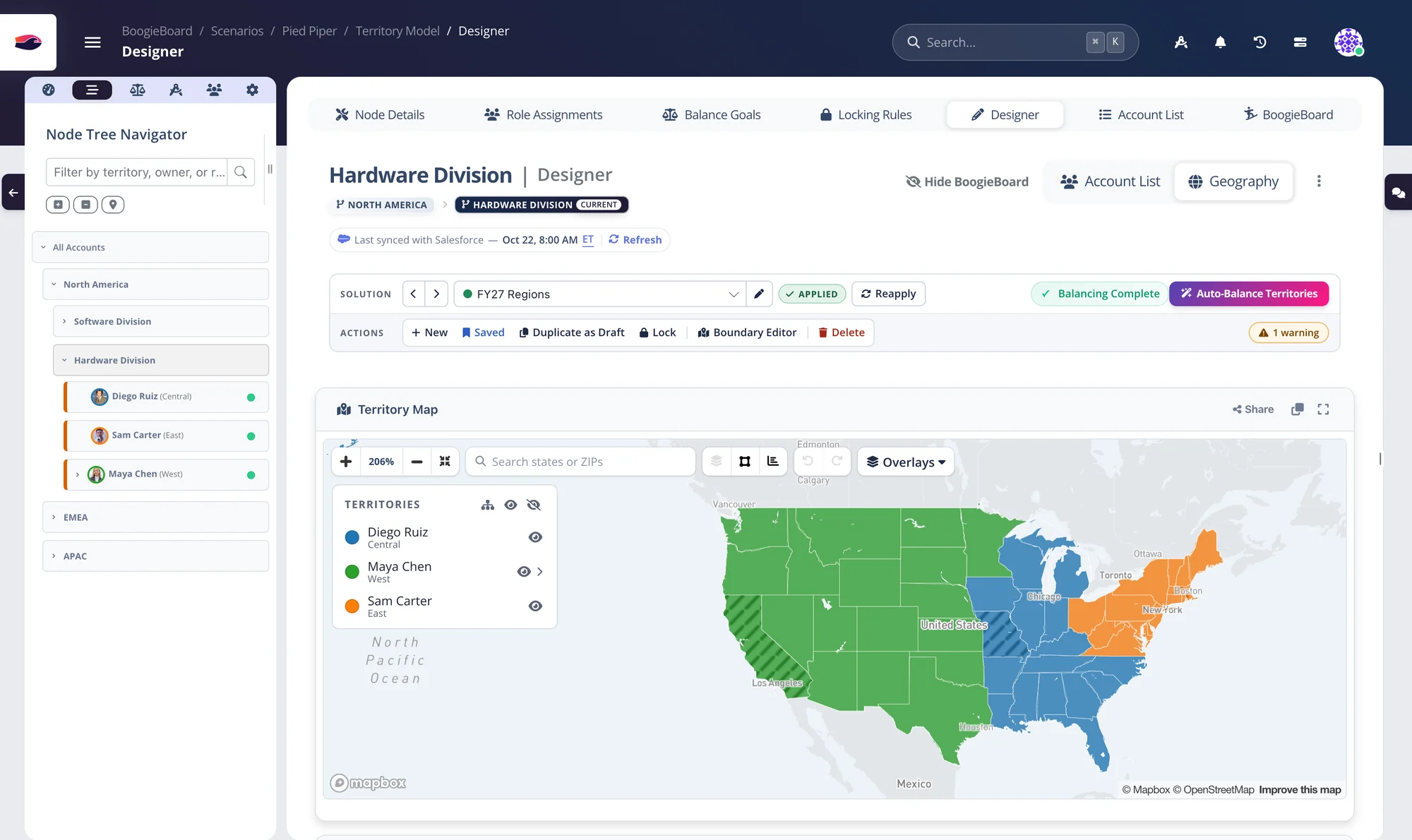
See every territory scored against your goals, or switch to the map to see the same plan by geography. Both stay in sync with Salesforce.
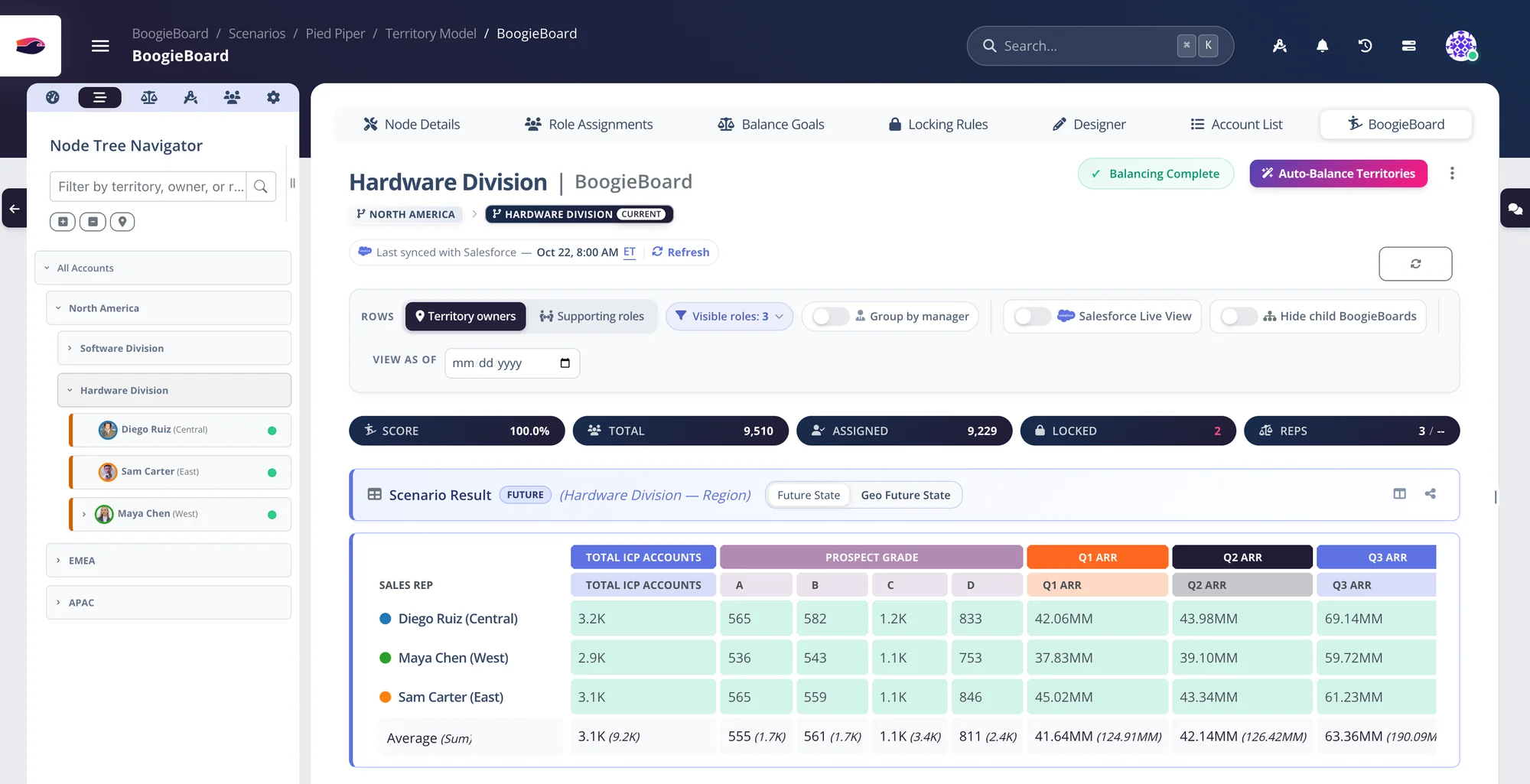
From Salesforce to a balanced, committed plan
Your RevOps team runs it end to end. No consultants, no 40-tab workbook.
Connect your data
Connect accounts and any standard or custom Salesforce object, or bring data from wherever it lives. Already on Salesforce ETM? Import it instantly.
Model your territories
Lay out regions, segments and territories as a tree. Readable rules route every account to the right place.
Balance to your goals
Set what fair means, run Auto-Balance, and watch every book turn green on the BoogieBoard.
Approve and push
Review with your leaders, commit the plan, preview every change and push to Salesforce.
Model your territories, then let the accounts flow
- Add a node anywhere in the tree in one click
- Build rules from your data, with a live count that checks your logic as you go
- Built-in reports and alerts flag exceptions and every account gained or lost
Set your goals. Click balance. Watch every book turn green.
- Nine goal templates to balance, cap or score any metric
- Choose which territories can gain accounts and which can give them up
- A full report and one-click undo for every run
Auto-Carve territories on a real map, down to the ZIP code
- Use 22 pre-made regions, and split dense metros in one click
- Size territories with census data: population, income, housing
- Share the map by link, no login needed
Rebalance without touching live deals
- Set a rule at the top, and every territory below follows it
- Manual locks expire after 90 days, so nothing gets stuck
- Keep parent and child accounts with the right owner
Rep departures and new hires, handled in minutes
- Rebalance a subset of accounts without touching the rest
- Undo any change, or roll back to any date
- Show Me Why explains any assignment in seconds
Let AI design your territories
- Account-based or geographic territories
- Know when you've hit the best possible balance
- Run it from Claude Code or Codex
Leadership sign-off, without the spreadsheet ping-pong
Give each sales leader a simple view of their own team. Their changes stay put, RevOps rebalances around them in one click, and you repeat until everyone signs off.
Leaders adjust their own team
They move accounts between their reps, and each move locks in place.
RevOps rebalances around them
One click on Auto-Balance evens out every book, and every leader's move stays put.
The cycle: leaders adjust their branch and their edits hold as locks; RevOps rebalances around them; leaders review the rebalanced plan again, until everyone signs off.
Share with stakeholders
Each leader sees and edits only their own team, or gets a read-only link.
Get their feedback
Leaders move accounts between their reps or leave comments. Every move locks in place.
Rebalance in one click
Auto-Balance evens out every book. Leaders' moves stay put.
Approve and go live
When every leader signs off, push the plan live in Salesforce.
Design in BoogieBoard. Go live in Salesforce.
- Import the ETM model you already have
- Bulk-update Salesforce fields from any account list
- Catch drift when owners change in Salesforce
Every tool a territory team needs
Territories in weeks, not months
for Challenger to carve its new territories
faster territory planning at Beeline
from kickoff to finished territories at Watershed
across three continents planned in one place at Fullstory
With BoogieBoard, we were done with territories in three weeks. The shining light was the equity, the confidence that all reps had an equal shot at hitting their quotas.
 Trevor HusseyRevenue Operations, Watershed
Implementing BoogieBoard was as easy as it could be. Ultimately, we ended up with some strong territories and very happy sellers.
 Alli ManningChief Operating Officer, Challenger
BoogieBoard just works. It saved weeks of time that would have been spent in spreadsheets and created perfectly equitable territories.
 Meredith DowdVP of Revenue, Sana
We were worried that the demo was too good to be true. The idea that you could click a button and receive a territory design seemed unrealistic.
 Jessica WattsVP of Sales, Fundraise Up
We upgraded from spreadsheet based territory building with BoogieBoard. The biggest game changer here has been the territory balancing functionality, which allows us to create equitable territories based on multiple criteria rather than relying on a single rule or trying to workshop them together in a spreadsheet.
 Veronica K.
Sr. Rev Ops Analyst · Mid-Market · G2
Veronica K.
Sr. Rev Ops Analyst · Mid-Market · G2
With Boogieboard, we now have a straightforward connection directly to our Salesforce ETM. We saved a huge amount of time and were able to do things we simply didn't have the capacity for last time, like scenario planning and last-minute changes.
The product's ease of use is invaluable. It allows our Operations team to move more quickly, while ensuring Sales Leadership has a clear understanding of their territories.
Fits the stack you already run
- Salesforce: scheduled sync in; ETM, Account Owner, Account Teams and custom objects out
- ChatGPT & Claude: build and query your plan from your AI assistant
- CSV, Google Sheets & any HTTP API: plan on data that lives outside the CRM
- Slack: mentions, tasks and sync alerts where leaders already are
Questions RevOps teams ask us
What does sales territory planning software actually do?
It replaces the spreadsheet. Connect your accounts and reps, set what a fair book looks like, and the software assigns accounts to hit those goals. BoogieBoard also keeps the plan accurate after go-live: routing new accounts, handling rep changes and syncing with Salesforce.
Does BoogieBoard work with Salesforce Enterprise Territory Management?
Yes. Import your existing ETM model, plan in BoogieBoard, and push approved territories back to ETM. Not on ETM? Push to Account Owner, Account Teams or custom objects instead. You preview every change before anything is written.
How often does BoogieBoard sync with Salesforce?
As often as you need: on demand, hourly, every 2, 4, 8 or 12 hours, or daily at a set time. Syncs pull only records that changed, and pushes back to Salesforce happen when you choose: manually or on a schedule you can pause.
How does BoogieBoard handle mid-year changes like a rep leaving?
Remove the rep, and BoogieBoard spreads their accounts across the team to your goals. Open deals stay with their owner, a teammate covers the open seat, and you can undo any change or roll back to any date.
Can I design territories by geography?
Yes. BoogieBoard auto-carves territories from countries, states, ZIP codes and international postal codes, balanced on your account data, kept contiguous and overlaid with census data.
How is BoogieBoard priced?
Pricing is based on the number of live territories. Draft scenarios are free, so explore as many what-ifs as you like. See pricing for details.
How long does it take to get started?
As fast as you can connect your data. Challenger had new territories in 48 hours. Watershed went from kickoff to finished in 3 weeks.
See a demo with your own data on the first call.
Send a CSV or connect Salesforce before the call. We'll build a balanced plan from your real accounts.