
Balanced territory maps, carved by AI.
Click Auto-Balance and BoogieBoard's AI carves your map into balanced territories — whole states where that works, ZIP codes where your accounts are dense. Then fine-tune by hand, from countries down to 5-digit ZIP codes.
How AI carves your map
You decide what balanced means. BoogieBoard's AI does the carving.
Pick your geography
Countries, states and provinces, or ZIP and postal codes. Smart Subdivide splits dense areas only where your accounts are.
Set goals and guardrails
Balance on ARR, account count or any field. Keep territories contiguous, cap distance or time-zone spread, and lock the areas that can't move.
Click Auto-Balance
The AI explores a huge number of designs, and the map and the BoogieBoard update as it goes.
Review and fine-tune
Compare draft solutions, apply the one you like, then adjust by hand. Every change is previewed and can be undone.
The Territory Designer
Territories, solutions and Auto-Balance on a live map — with the legend, search and overlays your team uses every day.
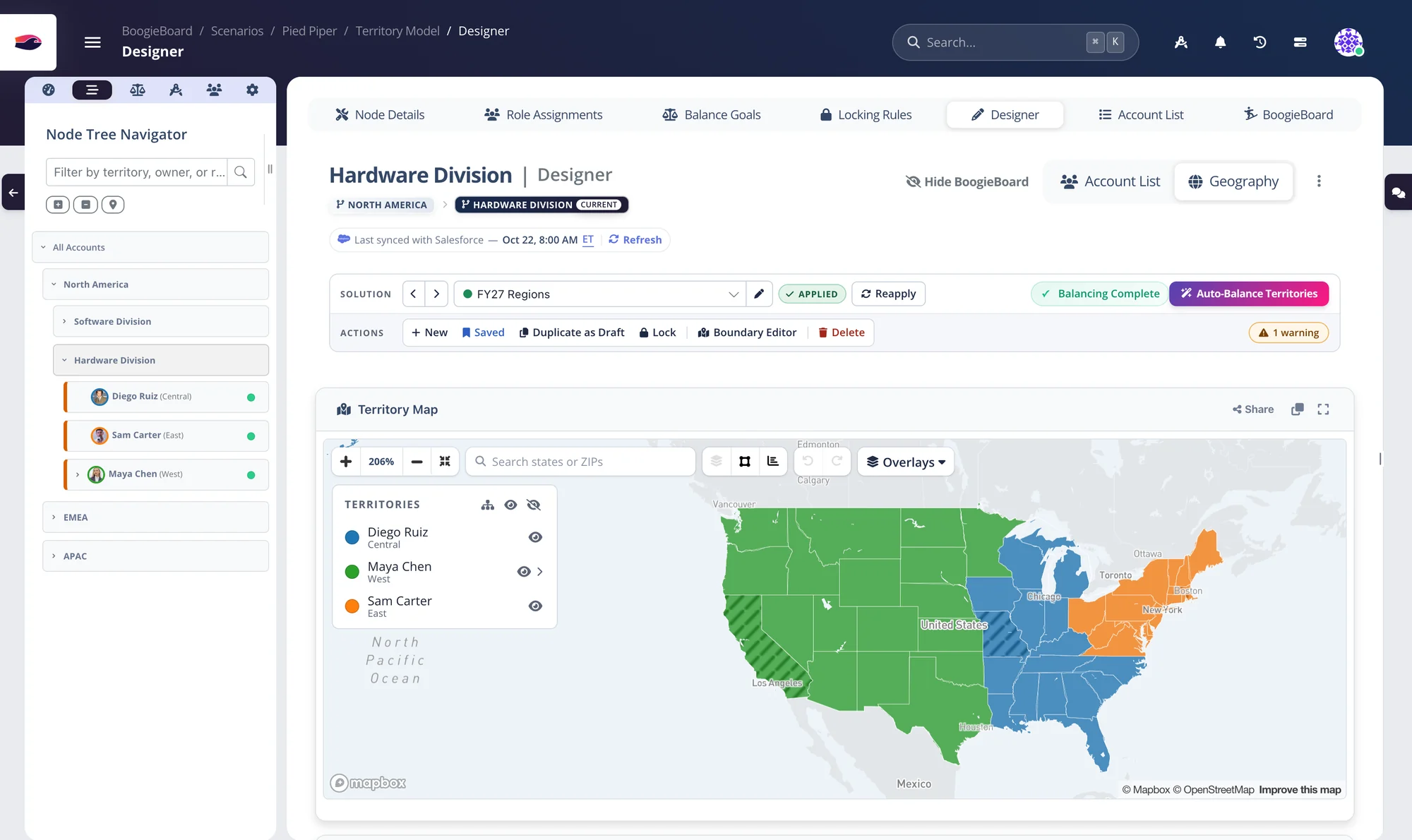
Change the map, watch the numbers move
Every edit on the map shows up on the BoogieBoard straight away, so you always know what a change does to each book.
Hover anything. Reassign with a right-click.
- Several draft solutions per region: apply the one you like
- Accounts are geo-tagged after every sync
Draw a shape. Reassign everything inside it.
- Lock areas as you assign them
- Lock, unlock or unassign a whole selection
Lock what can't move. AI balances around it.
- Lock from the map with ⌥ + right-click, or from a selection
- See every locked area per territory, and unlock any time
Territories your reps can actually cover
Go beyond contiguous blocks: keep accounts close to the rep who owns them, within the distances and time zones you set.
Clusters built around every rep
- Minimize distance with the GeoAware goal
- Use each rep's home ZIP to keep accounts nearby
Keep every territory drivable and in-hours
- Cap the miles from each rep's home location
- Cap the time-zone spread of a territory in hours
- Leave Alaska and Hawaii out of the limits
Dense metro? Split it at the ZIP code.
- US ZIP codes at 5, 3 or 2 digits
- Merge areas back together whenever you like
Presets, overlays and drill-down — built in
- Keep territories contiguous and compact
- Overlay US Census population, income, housing, age and commute
- Drill from a region into the territories inside it
Carve at the level each region needs — and mix them
One boundary can combine whole states with ZIP-level detail where the accounts are dense.
Countries
Every country, for global and regional teams.
States & provinces
First-level regions worldwide.
US ZIP codes
5-, 3- and 2-digit ZIP areas.
Canada & Germany
Canadian 3-character and German 5-, 3- and 2-digit postal codes.
Send the map, not a screenshot
- Export geo territories as CSV or Markdown
- Share BoogieBoard tables the same way; filtered account views go to teammates
GeoAware territory mapping in 90 seconds
Territory mapping questions
Which geographies can I build territories from?
Countries, states and provinces worldwide, US 5-, 3- and 2-digit ZIP codes, Canadian 3-character postal codes and German 5-, 3- and 2-digit postal codes. You can mix levels within one territory.
Can BoogieBoard balance a geographic territory on revenue?
Yes. Geographic territories are balanced on your account data — ARR, account count, pipeline or any other field — and can also be balanced on US Census metrics for whitespace territories.
How do you keep territories compact and coverable?
Auto-Balance keeps every territory contiguous, compactness scoring keeps shapes tidy, and limit goals can cap the distance between accounts or the time-zone spread in a territory.
Do geographic territories have to be contiguous?
No. Map territories can be kept contiguous, or you can use GeoAware territories, which group accounts into balanced clusters near each rep instead of one connected block.
Can reps see their map without a BoogieBoard login?
Yes. Share a read-only map link. It opens without a login and supports drilling into sub-territories.
Keep exploring
See your own territories balanced — on the first call.
Bring a CSV or connect Salesforce. We'll build a balanced plan from your real accounts while you watch.