5 Key Takeaways
- Territory-spreadsheet errors usually come from manual data handling, fragile formulas, conflicting versions, and logic only one person understands.
- Ten practical controls can reduce risk: separate layers, validate data, restrict inputs, protect logic, reconcile outputs, simplify rules, version changes, document definitions, name calculations, and automate imports.
- These controls stabilize spreadsheets but do not solve scenario scale, collaboration, account-level exceptions, approvals, or controlled CRM deployment.
- Move to a dedicated territory-planning platform when validation consumes the project, stakeholders dispute the source of truth, or the model cannot represent alternatives safely.
- Test the process with account-level failure drills before go-live: a stale source row, duplicate account, broken hierarchy, expired lock, vacant owner, and failed CRM write should each produce a visible exception.
Territory planning spreadsheets rarely fail with one spectacular formula error. They fail gradually: a stale export, a copied row, an exception added in a side file, a manager working from yesterday's version, and a formula that no longer reaches the bottom of the sheet.
That matters because a territory carve is one of the highest-stakes operational workbooks a company builds. Accounts move, customer relationships change, Salesforce access can change, and a seller's perceived chance of earning quota changes with them.
Operational-spreadsheet research found errors in 0.8% to 1.8% of formula cells across 50 workbooks, depending on the error definition. In a follow-up impact study, some errors materially affected important outputs (Powell, Lawson, and Baker). A territory workbook deserves controls proportionate to its consequences.
Understanding the Root Causes of Territory Spreadsheet Errors
Four patterns cause most failures:
- Manual data handling: CRM exports, enrichment files, roster changes, and manager edits are copied between tabs without a durable reconciliation process.
- Fragile formulas: nested lookups, range references, allocation formulas, and one-off exceptions break as rows and columns change.
- Version-control chaos: several stakeholders review different copies, then someone attempts to merge decisions into a master file.
- Opaque Territory Logic: segmentation, hierarchy, geography, locks, and assignment rules exist as formulas that only the workbook's creator can explain.
The problem is not that spreadsheets are bad. It is that a planning artifact is being asked to act simultaneously as a data pipeline, rule engine, scenario system, collaboration layer, audit trail, and deployment tool.
10 Practical Fixes for Territory Spreadsheets
1. Separate Data, Logic, Scenarios, and Reporting
Use distinct layers:
- Raw Current State: untouched exports from Salesforce, HRIS, enrichment, and finance.
- Normalized Data: cleaned IDs, hierarchy, segment labels, role status, and derived fields.
- Territory Logic: documented rules for eligibility, hierarchy, segmentation, region, locks, and assignment.
- Scenarios: isolated future-state outputs that never overwrite the current state.
- Reporting: account-level changes, territory summaries, scenario comparisons, and pre-flight deployment lists.
Mixing these layers makes every correction dangerous because nobody knows whether a cell is an input, rule, result, or presentation value.
A practical workbook might use tabs named 01_Current_State, 02_Normalized_Accounts, 03_Rules, 04_Locks, 05_Scenario_A, 06_Scenario_B, and 07_Preflight. The numbering matters less than the boundary. A reviewer should never have to guess whether changing a value will alter the source, one scenario, or every downstream report.
2. Enforce Primary Data Accuracy
A formula cannot repair a missing parent relationship, stale employee record, duplicate account, or blank segment field. Define the required fields and their owners before modeling.
At minimum, validate account ID, website, account status, segment input, geography, parent account, current owner, role status, opportunity state, renewal timing, and every Balance Attribute used in the design.
Do not silently replace missing data with zero. A blank annual revenue field does not mean the company has no revenue. Preserve unknown as unknown so reviewers can see the evidence boundary.
Add a data-quality dashboard before the design tabs. Show null rates, duplicate IDs, invalid role records, missing hierarchy, stale enrichment dates, and accounts that fail the segmentation rule. The team can then decide whether a defect blocks planning, requires remediation, or is acceptable with a documented limitation.
3. Use Validation to Prevent Invalid Inputs
Create controlled lists for scenario name, territory ID, employee ID, segment, region, role, account status, and exception type. Reject invalid values instead of allowing spelling variations to become new categories.
Use stable IDs for joins. Names change; Salesforce IDs and employee IDs are designed to persist. A territory called "Central Enterprise" can be renamed without breaking every assignment if the underlying territory identifier remains stable.
Validation should restrict transitions, not only values. An active customer should not become a prospect because someone selected the wrong dropdown value. Where possible, derive status from the source system and reserve manual fields for scenario decisions.
4. Protect Formula and Rule Cells
Lock the ranges that contain transformations, classification logic, balance calculations, and final assignments. Give reviewers designated comment or exception fields rather than edit access to the rule engine.
This is also a permissions decision. Sales leaders may need to review their teams, while RevOps owns shared logic and the deployment file. Broad edit access is not collaboration; it is ungoverned production access.
Before sharing, test the workbook using a non-owner account. Hidden tabs, protected formulas, and filtered ranges can behave differently for collaborators. Confirm that reviewers can see the evidence they need without gaining the ability to alter shared logic.
5. Build Reconciliation Checks
Do not rely on visual inspection alone. Add tests for:
- account counts from source through final assignment
- duplicate account IDs
- eligible but unassigned accounts
- accounts assigned to multiple exclusive territories
- active employees without a territory
- territories without a productive or temporary owner
- locked accounts that moved
- parent-child rules that were violated
- scenario totals that differ from the source universe
Pro Tip: Make Exceptions Visible
Use conditional formatting for failed checks, but also maintain an exceptions table with account ID, rule, reason, approver, owner, and expiration. A red cell tells you something is wrong. An exception record tells you whether it is wrong on purpose.
Run reconciliation after import, after scenario generation, and immediately before activation. A workbook can balance perfectly against its original export and still be wrong if Salesforce changed during review.
6. Keep Territory Logic as Simple as the Business Allows
Complexity is sometimes real. A global business may need hierarchy, language, product, partner, customer, and regulatory logic. The mistake is adding complexity with no named business requirement.
For each rule, record the decision it supports and the stakeholder who owns it. Remove obsolete rules rather than layering new exceptions on top. Generic parameters are the enemy, but unnecessary precision is not strategy either.
Separate structural rules from optimization preferences. "Enterprise accounts with a German contracting entity belong in DACH" may be a hard eligibility rule. "Keep total potential within 10%" is a Balance Goal. When both are buried in one formula, reviewers cannot tell what may be traded off.
7. Implement Explicit Version Control
Use standardized scenario names and a changelog. At minimum, capture:
- version and scenario name
- source-data timestamp
- roster version
- Territory Logic version
- change owner and timestamp
- approval status
- relationship to the current active state
Never reuse the current-state tab as a draft. Preserve the baseline so every reviewer can answer, "What changes if we choose this scenario?"
Freeze an approved version and record row counts for the deployment export. If the workbook changes after approval, return it to review rather than quietly producing a new write file.
8. Document Everything in a Definition Tab
The workbook should be operable by someone other than its creator. Document:
- every tab's purpose
- each input field and source
- segment and account definitions
- territory hierarchy
- Balance Goals and acceptable ranges
- Account Locking Criteria
- assignment and hierarchy rules
- known data limitations
- review and approval process
- CRM deployment boundary
Write the logic in plain language beside the formula. If the policy cannot be explained without tracing cell references, it is not ready for stakeholder review.
Include worked boundary cases: a global parent with local subsidiaries, a rep who leaves with open opportunities, a customer approaching renewal, and an account crossing a segment threshold. Examples expose ambiguity that a high-level rule hides.
9. Use Named Ranges and Structured References
Replace fragile cell addresses with named tables, fields, and calculations. Qualified_Prospects, Current_Owner_ID, and Target_Territory_ID are easier to audit than references to a changing column letter.
Keep formulas consistent within a column and test row-count changes. A calculation that works for 4,000 accounts should not stop at row 3,997 because last quarter's export was smaller.
Avoid volatile functions and uncontrolled cross-workbook links where possible. They make refresh behavior difficult to predict and can produce different results depending on which files are open.
10. Automate Data Imports Where Possible
Use controlled connectors or queries instead of repeated copy-paste. Record refresh time, row count, and source. Keep the imported layer read-only and apply transformations downstream.
Automation does not eliminate validation. Salesforce may contain legitimate changes after the scenario began. Reconcile the planning current state against the live system immediately before deployment.
Define the synchronization boundary: which objects and fields are read, how frequently they refresh, and which fields the final process may write. A connector with undefined ownership automates the same ambiguity that existed in the workbook.
The Tipping Point: When to Move Beyond Spreadsheets
The ten fixes improve a spreadsheet process, but they do not remove its ceiling. Warning signs include:
- Validation dominates the project: the team spends more time proving the workbook than evaluating territories.
- Stakeholder disputes are about versions: managers cannot tell which scenario or source data is authoritative.
- Scale exceeds human review: even a 25-rep organization can involve thousands of possible account-to-territory combinations before one or two viable scenarios remain.
- Current state goes stale: late-quarter changes make the original export unreliable.
- Scenario comparison is manual: each alternative requires another copied workbook and another merge of feedback.
- Deployment is risky: the workbook cannot produce a bounded, reviewable pre-flight list of Salesforce changes.
Personnel risk is another signal. If only one operator knows how to refresh, repair, and deploy the workbook, the company has a dependency rather than a durable process.
There is also an opportunity-cost question. BoogieBoard's practitioner evidence places a dedicated territory specialist at roughly $120,000-$180,000 annually. Do not treat that as automatic software ROI; calculate your own. It does show that the operating burden can become a real role, not a minor spreadsheet task.
The Advantage of a Dedicated Territory-Planning Platform
A purpose-built system changes the workflow in four ways:
- Current-state control: synchronize account, role, pipeline, customer, and territory data without rebuilding an export chain.
- Visible Territory Logic: define hierarchy, segmentation, regions, Balance Goals, locks, and roles as governed configuration.
- Scenario isolation: compare future states without overwriting the active model.
- Controlled activation: collect feedback, preserve activity history, inspect changes, and write only the approved values to Salesforce.
The platform should preserve rejected scenarios too. Those alternatives prove that leadership considered different balance-versus-disruption choices and explain why the selected design won.
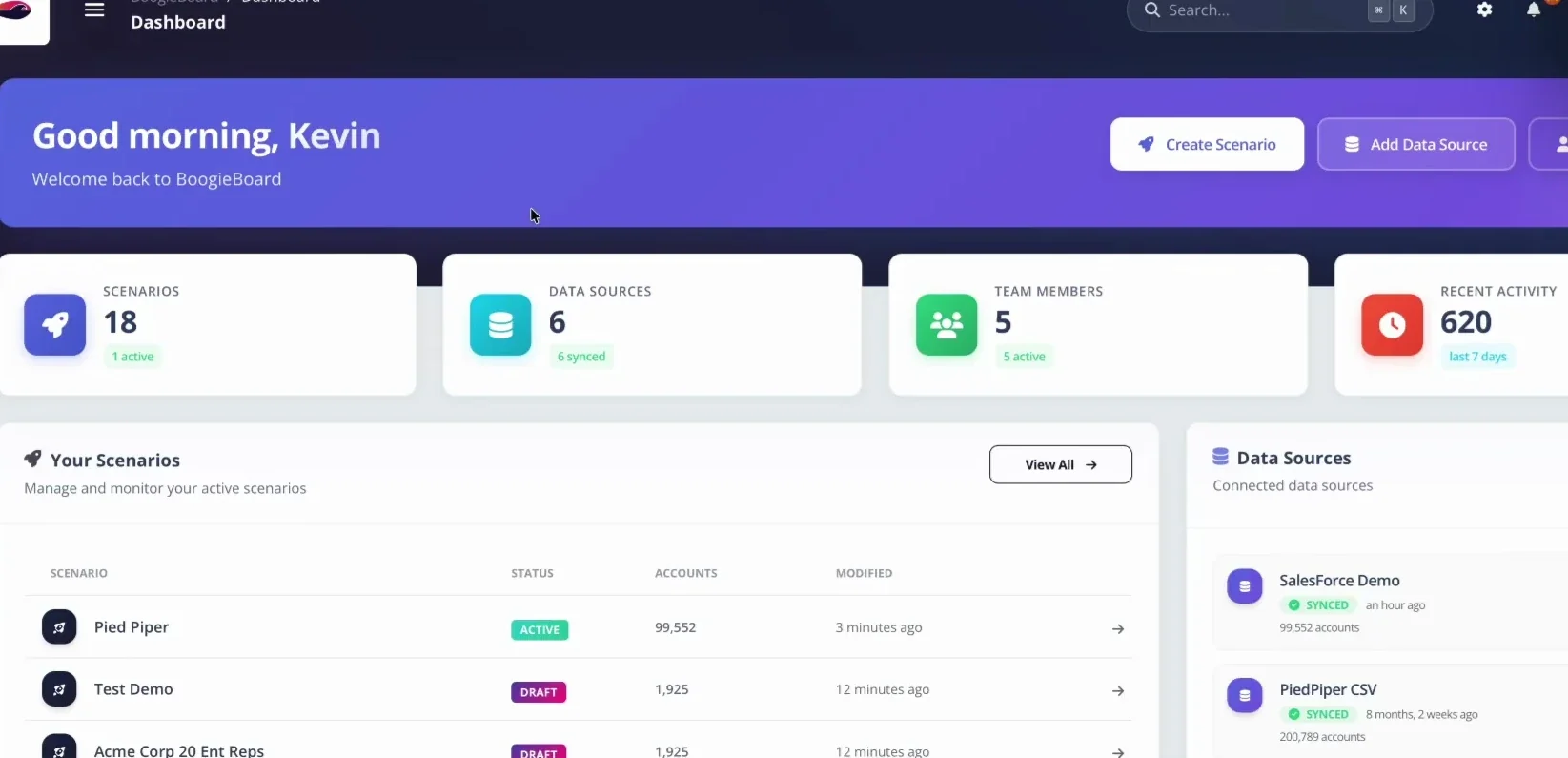
BoogieBoard keeps current and future territory scenarios separate so teams can model changes before activation.
BoogieBoard's Scenario Planning workflow keeps the Current State Scenario intact while operators test alternatives. Account-level and summary reports expose the output, and scenario comparison shows the balance-versus-disruption tradeoff before activation.
The goal is not to replace every spreadsheet. It is to stop asking a spreadsheet to carry production responsibilities it cannot govern reliably.
Run an Account-Level Failure Drill
Summary totals can pass while individual assignments are wrong. Before approval, deliberately test the workbook or platform against cases most likely to fail:
- Stale source record: Change a source field after the planning snapshot and verify that reconciliation flags the difference.
- Duplicate account: Add two records representing the same company and confirm that identity controls prevent double allocation.
- Broken hierarchy: Remove a parent link and inspect whether related accounts split across incompatible territories.
- Expired or missing lock: Test whether an account with a qualifying continuity rule remains protected and whether an expired lock returns to review.
- Vacant owner: Remove a rep and confirm that temporary coverage, future capacity, and downstream fields are explicit.
- Conflicting rule: Create an account that matches two territories and verify that priority or exception logic is visible.
- Failed deployment write: Reject one CRM update and confirm that the batch reports a partial failure instead of appearing complete.
Record the expected result before running each test. A control is useful only when the team knows what failure should look like and who responds.
Reconcile at Three Levels
Use separate reconciliation views:
- Population: total eligible, assigned, unassigned, excluded, duplicate, and multiply assigned accounts.
- Territory: counts, Balance Goals, workload, locks, roles, and material movement by book.
- Account: prior assignment, proposed assignment, rule or exception, approver, and deployment result.
The three levels prevent averages from hiding defects. A population can be fully assigned while one territory is overloaded. Territory summaries can look healthy while a strategic account moved against policy.
Finally, preserve the inputs and outputs used for approval. If live CRM data changes later, the team must be able to distinguish planning history from valid post-approval activity. That auditability is the line between a one-time calculation and an operating process.
Frequently Asked Questions
What are the most common errors in territory spreadsheets?
Stale source data, inconsistent IDs, formulas that miss rows, duplicate assignments, unassigned eligible accounts, broken hierarchy rules, locked accounts that move, and stakeholders reviewing different versions.
How can sales leaders review territories without editing the master model?
Provide territory-level and account-level reports with designated comment and exception fields. Keep shared logic protected and record every approved exception separately.
Is it expensive to move from spreadsheets to territory-planning software?
Compare software cost with the actual internal process: specialist or consultant expense, RevOps time, project duration, deployment risk, and the cost of repeating work after organizational changes. Do not rely on invented savings estimates.
Can a territory spreadsheet ever be production-ready?
Yes, for a small and stable model with limited rules, disciplined ownership, protected logic, reconciliation, and controlled deployment. The threshold is operational risk, not company prestige. When scenarios, stakeholders, exceptions, and system writes exceed reliable human control, the process has outgrown the workbook.
About the author: Tyler Thompson is Co-Founder & CTO of BoogieBoard.
In summary: Spreadsheet controls reduce territory-planning risk, but they cannot create governed scenarios, collaboration, auditability, and controlled activation at scale.
Watch territory planning in action
See current-state, scenario, and Salesforce workflows on BoogieBoard's YouTube channel.
Customer proof: Fullstory described stale data, version-control failures, and models that broke when one account moved. BoogieBoard replaced that process with live scenario design and side-by-side review (read the Fullstory case study).