5 Key Takeaways
- The message and the operating reality have to match. Announce before CRM is live and you burn trust in an afternoon.
- A territory rollout is the controlled transition from an approved future model to informed managers, prepared sellers, live systems, documented support paths, and monitored account coverage.
- Sequence approval, manager enablement, account-level materials, policy publication, CRM activation, seller communication, office hours, exception intake, and reconciliation so the message and operating reality agree.
- A synchronized launch requires more preparation and coordination, while a staggered improvised launch feels faster; every mismatch between message, manager, roster, and CRM consumes trust and creates manual correction work.
- The rollout fails when territories are announced before systems are live, managers see the plan at the same time as reps, or no one owns the questions that arrive after go-live.
Your territory shapes your accounts, workload, pipeline, customer relationships, quota, earnings, and opportunity to advance. The message and the operating reality have to match. Announce before CRM is live and you burn trust in an afternoon. This guide shows what you should check, what evidence to request, and which questions to bring to your manager. You can use them without becoming the territory designer yourself.
BoogieBoard treats large-team territory rollout as part of a governed change process. The model must connect market strategy with account-level evidence, productive capacity, explicit decision rights, and controlled activation. The objective is not to remove judgment. It is to make judgment visible and repeatable.
The central position is: Start with a good truth to tell; communication is downstream of design. The sections below turn that position into definitions, alternatives, procedures, examples, controls, and an operating decision.
Working Definitions
- go-live: the effective date when the approved territory state becomes operational.
- Salesforce Sync: the controlled exchange of approved territory structure and assignments with Salesforce.
- Rules of Engagement: published rules for ownership, collaboration, credit, exceptions, and escalation across roles.
- Territory Design Assets: the reports, rosters, maps, policies, and account-level materials used to explain and operate a model.
- planning cycle: the governed sequence from current-state analysis through decision, activation, and monitoring.
In BoogieBoard's first-party work, FullStory completed rollout in about two weeks. The example illustrates the effect of prepared data and decision clarity rather than a universal implementation guarantee. For large-team territory rollout, use that observation only for the claim and population it directly supports.
Independent evidence provides a separate check for large-team territory rollout: Research on territory realignment found that managerial actions during implementation influence seller motivation and performance.
A Practical Decision Lens: Large-Team Territory Rollout
The rollout fails when territories are announced before systems are live, managers see the plan at the same time as reps, or no one owns the questions that arrive after go-live. A practical test is to pick one surprising account and trace it end to end. Explain why it is in the segment, why it belongs in the territory, whether it is locked, which goals it affects, and what happens when the seller changes. If the answer requires several private spreadsheets, the model is not yet governed. In large-team territory rollout, test the choice against Salesforce Sync, then record any accepted exception in the decision log. You should be able to trace the result from your account roster to the published rule.
Use this module to make the hidden decision explicit. State the role, population, evidence, rule, exception path, and operating consequence. The objective is not a perfectly clean model; it is a model whose compromises are visible enough to approve, communicate, and improve. The large-team territory rollout review is complete only when Rules of Engagement and the affected account roster tell the same story. If your territory is an outlier, ask whether the difference is intentional, temporary, or a data error.
Inputs and Assumptions: Large-Team Territory Rollout
A synchronized launch requires more preparation and coordination, while a staggered improvised launch feels faster; every mismatch between message, manager, roster, and CRM consumes trust and creates manual correction work. Use this module to make the hidden decision explicit. State the role, population, evidence, rule, exception path, and operating consequence. The objective is not a perfectly clean model; it is a model whose compromises are visible enough to approve, communicate, and improve. The large-team territory rollout review is complete only when Rules of Engagement and the affected account roster tell the same story. If your territory is an outlier, ask whether the difference is intentional, temporary, or a data error.
A practical test is to pick one surprising account and trace it end to end. Explain why it is in the segment, why it belongs in the territory, whether it is locked, which goals it affects, and what happens when the seller changes. If the answer requires several private spreadsheets, the model is not yet governed. Use one current-state baseline to keep every large-team territory rollout scenario comparable. Your manager should be able to explain the tradeoff without relying on a private spreadsheet.
Name the Business Change
Sequence approval, manager enablement, account-level materials, policy publication, CRM activation, seller communication, office hours, exception intake, and reconciliation so the message and operating reality agree. Classify incoming feedback as a data correction, policy question, exception request, or escalation. For your territory, the practical test is whether the reader knows what changed, when it takes effect, and where evidence receives an answer. Use one current-state baseline to keep every large-team territory rollout scenario comparable. Your manager should be able to explain the tradeoff without relying on a private spreadsheet.
| Stage | Required output | Ready when |
|---|---|---|
| Approve | Future model and decision record | Leadership accepts the tradeoff |
| Enable managers | Reports, scripts, policies, escalation routes | Managers can answer and route questions |
| Prepare systems | Approved CRM deployment package | Assignments reconcile to the scenario |
| Communicate | Seller and customer impact materials | Timing and operating reality agree |
| Stabilize | Correction, exception, and transition queues | Owners and response times are active |
| Close | Post-launch reconciliation | Temporary states and material gaps are resolved |
Name the Business Change should produce one ready audience, artifact, or operating control before the next stage. Preserve the prior state, prepare managers first, show account-level impact, publish support paths, and align communication with go-live. For large-team territory rollout, name the approver, the permitted evidence, and the condition that would justify a departure from the rule. Check how the decision changes your workload, pipeline, customer continuity, and quota context.
Preserve the Prior State and Impact
A 1,000-rep rollout should give managers their reports and scripts before the announcement, activate Salesforce at the stated go-live, and route data errors separately from policy and exception questions. Preserve the Prior State and Impact should produce one ready audience, artifact, or operating control before the next stage. Preserve the prior state, prepare managers first, show account-level impact, publish support paths, and align communication with go-live. For large-team territory rollout, name the approver, the permitted evidence, and the condition that would justify a departure from the rule. Check how the decision changes your workload, pipeline, customer continuity, and quota context.
Classify incoming feedback as a data correction, policy question, exception request, or escalation. For your territory, the practical test is whether the reader knows what changed, when it takes effect, and where evidence receives an answer. Keep account-level results beside the large-team territory rollout summary so Salesforce Sync remains inspectable after approval. You need an account-level correction path when the source data does not match what you know.
Prepare Managers and Account-Level Materials
For Prepare Managers and Account-Level Materials, produce a reviewable output before the next decision begins. Use go-live to test whether the prior state, rationale, communication, effective date, and operating result agree; keep the account-level evidence visible. You should be able to see how the rule changes your accounts, role, workload, or customer responsibility.
Prepare Managers and Account-Level Materials should produce one ready audience, artifact, or operating control before the next stage. Preserve the prior state, prepare managers first, show account-level impact, publish support paths, and align communication with go-live. Give the large-team territory rollout decision a source date, an owner, and a condition that would trigger revision. Ask what evidence would cause leadership to revisit your territory after activation.
Systems and Tooling: Large-Team Territory Rollout
Technology should preserve the model, not only the final owner field. Test version control, current-to-future comparison, account-level inspection, locks, scenario assumptions, approvals, effective dates, CRM deployment, and audit history. A faster spreadsheet export is not the same as a governed planning system. Give the large-team territory rollout decision a source date, an owner, and a condition that would trigger revision. Ask what evidence would cause leadership to revisit your territory after activation.
Evaluate the operating burden as carefully as the feature list. Ask who maintains the data and logic, how managers review changes, what sellers receive, and how a correction reaches the live system. The system should make tradeoffs easier to inspect without pretending software can make the business judgment. Before activating large-team territory rollout, show managers the effect on Rules of Engagement and every downstream rule that depends on it. Your review should focus on documented facts and rules, not a negotiation for preferred accounts.
See Salesforce Sync in the Planning Workflow
The relevant product workflow is Push Territory Changes to Salesforce. BoogieBoard Scenario Planning keeps the account-level assumptions, tradeoffs, and proposed assignments visible while the team completes that work.
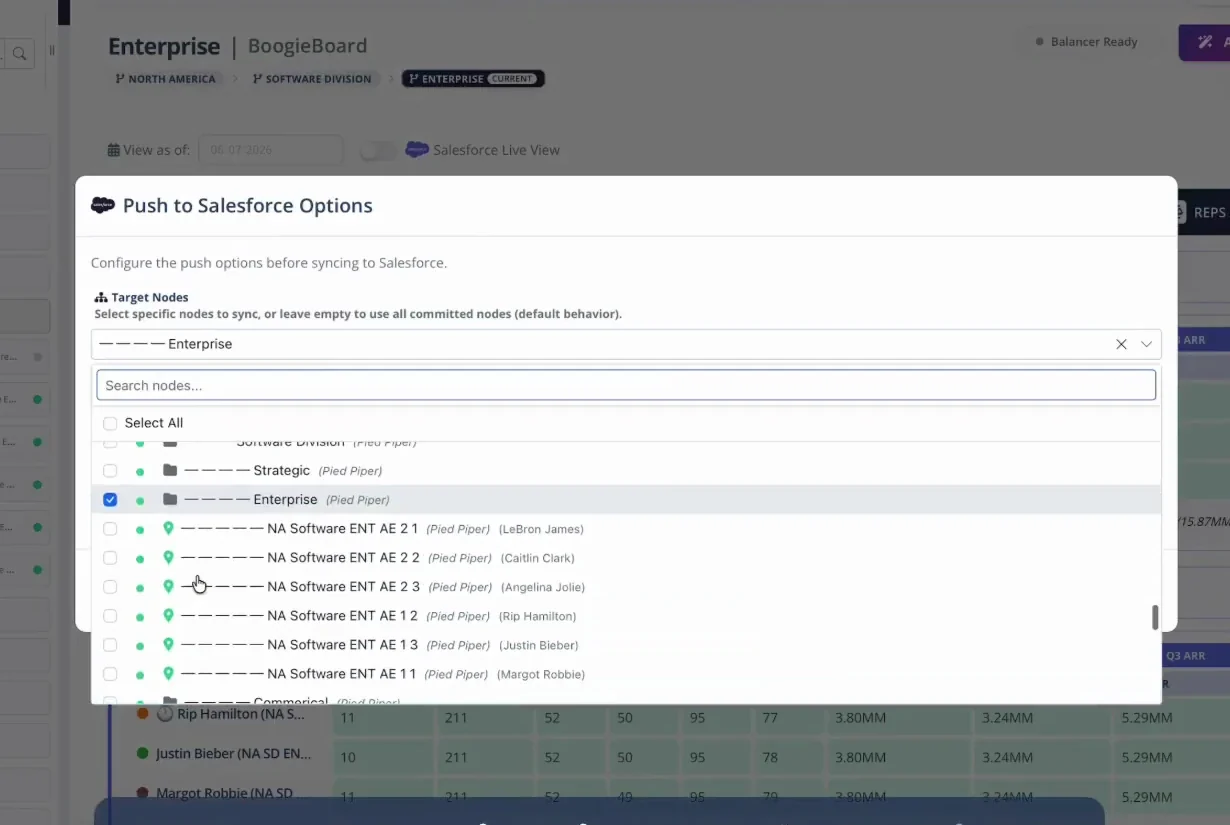
The Salesforce push workflow lets operators select the target node and confirm which territory changes will be activated.
Scenario Control
For Scenario Control, trace the change from source data through Salesforce activation. Use Rules of Engagement to test whether the prior state, rationale, communication, effective date, and operating result agree; keep the account-level evidence visible. You should be able to see how the rule changes your accounts, role, workload, or customer responsibility.
Account-Level Inspection
For Account-Level Inspection, trace the change from source data through Salesforce activation. Use Territory Design Assets to test whether the prior state, rationale, communication, effective date, and operating result agree; keep the account-level evidence visible. You should be able to see how the rule changes your accounts, role, workload, or customer responsibility.
The Population Test
For The Population Test, make the implicit policy inspectable at account level. Use planning cycle to test whether the prior state, rationale, communication, effective date, and operating result agree; keep the account-level evidence visible. You should be able to see how the rule changes your accounts, role, workload, or customer responsibility.
Operating and Governing the Model: Large-Team Territory Rollout
Name owners for manager enablement, seller communication, CRM activation, data corrections, policy questions, exceptions, and reconciliation. Temporary arrangements require explicit expirations. The large-team territory rollout review is complete only when Rules of Engagement and the affected account roster tell the same story. If your territory is an outlier, ask whether the difference is intentional, temporary, or a data error.
After go-live, track questions by class, correction time, approved exceptions, expired transitions, unassigned accounts, and unresolved customer commitments. Close the launch only when the operating state matches the promise. Use one current-state baseline to keep every large-team territory rollout scenario comparable. Your manager should be able to explain the tradeoff without relying on a private spreadsheet.
Manager Preparation
For Manager Preparation, assign decision rights, review cadence, and correction path. Use Salesforce Sync to test whether the prior state, rationale, communication, effective date, and operating result agree; keep the account-level evidence visible. You should be able to see how the rule changes your accounts, role, workload, or customer responsibility.
CRM Activation
For CRM Activation, trace the change from source data through Salesforce activation. Use Rules of Engagement to test whether the prior state, rationale, communication, effective date, and operating result agree; keep the account-level evidence visible. You should be able to see how the rule changes your accounts, role, workload, or customer responsibility.
Practical Implications
A territory rollout is the controlled transition from an approved future model to informed managers, prepared sellers, live systems, documented support paths, and monitored account coverage.
Decision Worksheet
| Decision | Evidence to inspect | Control |
|---|---|---|
| Explain the change | go-live and business rationale | Approved narrative |
| Show the impact | Salesforce Sync and Rules of Engagement | Manager and seller reports |
| Prepare go-live | CRM, policies, temporary rules, and support paths | Effective date and named owners |
| Close the transition | Corrections, exceptions, expirations, and unresolved commitments | Reconciliation checkpoint |
What This Means for You
You do not need to rebuild the model to evaluate large-team territory rollout. Check whether your accounts match the published population, whether your workload and opportunity are measured with understandable inputs, whether locked accounts remain in the final comparison, and whether your quota reflects material territory differences. Bring account IDs and evidence when you find an error.
Questions to Ask Your Manager
- What business objective drove this decision, and what tradeoff did leadership accept?
- Which rules determine the accounts and customers in my territory?
- Which Balance Goals were used, and what range is considered acceptable?
- Which accounts were locked, and are they included in the final Territory Health result?
- How does my quota account for potential, workload, capacity, and ramp?
- Where do I submit a data correction or policy challenge, and when will I receive an answer?
Frequently Asked Questions
How long should a territory rollout take?
A territory rollout is the controlled transition from an approved future model to informed managers, prepared sellers, live systems, documented support paths, and monitored account coverage. A synchronized launch requires more preparation and coordination, while a staggered improvised launch feels faster; every mismatch between message, manager, roster, and CRM consumes trust and creates manual correction work. Use the published definitions and complete-territory result instead of relying on one universal benchmark. Ask your manager to show how that standard applies to your book.
What has to be ready before you announce territories?
Sequence approval, manager enablement, account-level materials, policy publication, CRM activation, seller communication, office hours, exception intake, and reconciliation so the message and operating reality agree. A 1,000-rep rollout should give managers their reports and scripts before the announcement, activate Salesforce at the stated go-live, and route data errors separately from policy and exception questions. Publish the assumptions so another reviewer can reproduce the answer. You should be able to reproduce the answer from your roster and the stated inputs.
What evidence is required for large-team territory rollout?
For large-team territory rollout, assemble governed account data, current assignments, role capacity, and decision evidence for go-live, Salesforce Sync, and Rules of Engagement. Date the sources and publish the definitions so another reviewer can reproduce the result and separate a factual correction from a policy exception. Request the source date when the underlying account facts look stale.
How often should large-team territory rollout be reviewed?
Review large-team territory rollout on the formal planning cadence and whenever the inputs behind go-live, Salesforce Sync, and Rules of Engagement change materially. Keep customer and pipeline ownership stable between reviews; reopen the model when strategy or new evidence changes the decision, not merely because a manager prefers a different assignment. Ask when your territory will next receive a formal review.
How should data corrections and policy exceptions be separated?
Disputes about large-team territory rollout should send incorrect account facts through the data-correction path and challenges to the published rule through policy governance. Any exception needs a reason, approver, effective period, and visible effect on the complete approved model. Check that your locked accounts remain in the final health calculation.
What must be ready before a territory change goes live?
A change involving large-team territory rollout can go live only after the manager briefing, account-level report, published policy, CRM assignment, temporary coverage, support path, and effective date agree. Reconcile the live result after activation so the announcement and operating record cannot drift apart. You need a system when manual reconciliation makes the rule impossible to inspect.
About the author: Tyler Thompson is Co-Founder & CTO of BoogieBoard.
In Summary
The message and the operating reality have to match. Announce before CRM is live and you burn trust in an afternoon. Use the sequence above to keep the decision governed, evidence-based, and inspectable at both the account and territory levels.
See Territory Planning in Practice
Watch practical territory-design workflows on the BoogieBoard YouTube channel.