5 Key Takeaways
- Salesforce can record territory labels, account ownership, team access, and Enterprise Territory Management assignments, but those objects do not by themselves create a complete territory operating process.
- An owner-centric model is simple at first, yet every personnel change can require account-level updates; a territory-based model separates durable coverage structure from the people serving it.
- Custom Salesforce automation can support sophisticated territory logic, but the organization then owns the data model, testing, exception handling, auditability, and maintenance burden.
- A dedicated territory platform should preserve Salesforce as the system of record while adding scenario design, balance measurement, approvals, pre-flight checks, and controlled synchronization.
- Safe implementation starts with a CRM data audit, a documented current state, sandboxed future scenarios, parallel validation, explicit sync rules, and clear training for every affected role.
Salesforce is where most revenue teams already store accounts, opportunities, users, ownership, and reporting relationships. It is reasonable to want territory tracking there too. The trouble begins when the company treats a collection of Salesforce fields as if it were a territory-management system.
Territories are not just labels. They are durable coverage units with business logic, account membership, role assignments, balance standards, exceptions, effective dates, and a history of change. Salesforce can store and enforce many pieces of that model. Revenue Operations still needs a controlled process for designing, testing, approving, and maintaining it.
The practical question is not whether Salesforce belongs in territory management. It does. The question is which jobs Salesforce should own and which jobs require a purpose-built planning layer.
The Allure of Centralization: Why Track Territories in Salesforce?
The case for centralization is strong. Salesforce already contains the account and opportunity data that territory decisions depend on. Keeping live assignments in the CRM reduces exports, gives sellers one place to work, and lets reporting use the same labels that drive coverage.
There are three clear benefits.
- Data consistency: Account ownership, territory membership, role overlays, pipeline, and customer status can be evaluated from the same operational data.
- Seller usability: Reps and managers can see who covers an account inside the system they use every day.
- Reporting continuity: Forecasts and performance reports can roll up by the territory structure instead of relying only on the current employee occupying a role.
Salesforce's own documentation describes territory models as a way to assign records and users through a hierarchy, run assignment rules, review the results, and activate the model. It also explicitly recommends validating assignments while a model is still in Planning state before activation (Salesforce: Setting Up and Managing Territory Assignments).
That is valuable infrastructure. It is not the same as deciding what a healthy territory should contain, comparing alternative designs, or coordinating stakeholder approval.
Unpacking Salesforce's Native Territory-Tracking Capabilities
Salesforce gives teams several ways to represent coverage. The right combination depends on the maturity of the organization.
Account Owner and custom role fields
The simplest model ties accounts directly to people. The standard Account Owner establishes one accountable user. Custom fields can represent an AE, BDR, CSM, channel manager, or other supporting role.
This can work for a small team with simple coverage. It also creates a structural problem: when a rep leaves, joins, or changes roles, the account records themselves must change. Historical books become harder to reconstruct because the person and the territory have been treated as the same thing.
Account and opportunity teams
Teams add collaboration and access around an account or deal. They are useful for overlays and cross-functional execution, but they do not create a complete coverage model. A team answers who is involved. It does not necessarily answer how the account entered the territory, whether the book is balanced, or what should happen when the organization changes.
Enterprise Territory Management
Enterprise Territory Management (ETM) provides dedicated models, territories, assignment rules, account associations, and user-to-territory relationships. Salesforce publishes the underlying Territory Management 2.0 object model, including Territory2, Territory2Model, assignment-rule objects, account associations, and user associations.
ETM is the strongest native foundation when the business needs durable territory units and territory-based reporting. It still leaves several planning questions outside the CRM:
- What criteria define a viable territory?
- How should multiple metrics be balanced?
- Which accounts must be locked or protected?
- How much disruption is acceptable?
- Which future-state design should leadership approve?
- How will the team compare the current state with proposed alternatives?
These questions belong to territory design and governance, not merely record storage.
The limitations become especially visible when rules change. Salesforce notes that assignment-rule behavior depends on model state, account data, field operators, exclusions, and whether rules are manually rerun (Salesforce territory-assignment troubleshooting). A change that looks simple can have downstream consequences if the team cannot preview exactly which records will move.
The DIY Route: Customizing Salesforce for Territory Management
When fields and native ETM do not cover the full process, some organizations build a custom territory application in Salesforce.
Building a custom data model
A robust custom model typically needs records for:
- Territory definitions: The durable coverage units, hierarchy, segment, region, and effective dates.
- Territory rules: The criteria that determine account eligibility and membership.
- Role assignments: The people covering each territory and the dates that coverage applies.
- Account associations: A timestamped record of which accounts belong to which territories.
- Exceptions and locks: Accounts that should not follow the standard rule and the reason for the exception.
- Change history: The prior value, proposed value, approver, rationale, and deployment status.
Static associations and effective dates matter. If every report simply looks at today's Account Owner, the company cannot reliably reconstruct the territory that existed when a decision or performance result occurred.
Automation with Flow and Apex
Flow can automate straightforward updates, such as assigning an account when a segment or geography changes. Apex may be necessary when logic spans large data volumes, complex hierarchies, multiple models, or conditional exceptions.
The issue is not whether Salesforce can be customized. It can. The issue is that the organization is now maintaining a software product. Every new field, role, exception, and territory policy becomes a development and regression-testing concern.
Warning: The Hidden Costs of Custom Development
Custom development shifts the workload rather than eliminating it. RevOps still has to specify the logic, Salesforce administrators have to implement it, developers may have to extend it, and stakeholders must validate the result. Future changes compete with the rest of the CRM roadmap.
The biggest risk is often not a visible technical failure. It is an apparently successful update that changes the wrong accounts, drops an overlay, or applies new logic to records that should have remained untouched.
A Comparison of Territory-Tracking Approaches in Salesforce
| Capability | Owner Fields and Native Reports | Custom Salesforce Build | Dedicated Territory Platform + Salesforce |
|---|---|---|---|
| Initial setup | Low | High | Medium |
| Ongoing maintenance | Manual and admin-heavy | Developer/admin owned | RevOps owned with managed integration |
| Durable territory structure | Limited without ETM | Possible | Native to the planning model |
| Scenario comparison | Spreadsheet or custom | Must be built | Purpose-built |
| Multi-variable balance | Manual | Must be built | Purpose-built |
| Historical reconstruction | Limited unless designed in | Possible with effective dating | Scenario and activity history |
| Stakeholder collaboration | Comments and external process | Must be built | Draft scenarios, permissions, comments, approvals |
| Deployment control | Direct record updates | Custom release process | Pre-flight review and controlled sync |
| Best fit | Small, stable, simple teams | Highly unique requirements with development capacity | Changing or complex organizations led by RevOps |
There is no universal winner. A five-person sales team with one owner field may not need a dedicated planning system. A global organization with multiple segments, overlays, future hires, and regular realignments should not expect owner fields to carry the entire operating model.
The Modern Solution: A Territory Platform Connected to Salesforce
A dedicated territory platform should not compete with Salesforce as the operational system of record. It should make Salesforce safer and more useful.
BoogieBoard connects the planning model to the CRM in both directions. RevOps can first reconcile BoogieBoard with the current Salesforce state, design changes in a separate scenario, inspect balance and assignments, run pre-flight checks, and then push approved territory changes to Salesforce.
That flow keeps distinct jobs in the right places:
- Salesforce remains the record of live accounts, opportunities, users, and operational assignments.
- BoogieBoard holds the territory logic, future-state scenarios, balance criteria, role structure, locks, and design history.
- The synchronization policy determines whether the approved model writes Account Owner, custom role fields, the BoogieBoard custom object, native ETM objects, or a combination.
The product image belongs here. It should show the future-state Scenario Results view before synchronization. The adjacent claim is limited to what the image proves: managers can inspect account mix, prospect grades, quarterly ARR, account locks, and rep capacity by proposed assignment before activation.
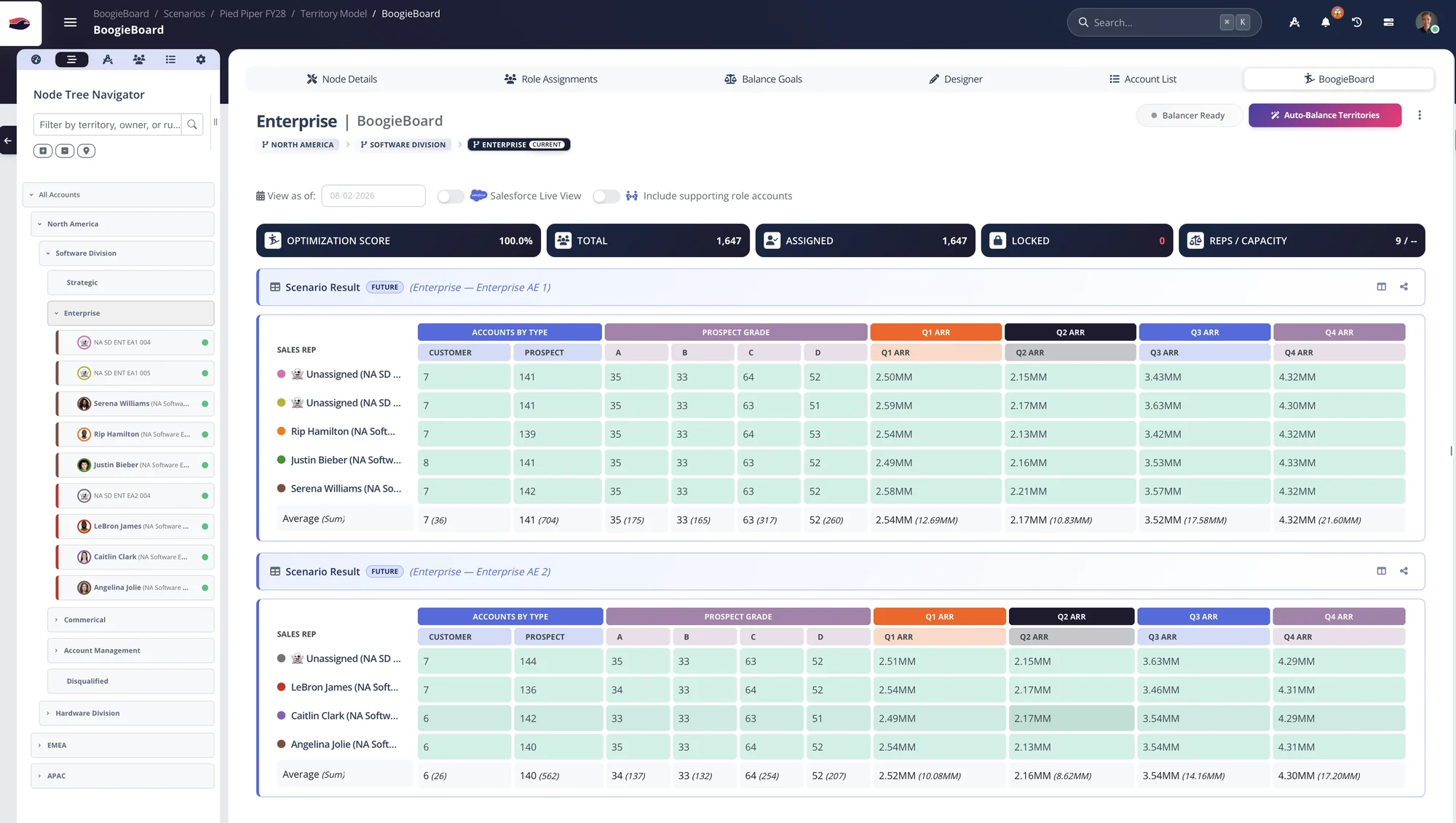
Scenario Results show customer and prospect mix, prospect grade, quarterly ARR, account locks, and rep capacity in one review surface.
This separation also supports a core BoogieBoard doctrine: the territory should be durable while the person covering it can change. For a deeper explanation of that distinction, see the Guide to Territory Management in Salesforce.
Best Practices for Implementation and Migration
Moving from owner fields, spreadsheets, or a custom model should be treated as an operational migration, not a one-click integration.
Note: Data Quality Is Paramount
Territory automation applies the logic you give it to the data you have. Missing country values, stale segments, duplicates, broken hierarchies, or inconsistent role fields will produce unreliable assignments faster. Define the account-data policy before automating the movement. BoogieBoard's RevOps and Sales Account Data Strategy provides a practical starting point.
A Checklist for a Successful Migration
- Document the current model. Record the hierarchy, territory roster, account rules, supporting roles, exceptions, locks, and effective dates.
- Define the Salesforce contract. Decide which objects and fields are authoritative, which values BoogieBoard reads, and which approved values it may write.
- Reconcile before redesigning. Compare the planning model with live Salesforce ownership so the future scenario begins from a true current state.
- Design and test outside production. Build alternative scenarios, compare their balance, inspect high-risk accounts, and keep the active model unchanged.
- Validate in parallel. Compare the proposed assignments with the current process for a representative sample, including exceptions and supporting roles.
- Use pre-flight controls. Review the exact accounts, owners, territory labels, and roles that will change before any write occurs.
- Deploy in controlled increments. Push a limited scope first when risk is high, then verify reporting and access before expanding.
- Train every audience. Reps need to know what changed; managers need the rationale and escalation path; Ops needs the reconciliation and rollback procedure.
Define the Sync Contract Explicitly
Before implementation, document the field-level contract between the planning layer and Salesforce. For each object or field, state which system may create it, which system may update it, when synchronization runs, how conflicts are handled, and what happens when a referenced user or territory does not exist.
The contract should also distinguish design state from production state. A draft Scenario can contain future hires, proposed territories, and assignments that should never reach seller workflows. Only an approved, effective model should write to operational fields. Preserve the Scenario ID or deployment record so every live change can be traced back to the reviewed proposal.
Finally, define rollback and reconciliation. Rollback is not merely restoring a backup; it must account for legitimate CRM changes that occurred after deployment. Reconciliation should show differences between the approved territory model and Salesforce without automatically assuming either side is correct. Named owners then classify the difference as a delayed write, valid operational edit, data defect, or unauthorized drift.
Salesforce is an essential part of territory management. It is where the live operating model becomes real. But using Salesforce effectively requires a clear division of labor: store and enforce the approved state in the CRM; design, compare, govern, and validate change in a planning system built for the job.
The right setup gives Sales Ops one connected process from current-state reconciliation to future-state design to controlled deployment. The result is not another system beside Salesforce. It is a safer way to keep Salesforce aligned with the coverage strategy the business actually intends to run.
Frequently Asked Questions
Can Salesforce track sales territories natively?
Yes. Teams can use Account Owner, custom role fields, Account Teams, Opportunity Teams, and Enterprise Territory Management. ETM provides dedicated territory models, hierarchies, assignment rules, account associations, and user assignments. Native tracking does not automatically provide multi-variable balance design, scenario comparison, stakeholder approval, or a complete operating history.
What are the main drawbacks of building a custom territory system in Salesforce?
The main drawbacks are development cost, maintenance, testing burden, and operational dependency on administrators or engineers. A custom system can be appropriate when requirements are genuinely unique, but the organization must maintain effective dating, exception logic, audit history, user experience, and every future rule change.
How does a dedicated platform improve Salesforce territory management?
A dedicated platform adds the planning layer: current-state reconciliation, multiple future scenarios, balance goals, account locks, role assignments, collaboration, audit history, pre-flight checks, and controlled synchronization. Salesforce remains the live system of record after the approved model is deployed.
When should a team use Enterprise Territory Management instead of Account Owner fields?
Use ETM when the organization needs durable territory units, a hierarchy independent of individual employees, account membership in more than one territory, user-to-territory assignments, or reporting by territory model. Owner fields may remain sufficient for a small, stable team with simple one-person coverage. The decision should reflect operating complexity and reporting needs, not a desire to use every available Salesforce feature.
About the author: Kevin Davis is Co-Founder & CEO of BoogieBoard.
Customer proof: Challenger moved away from traditional geography-based territories while navigating a demanding planning season. Its published story shows why architecture and adoption have to move together when a company changes the model behind Salesforce (read the Challenger case study).
Watch the Salesforce Workflow
See reconciliation, future-state design, and controlled deployment on the BoogieBoard YouTube channel.
Related Content
- Your Account Data Strategy: The RevOps Guide
- Balance Goals: Complete Guide to Territory Equity
- How to Communicate a New Territory Plan Effectively