
Instructions to Use this Template
Welcome! This resource is designed to help RevOps and Sales leadership teams in B2B software companies effectively develop and communicate their account data strategy internally—especially to their sales teams. We know that building trust in CRM data is crucial, and clear, proactive communication is the foundation.
You have two primary ways to leverage this resource:
OPTION 1: Adapt This Pre-Built Template Directly
The content immediately following this section (starting with "🤝 Note to Sales Team...") is a comprehensive, ready-to-use template.
- How to use:
- If you're viewing this in Notion: The simplest way to make your own editable copy is to click the "..." (ellipsis) menu in the top right corner of this Notion page and select "Duplicate." This will create a copy of the entire page in your own Notion workspace.
- Alternatively, you can manually copy the template content and paste it into your own document (e.g., Google Docs, Confluence, or a new Notion page).
- Once you have your own copy, carefully review and replace all bracketed placeholders (e.g.,
[Your Company Name],[Specific Vendor Names],$[XYZ]k,[Date Last Updated]) and example data with your company's specific information.
- Best for: Teams who want a strong, detailed starting point and are comfortable customizing the content directly.
OPTION 2: Generate a Highly Customized Document Using Our AI Prompt
For a more guided approach that helps you create a document tailored from the ground up with your specific inputs, we've also developed a detailed AI prompt.
- How it works:
- You'll fill in a series of questions and placeholders within the AI prompt, providing specific details about your company's data sources, tools, RevOps processes, common sales team questions, and more.
- You then provide this completed prompt to a generative AI model (like ChatGPT, Gemini, Claude, etc.).
- The AI will use your detailed inputs to write the first draft of your internal communication document.
- Best for: Teams who want the AI to do more of the initial drafting based on very specific, company-centric information and who want to ensure all unique aspects of their setup are considered from the outset.
Copy the prompt here by clicking the toggle arrow
AI Prompt Start

Objective for the AI:
Generate a comprehensive internal communication document for our Sales Team regarding our Account Data Strategy. The document should be similar in structure, content, and tone to a best-practice RevOps communication that aims to build trust, explain data processes and challenges, and encourage collaboration.

Desired Tone: Professional, empathetic, transparent, collaborative, and supportive.

Document Title (Suggestion): "Understanding Our Account Data: A Guide for the [Your Company Name] Sales Team" or "Our Commitment to Reliable Account Data for the [Your Company Name] Sales Team"

Please generate the document based on the following company-specific information:

I. Overall Document Details:
* Company Name: [Your Company Name]
* Team Issuing Document: [e.g., Your RevOps Team, The Sales Operations Team, etc.]
* Document Version (Optional): [e.g., 1.0]
* Date of Issue (Optional): [e.g., May 2025]

II. Section: Note to Sales Team (Introduction)
* Key Sales Team Data Pain Points to Acknowledge: [List 2-3 common frustrations your sales team has with account data, e.g., "time spent on data hygiene," "account ownership disputes," "inconsistent information for prospecting"]
* RevOps Team's Core Commitment Regarding Data: [Describe your RevOps team's primary goal for sales data, e.g., "to provide reliable and useful data that minimizes research time and maximizes selling time," "to relentlessly pursue data accuracy and completeness"]
* Briefly mention why CRM data is uniquely challenging (if desired): [e.g., "its dynamic nature compared to more static ERP data"]

III. Section: First-Party Data
* Your Company's Primary Sources of First-Party Data:
    1.  Direct Sales Input & CRM Activity:
        * CRM System Name(s): [e.g., Salesforce, HubSpot CRM, Microsoft Dynamics 365]
        * Examples of sales input: [e.g., call notes, meeting outcomes, contact updates, deal progression details]
    2.  Company Websites & Platforms:
        * Main Company Website URL(s): [e.g., www.yourcompany.com]
        * Other Company Platforms (App Name, Community Forum, etc.): [List names or types, e.g., "Our 'ConnectSphere' community forum," "Product usage data from the 'InnovateApp' platform"]
        * Examples of data collected: [e.g., demo requests, content downloads, form submissions]
    3.  Customer Interactions & Support Systems:
        * Support System Name(s): [e.g., Zendesk, Salesforce Service Cloud, Intercom]
        * Examples of data: [e.g., purchase history, service requests, communication logs]
    4.  Marketing Engagement:
        * Marketing Automation Platform(s): [e.g., Marketo, Pardot, HubSpot Marketing Hub, Mailchimp]
        * Examples of data: [e.g., email opens, link clicks, webinar attendance, survey responses]
    5.  Company Social Media Channels:
        * Platform names/links: [e.g., "Our LinkedIn Page: [link]", "Company Twitter: @[handle]"]
* How Your Company Uses First-Party Data (Provide specific examples if possible):
    * Personalization: [e.g., "tailoring email outreach based on downloaded content," "customizing demo experiences"]
    * Customer Segmentation & Territory Definition: [e.g., "segmenting by industry and company size for targeted campaigns," "defining territories based on historical engagement"]
    * Predictive Analytics: [e.g., "using historical purchase data to identify upsell opportunities," "scoring leads based on engagement signals"]
    * Improving Customer Experience: [e.g., "understanding product usage to offer proactive support," "using feedback forms to refine onboarding"]

IV. Section: Third-Party Data
* Your Company's Primary Sources of Third-Party Data:
    1.  Data Aggregators/Enrichment Services Used: [List all specific vendors, e.g., ZoomInfo, Lusha, Apollo.io, Clearbit, Dun & Bradstreet. Be specific.]
    2.  Publicly Available Information Sources Leveraged: [e.g., company websites, news articles, press releases, regulatory filings – often used by your listed aggregators]
    3.  Large Language Models (LLMs) & AI-Generated Data:
        * How LLMs are currently used or planned for data (by RevOps or vendors): [e.g., "Our vendor [Vendor Name] uses LLMs to summarize news articles for account insights," "RevOps is experimenting with LLMs to draft initial company overview summaries from public data," "We use an AI tool to extract technology stack information from career pages." Be specific if possible.]
        * Key considerations/cautions for sales team regarding LLM-generated data: [e.g., "Always verify critical facts from LLM summaries," "Use AI-generated talking points as inspiration, not direct copy."]
    4.  List Purchases (if applicable): [Specify if your company purchases lists, from what types of providers, and for what general purpose. If not applicable, state "Not applicable."]
* Challenges with Third-Party Data (Provide company-specific insights if possible):
    * Internal statistic (if available): [e.g., "An internal review showed X% of ingested third-party contact data required correction." If not, the AI can use a general statement.]
    * Relatable examples of data inaccuracies: [e.g., "outdated employee information due to job changes," "incorrect hierarchy after acquisitions"]
* Reference to Data Aggregator Space Graphic (Optional): [Type "Yes" if you want the AI to include a sentence about a graphic (you'll need to add the graphic yourself later). Type "No" if not.]

V. Section: What Your RevOps Team Is Doing To Improve Data Quality
* Specific RevOps Efforts (Provide quantifiable examples where possible):
    * Scrubbing Duplicates: [e.g., "deduplicated over X account records last quarter," "implemented [Tool Name] for ongoing deduplication"]
    * Manually Fixing Hierarchies & Key Fields: [e.g., "our team manually reviews and corrects X parent-child relationships weekly," "focus on [Key Field 1] and [Key Field 2] accuracy"]
    * Reviewing Flagged Errors: [e.g., "resolved X user-reported data issues last month," "daily review of automated error logs"]
    * Designing and Maintaining Integrations: [List key systems integrated, e.g., "[CRM Name] with [Marketing Automation Platform Name]," "[CRM Name] with [Sales Engagement Platform Name like Salesloft/Outreach]"]
    * Strategic Vendor Management (Annual Spend): [e.g., "approximately $[XYZ]k annually on data providers and hygiene tools"]
    * Data Hygiene Dashboard:
        * Name/Link/Access Instructions: [e.g., "Our Data Quality Dashboard in [BI Tool like Tableau/PowerBI]," "Accessible via [link]," "Found under Sales Reports in [CRM Name]"]
        * Example of impact/insight from dashboard: [e.g., "recently identified and addressed a Y% gap in 'Number of Employees' data for Tier 1 accounts," "tracks completion rates for critical fields like 'Industry'"]

VI. Section: Here is the Account Data We Use (Data Fields & Sources Table)
* Your CRM Name (for table context): [e.g., Salesforce, HubSpot CRM]
* Account Data Fields Table Information:
    * Instructions for User: Please provide the information for your key account data fields in the following format. List each field as a separate item.
        Field Name in CRM: [Field Name]
        Description: [Brief description of the field]
        Primary Source of Truth: [e.g., ZoomInfo, then manual RevOps validation; Your CRM Name (System Generated); Picklist managed by RevOps; NetSuite/ERP for Customers, ZoomInfo for Prospects]
        Secondary Source of Truth: [e.g., LinkedIn; Company Website; N/A]
        What to do if sales spots an error?: [e.g., Report via Data Hygiene Dashboard; Contact Sales Ops; Correct it if you have verified info]
    * Example Field Entry:
        Field Name in CRM: Account Name
        Description: The official legal name of the account.
        Primary Source of Truth: ZoomInfo, then manual RevOps validation
        Secondary Source of Truth: LinkedIn, Company Website
        What to do if sales spots an error?: Report via Data Hygiene Dashboard (see instructions below)
    * Your Fields (add as many as needed):
        Field Name in CRM: [Your Field 1 Name]
        Description: [Description]
        Primary Source of Truth: [Primary Source]
        Secondary Source of Truth: [Secondary Source]
        What to do if sales spots an error?: [Action]

        Field Name in CRM: [Your Field 2 Name]
        Description: [Description]
        Primary Source of Truth: [Primary Source]
        Secondary Source of Truth: [Secondary Source]
        What to do if sales spots an error?: [Action]
        ... (continue for all key fields) ...
* Annotated Screenshot of Account Record (Optional): [Type "Yes" to include a placeholder/suggestion for an annotated screenshot in the generated document. Type "No" if not.]

VII. Section: Other Account Data FAQ
* Provide 3-5 Common Questions your Sales Team asks about Account Data and their Answers:
    * Question 1: [e.g., How often is data from [Vendor X] refreshed in our CRM?]
        Answer 1: [e.g., Data from [Vendor X] is synced [nightly/weekly]. Manual refreshes can be requested for specific accounts if urgent changes are noted from the vendor's portal.]
    * Question 2: [e.g., How are AI-generated insights incorporated, and how should I use them?]
        Answer 2: [e.g., We surface AI summaries in the '[AI Insights Field Name]' field. Treat these as preliminary research aids. Always verify critical facts and personalize any AI-generated content before use.]
    * Question 3: [e.g., What's the process for requesting a new account if it's missing?]
        Answer 3: [e.g., Use the 'Create New Account' button in [CRM Name], completing all mandatory fields. RevOps reviews new accounts [daily/weekly] for duplicates.]
    * Question 4: [Your Question]
        Answer 4: [Your Answer]
    * Question 5: [Your Question]
        Answer 5: [Your Answer]

VIII. Section: Help Us to Continuously Improve Our Data (Call to Action)
* Reporting Data Issues:
    * Primary method: [e.g., Data Hygiene Dashboard, Specific Form, Button in CRM]
    * Detailed instructions/link: [Provide step-by-step instructions or a link to instructions/tool, e.g., "1. Navigate to Account Record in [CRM Name]. 2. Click 'Report Data Issue' button..."]
    * Alternative method (if any): [e.g., Dedicated Slack channel #[channel-name], Email alias [email@address.com]]
* Participating in Data Scrub Exercises:
    * General approach/frequency: [e.g., "When new territories are delivered," "Before major QBRs," "Annually"]
    * Where instructions are posted: [e.g., "Detailed instructions will be provided here or communicated by your manager and RevOps."]`
* Giving Feedback on Data Needs:
    * Feedback mechanisms: [e.g., "Annual Sales Data Feedback Survey," "Quarterly focus groups," "Ad-hoc feedback to [RevOps Contact Name/Email]," "Dedicated Slack channel #[channel-name]"]
    * Specific timelines (if known): [e.g., "Our next survey is planned for [Month, Year]."]

IX. Section: Closing Section
* Key Message for Closing: [e.g., Reinforce partnership, commitment to empowering sales, shared goal of success, excitement for future collaboration. The AI can craft this based on the overall tone, or you can provide specific phrases.]
    * [Example: "Our ultimate goal is to equip you with data that empowers your success. Your feedback is vital. We're excited to continue partnering with you."]

X. Any Other Specific Information or Sections to Include?
* [If you have any other specific points, disclaimers, or sections you want the AI to include, list them here. Otherwise, type "None."]

AI Prompt End
🤝 Note to Sales Team
Hi Sales Team
We want you to know how much we care about getting you reliable and useful account data. Reliable account data is the bedrock of your ability to prospect effectively, manage your territory, identify key opportunities, and ultimately hit your targets.
In our ideal world, you would spend no time dealing with data hygiene issues, researching account information, having account ownership disputes, or navigating rules that seem prohibitive. Our goal as a RevOps team is to relentlessly pursue this ideal because we understand how much these factors impact your day and your ability to sell.
This resource is to explain all that is going on behind the scenes to try to make this a reality. We highlight some of the challenges in this process, not to make excuses, but so you can understand why perfection, while our goal, is a tough benchmark to consistently achieve with dynamic data. CRM account data, unlike more static ERP data, is constantly changing and gathered from many sources, making its quality uniquely challenging but also incredibly powerful when managed well.
🥇 First Party Data
First-party data refers to information collected directly from our audience, customers, or through our own internal systems and activities. This data is gathered from our own sources and interactions, making it highly valuable and generally the most reliable.
Our Sources of First Party Data Are:
- Your Direct Input & CRM Activity: Information you gather and input into the CRM (e.g.,
[Salesforce/HubSpot/etc.]) such as call notes, meeting outcomes, contact updates, and deal progression. This is invaluable! - Our Company Websites & Platforms: Data collected from user interactions on
[Your Company Website URL, e.g., www.yourcompany.com]and our[App Name, if applicable, or other company platforms like a community forum]such as demo requests, content downloads, page views, and form submissions. - Customer Interactions & Support Systems: Information from customer purchases, service requests (e.g., from
[Zendesk/Service Cloud/etc.]), and communication history. - Marketing Engagement: Data from our email marketing campaigns (e.g., from
[Marketo/Pardot/HubSpot Marketing Hub]) such as email opens, link clicks, and webinar attendance. Also, responses and insights gathered directly from prospects and customers through surveys and feedback forms. - Our Social Media Channels: Data collected from interactions on our official company social media profiles (e.g.,
[Link to Company LinkedIn Page, Twitter Profile, etc.]), including direct messages and engagement with our pos
Our First Party Data is accurate, reliable, and consistent. We use it for:
- Personalization: Tailoring marketing messages, sales outreach, and product offers based on individual prospect/customer preferences and behaviors.
- Customer Segmentation & Territory Definition: Grouping customers and prospects into segments based on similar characteristics or behaviors for targeted campaigns and equitable territory assignments.
- Predictive Analytics: Using our own historical data to forecast future customer behaviors, identify at-risk accounts, or score leads.
- Improving Customer Experience: Enhancing user experience by understanding customer needs, pain points, and preferences throughout their lifecycle.
🥉Third Party Data
Third-party data refers to information collected by an entity that does not have a direct relationship with the user or customer from whom the data is being gathered. This data is typically aggregated from a variety of sources and is often purchased to enrich our own data.
Our Primary Sources of Third Party Data Are:
- Data Aggregators/Enrichment Services: We subscribe to services like
[e.g., ZoomInfo, Lusha, Apollo.io, Clearbit - List your specific vendors here]to supplement our account and contact information. These providers often use a mix of technology (including AI and web scraping) and human verification to compile their data. - Publicly Available Information: Information compiled from public websites (e.g., company 'About Us' pages, news articles, press releases), regulatory filings, and other open sources. This is often a primary input for data aggregators.
- Large Language Models (LLMs) & AI-Generated Data:
- Role of LLMs: LLMs (e.g., models from OpenAI, Anthropic, Google, or specialized B2B intelligence platforms) are increasingly used by data providers, and sometimes by our RevOps team, to:
- Summarize large volumes of text into concise company descriptions or identify key personnel changes from news articles.
- Extract specific data points from unstructured text (e.g., identifying technologies mentioned on a company's career page).
- Generate initial drafts of account research or potential talking points (which always require your review and personalization).
- Important Considerations (as of May 2025): While powerful for processing and generating text-based insights, LLMs are not yet infallible sources for discrete, hard factual data (like precise revenue figures or employee counts) without robust verification against other primary or trusted secondary sources. We use them cautiously as a component of our broader data strategy, often to augment rather than replace traditional data points. Always cross-reference critical information.
- Role of LLMs: LLMs (e.g., models from OpenAI, Anthropic, Google, or specialized B2B intelligence platforms) are increasingly used by data providers, and sometimes by our RevOps team, to:
- List Purchases (Used Sparingly/If Applicable): Occasionally, for specific campaigns or market research, we may acquire targeted lists from reputable providers
[If you do this, mention it; otherwise, omit].
Most Companies Feel Low Satisfaction with Third Party Data.
BoogieBoard surveyed 583 companies, 436 of them reported dissatisfaction with third party data provider ROI, 105 of them reported indifference, 42 reported satisfaction
Most companies, including us, experience challenges with third-party data ROI. Industry reports (and our own experience!) often show that while essential, this data isn't a silver bullet. For example, a recent internal review showed that approximately [e.g., 15-20%] of initially ingested third-party contact data required some form of correction or validation.
The reason for this is that companies sometimes expect third-party data to be as flawlessly reliable and instantly accurate as well-maintained first-party data. They expect perfection, but with data sourced externally and at scale, perfection is not currently possible. Data Aggregators and AI tools maintain vast databases by scraping public information, interpreting unstructured data, conducting manual research, utilizing customer feedback, or user-generated content.
Think about all the "creative" job titles you see on LinkedIn, or how quickly employee information can become outdated when someone changes roles. Consider how often company websites lag in updating their own information after an acquisition or restructuring. These are the types of real-world, live, unstructured sources that feed into these databases, meaning they are not always 100% accurate or uniform.
The Data Aggregator space is large and constantly evolving. Despite significant investment, many companies are still working to maximize their return. This is a significant industry-wide challenge.
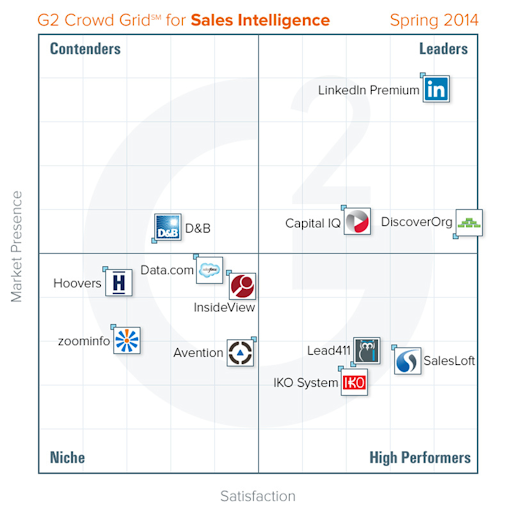
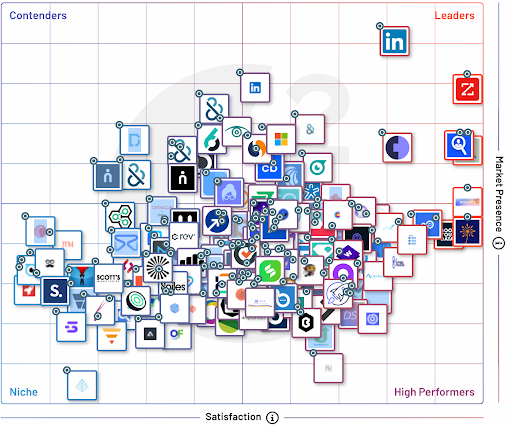
To enhance the quality and usefulness of all our account data for you, your RevOps team is continuously:
- Scrubbing Duplicates: We've implemented processes that, for example, deduplicated over
[e.g., 5,000]account records in the last quarter. - Manually Fixing Hierarchies & Key Fields: Our team reviews and corrects
[e.g., hundreds of parent-child account relationships and industry classifications]weekly. - Reviewing Flagged Errors: We investigate and resolve data discrepancies flagged by our automated tools or by you, the sales team. Last month, we resolved
[e.g., X number]user-reported data issues. - Designing and Maintaining Integrations: Ensuring smooth data flow between our CRM (
[Salesforce/HubSpot/etc.]), Marketing Automation ([Marketo/Pardot/etc.]), Sales Engagement ([Salesloft/Outreach/etc.]), and our enrichment tools. This includes evaluating how new AI-driven data tools can be responsibly integrated. - Strategic Vendor Management: We are spending approximately
$[XYZ]kannually on different data providers, hygiene tools, and the integrations required to make them work effectively. We regularly evaluate these vendors for quality and ROI. - Maintaining Our Data Hygiene Dashboard: This dashboard (
[Link to Dashboard or explain how to access it, e.g., "accessible in our BI tool under Sales Reports"]) tracks key data quality metrics like completion rates for critical fields, duplicate rates, and data freshness. It helps us identify problem areas and measure the impact of our initiatives. For example, we recently used it to identify and address a[e.g., 10%]gap in 'Number of Employees' data for Tier 1 accounts.
We hope that by pulling back the curtain on this, we can get your help and buy-in towards our shared pursuit of data accuracy. We are grateful for your patience and eager for your participation via the processes below.
Sincerely,
Your RevOps Team
👩💻 Here is the Account Data We Use and the Corresponding Sources of Truth
Below is a simple table to illustrate what Sales needs to know. An annotated screenshot of the Account Record also works well.
| Field Name in CRM | Description | Primary Source of Truth | Secondary Source of Truth | What to do if you spot an error? |
| Account Name | The official legal name of the account. | [e.g., ZoomInfo, then manual RevOps validation] | [e.g., LinkedIn, Company Website] | Report via Data Hygiene Dashboard (see instructions below) |
| Account Number | A unique identifier for the account in our CRM. | [Your CRM Name] (System Generated) | N/A | Report via Data Hygiene Dashboard |
| Account Owner | The sales team member who owns the account. | [Your CRM Name](Managed by Sales Ops/Leadership) | N/A | Contact [Sales Ops/Your Manager] for ownership changes |
| Parent Account | The parent/ultimate parent company of the account. | [e.g., ZoomInfo, then manual RevOps validation] | [e.g., Dun & Bradstreet, Orbis] | Report via Data Hygiene Dashboard |
| Account Site | The specific location or site of the account, if appl. | [Your CRM Name] (Often manually entered or from forms) | [e.g., ZoomInfo] | Report via Data Hygiene Dashboard |
| Type | Account classification (e.g., Customer, Partner, Prospect). | [Your CRM Name] (Picklist managed by RevOps) | N/A | Report via Data Hygiene Dashboard if options are wrong |
| Industry | The primary industry to which the account belongs. | [e.g., LinkedIn Sales Navigator or ZoomInfo - Be specific] | [The other of the primary, e.g., ZoomInfo or LinkedIn] | Report via Data Hygiene Dashboard |
| Annual Revenue | The estimated annual revenue of the account. | [e.g., ZoomInfo or other financial data provider] | [e.g., LinkedIn Premium, Public Filings] | Report via Data Hygiene Dashboard |
| Ownership | The ownership structure (e.g., Public, Private, Sub). | [e.g., ZoomInfo] | [e.g., Public Filings] | Report via Data Hygiene Dashboard |
| Number of Employees | The estimated total number of employees. | [e.g., LinkedIn Sales Navigator or ZoomInfo - Be specific] | [The other of the primary, e.g., ZoomInfo or LinkedIn] | Report via Data Hygiene Dashboard |
| Website | The primary website URL of the account. | [e.g., ZoomInfo, then validated against actual site] | [e.g., LinkedIn] | Report via Data Hygiene Dashboard |
| SIC Code / NAICS Code | Standard Industrial/Industry Classification code. | [e.g., ZoomInfo] | [e.g., Government Databases] | Report via Data Hygiene Dashboard |
| Billing Street | The billing street address. | [e.g., NetSuite/ERP for Customers, ZoomInfo for Prospects] | [e.g., Company Website] | Report via Data Hygiene Dashboard |
| Billing City | The billing city. | [As above] | [As above] | Report via Data Hygiene Dashboard |
| Billing State/Province | The billing state or province. | [As above] | [As above] | Report via Data Hygiene Dashboard |
| Billing Postal Code | The billing postal code. | [As above] | [As above] | Report via Data Hygiene Dashboard |
| Billing Country | The billing country. | [As above] | [As above] | Report via Data Hygiene Dashboard |
| Phone (Main Corp) | The main corporate phone number. | [e.g., ZoomInfo] | [e.g., Company Website, LinkedIn] | Report via Data Hygiene Dashboard |
| [Your Custom Field 1] | [Description of custom field] | [Primary Source] | [Secondary Source] | [Instructions] |
| [Your Custom Field 2] | [Description of custom field] | [Primary Source] | [Secondary Source] | [Instructions] |
Other Account Data FAQ
This section will be populated with answers to your most common questions. Here are a few we anticipate:
- How often is account data from
[e.g., ZoomInfo]refreshed in our CRM?- Answer Example: Data from
[ZoomInfo]is synced[e.g., nightly for key fields, weekly for others]. Manual refreshes can be requested for specific accounts if urgent changes are noted from the vendor's portal.
- Answer Example: Data from
- How are AI-generated insights (e.g., from LLMs) incorporated into account views, and how should I use them?
- Answer Example: We may surface AI-generated summaries or potential talking points on account records in a field like
[e.g., 'AI Insights' or 'Sales Assistant Notes']. Treat these as preliminary research or brainstorming aids. Always verify critical facts and tailor any AI-generated content with your own expertise before using it in prospect communications.
- Answer Example: We may surface AI-generated summaries or potential talking points on account records in a field like
- What's the process for requesting a new account to be created if it's missing and not found via search?
- Answer Example: Please use the 'Create New Account' button in
[Your CRM Name], ensuring you complete all mandatory fields marked with an asterisk. RevOps reviews new accounts[e.g., daily]for potential duplicates before full approval.
- Answer Example: Please use the 'Create New Account' button in
- How are parent-child account relationships determined and maintained?
- Answer Example: We primarily use
[e.g., ZoomInfo's hierarchy data]and supplement this with manual research for key accounts. If you identify an incorrect hierarchy, please report it via the Data Hygiene Dashboard.
- Answer Example: We primarily use
- Where can I see when an account was last updated by an enrichment service or by whom it was manually modified?
- Answer Example: In
[Your CRM Name], the[e.g., 'System Information' or 'Audit History']section of the Account record often shows the 'Last Modified Date' and 'Last Modified By'. Specific enrichment update timestamps might be visible in custom fields like[e.g., 'ZoomInfo Last Updated'].
- Answer Example: In
- How do we handle accounts that span multiple geographies or sales territories?
- Answer Example: Our territory rules are defined in
[Link to Territory Document or brief explanation]. Generally, accounts are assigned based on their[e.g., Billing Country and Postal Code for HQ]. For complex global accounts, specific rules apply and are managed by Sales Ops.
- Answer Example: Our territory rules are defined in
(Please send us more questions to add here!)
🫂 Help us to continuously improve our data
Your active participation is crucial for maintaining and improving our account data.
- Report Data Issues via the Data Hygiene Dashboard/Process:
[Post specific, step-by-step instructions and screenshots here for how to use your Data Hygiene Dashboard or reporting process. Example: "1. Navigate to the Account Record in Salesforce. 2. Click the 'Report Data Issue' button. 3. Fill in the short form indicating the incorrect field and the correct information. 4. Click Submit. RevOps reviews these submissions twice daily."]- Alternatively:
[If you have a dedicated Slack channel, e.g., #data-hygiene-heroes, provide instructions: "Post a message in #data-hygiene-heroes with the Account Name, a link to the CRM record, the field(s) in error, and the correct information."]
- Participate in Data Scrub Exercises:
- If Sellers are asked to participate in data scrub exercises (e.g., when new territories are delivered or before a major campaign), detailed instructions, goals, and deadlines will be provided here or communicated directly by your manager and RevOps.
[Placeholder: Post general guidelines or past examples of instructions for scrub exercises here if applicable.]
- Give Us Feedback on Data You Need:
- We periodically seek feedback on the data fields and sources that are most valuable to you.
[Post timelines and instructions for upcoming surveys, focus groups, or other feedback mechanisms here. Example: "Our next Sales Data Feedback Survey will be sent out on [Date] and will remain open until [Date]. Please also feel free to share ad-hoc feedback with [Specific RevOps Contact or Email Alias, e.g., revops-feedback@yourcompany.com] or in the [e.g., #sales-revops-collab] Slack channel."]
🏆 Let’s Do This Together
Our ultimate goal is to equip you with account data that empowers your success, helping you connect with the right prospects at the right accounts, at precisely the right time. This commitment to data excellence is an ongoing journey, and your active feedback and collaboration are not just appreciated, they are vital.
We are excited to continue partnering with you to build and maintain a data environment that gives our sales team a competitive edge. Thank you for your engagement and commitment to this shared goal.