5 Key Takeaways
- An assignment tells you the current answer. Change tracking preserves the prior state, the proposed move, and who decided.
- An assignment records the current answer, while change tracking preserves the prior state, proposed state, reason, decision owner, approval, effective date, and activation result.
- Capture the Current State Scenario, calculate account-level differences, classify corrections and exceptions, record the approver and reason, schedule activation, and reconcile Salesforce back to the approved future state.
- Automated logging creates more visible governance than silently editing owner fields, but that visibility is the mechanism that permits legitimate manager discretion without turning it into favoritism.
- Tracking fails when a team stores only the latest owner, because it cannot reconstruct which rule applied, distinguish a data correction from an exception, or explain why an account moved.
Your territory shapes your accounts, workload, pipeline, customer relationships, quota, earnings, and opportunity to advance. An assignment tells you the current answer. Change tracking preserves the prior state, the proposed move, and who decided. This guide shows what you should check, what evidence to request, and which questions to bring to your manager. You can use them without becoming the territory designer yourself.
BoogieBoard treats automated territory assignment tracking as a governed change process connecting strategy, account evidence, decision rights, and controlled activation.
The central position is: Hidden discretion is the problem, not discretion. The sections below turn that position into definitions, alternatives, procedures, examples, controls, and an operating decision.
Working Definitions
- audit trail: a dated record of prior state, proposed change, decision owner, reason, approval, and activation.
- assignment rule: a repeatable condition that determines where an eligible record belongs.
- Territory2Rule: the Salesforce object that stores account-assignment rules for an Enterprise Territory Management (Salesforce's account-territory assignment model) territory.
- Current State Scenario: a preserved planning baseline that mirrors the live model before proposed changes.
- Exception Account: an account whose approved treatment departs from the standard assignment rule for a documented reason.
BoogieBoard's customer-coverage doctrine also reflects interviews with more than 50 Sales and Operations leaders responsible for customer and account-management motions. It is practitioner evidence, not a controlled prevalence study. For automated territory assignment tracking, use that observation only for the claim and population it directly supports.
Independent evidence provides a separate check for automated territory assignment tracking: Salesforce's Sales Territories implementation guide documents territory models, hierarchies, assignment rules, user assignments, account assignments, and activation as distinct parts of the operating architecture.
A Practical Decision Lens: Automated Territory Assignment Tracking
Tracking fails when a team stores only the latest owner, because it cannot reconstruct which rule applied, distinguish a data correction from an exception, or explain why an account moved. A practical test is to pick one surprising account and trace it end to end. Explain why it is in the segment, why it belongs in the territory, whether it is locked, which goals it affects, and what happens when the seller changes. If the answer requires several private spreadsheets, the model is not yet governed. In automated territory assignment tracking, test the choice against assignment rule, then record any accepted exception in the decision log. You should be able to trace the result from your account roster to the published rule.
Use this module to make the hidden decision explicit. State the role, population, evidence, rule, exception path, and operating consequence. The objective is not a perfectly clean model; it is a model whose compromises are visible enough to approve, communicate, and improve. The automated territory assignment tracking review is complete only when Territory2Rule and the affected account roster tell the same story. If your territory is an outlier, ask whether the difference is intentional, temporary, or a data error.
Why the Decision Matters: Automated Territory Assignment Tracking
Automated logging creates more visible governance than silently editing owner fields, but that visibility is the mechanism that permits legitimate manager discretion without turning it into favoritism. This decision affects more than visual symmetry. It changes market coverage, seller focus, quota credibility, customer continuity, performance interpretation, and the amount of manual administration required during the year. Poor design transfers work to managers and sellers, who then create informal rules to keep operating. The automated territory assignment tracking review is complete only when Territory2Rule and the affected account roster tell the same story. If your territory is an outlier, ask whether the difference is intentional, temporary, or a data error.
The business consequence is clearest when a company cannot separate execution from starting conditions. If opportunity and workload are invisible, attainment becomes an ambiguous signal. A measured territory does not explain every result, but it gives leadership a defensible denominator for capacity, quota, and performance conversations. Use one current-state baseline to keep every automated territory assignment tracking scenario comparable. Your manager should be able to explain the tradeoff without relying on a private spreadsheet.
assignment rule: The Decision Test
For assignment rule: The Decision Test, make the implicit policy inspectable at account level. Use Current State Scenario to test whether the live state, future scenario, and approved Salesforce result remain consistent; record exceptions instead of hiding them in a person field. You should be able to see how the rule changes your accounts, role, workload, or customer responsibility.
Territory2Rule: The Decision Test
For Territory2Rule: The Decision Test, make the implicit policy inspectable at account level. Use Exception Account to test whether the live state, future scenario, and approved Salesforce result remain consistent; record exceptions instead of hiding them in a person field. You should be able to see how the rule changes your accounts, role, workload, or customer responsibility.
Current State Scenario: The Decision Test
For Current State Scenario: The Decision Test, make the implicit policy inspectable at account level. Use audit trail to test whether the live state, future scenario, and approved Salesforce result remain consistent; record exceptions instead of hiding them in a person field. You should be able to see how the rule changes your accounts, role, workload, or customer responsibility.
How to Put Automated Territory Assignment Tracking Into Practice
Capture the Current State Scenario, calculate account-level differences, classify corrections and exceptions, record the approver and reason, schedule activation, and reconcile Salesforce back to the approved future state. How to Put Automated Territory Assignment Tracking Into Practice should produce one inspectable Salesforce decision before the process advances. Preserve the live state, validate identifiers and roles, model the proposed state, review account-level changes, record approval, and activate on a defined date. A late exception should not silently rewrite the rule or the baseline. Give the automated territory assignment tracking decision a source date, an owner, and a condition that would trigger revision. Ask what evidence would cause leadership to revisit your territory after activation.
Use current and future states side by side. Classify feedback as a data correction, policy exception, or preference, and preserve who made the decision. For your territory, the practical test is whether another informed person can trace an active assignment back to the approved rule and scenario. Before activating automated territory assignment tracking, show managers the effect on Territory2Rule and every downstream rule that depends on it. Your review should focus on documented facts and rules, not a negotiation for preferred accounts.
Define Roles and Comparable Populations
When a rep leaves, the log should show the former role assignment, temporary manager coverage, the preserved territory, the future replacement assignment, each effective date, and who approved the transition. Use current and future states side by side. Classify feedback as a data correction, policy exception, or preference, and preserve who made the decision. For your territory, the practical test is whether another informed person can trace an active assignment back to the approved rule and scenario. Before activating automated territory assignment tracking, show managers the effect on Territory2Rule and every downstream rule that depends on it. Your review should focus on documented facts and rules, not a negotiation for preferred accounts.
Define Roles and Comparable Populations should produce one inspectable Salesforce decision before the process advances. Preserve the live state, validate identifiers and roles, model the proposed state, review account-level changes, record approval, and activate on a defined date. A late exception should not silently rewrite the rule or the baseline. For automated territory assignment tracking, document the effect on audit trail before the model advances. For your book, ask which accounts move and which measure justifies the change.
See Collaboration and Audit Trails in the Planning Workflow
The relevant product workflow is Track Territory Collaboration and Audit Trails. BoogieBoard Scenario Planning keeps the account-level assumptions, tradeoffs, and proposed assignments visible while the team completes that work.
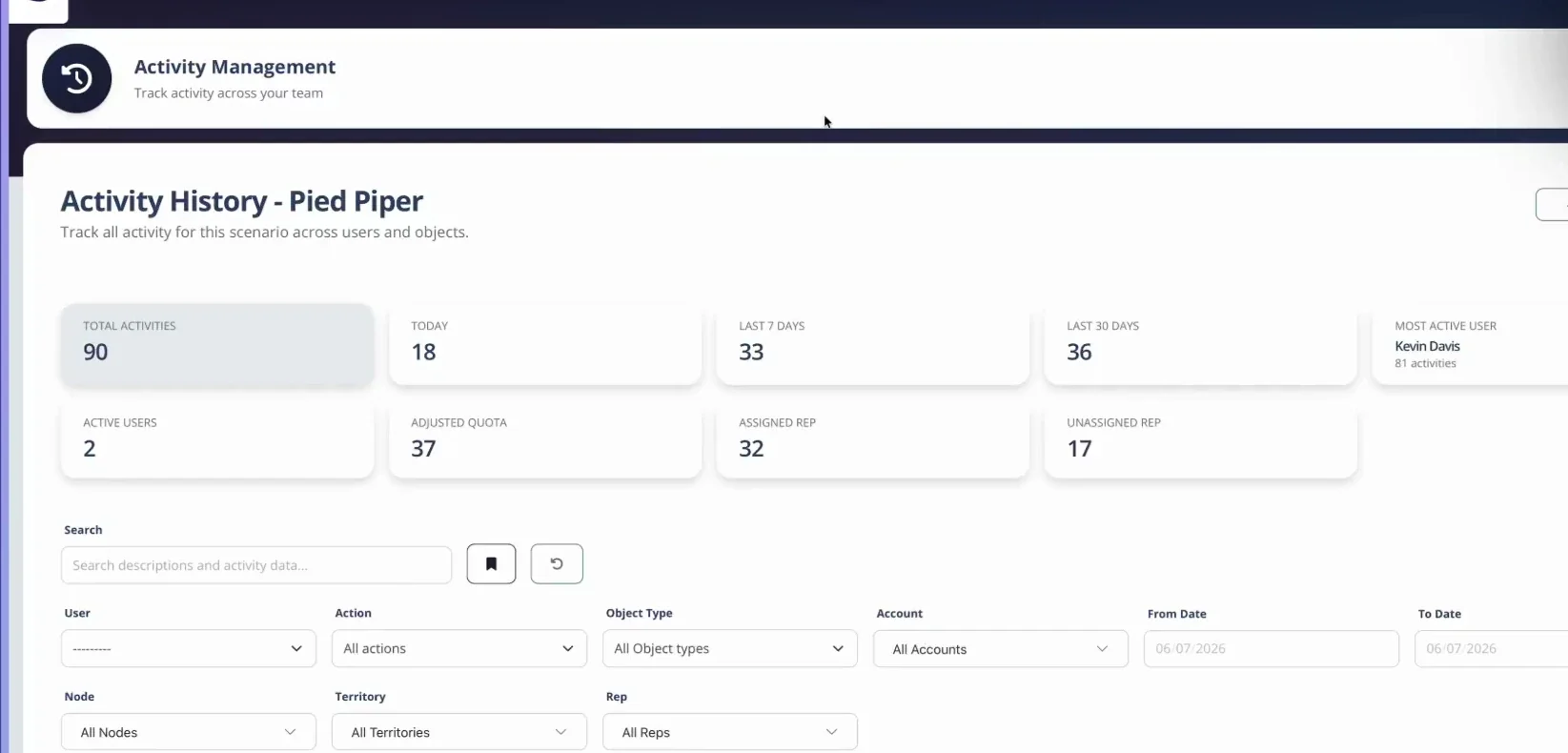
Activity History records territory actions by user and time so teams can review how the model changed.
Decision Note: Exception Account
For Decision Note: Exception Account, make the implicit policy inspectable at account level. Use Current State Scenario to test whether the live state, future scenario, and approved Salesforce result remain consistent; record exceptions instead of hiding them in a person field. You should be able to see how the rule changes your accounts, role, workload, or customer responsibility.
Validate Account and Identity Data
For Validate Account and Identity Data, produce a reviewable output before the next decision begins. Use Exception Account to test whether the live state, future scenario, and approved Salesforce result remain consistent; record exceptions instead of hiding them in a person field. You should be able to see how the rule changes your accounts, role, workload, or customer responsibility.
Validate Account and Identity Data should produce one inspectable Salesforce decision before the process advances. Preserve the live state, validate identifiers and roles, model the proposed state, review account-level changes, record approval, and activate on a defined date. A late exception should not silently rewrite the rule or the baseline. The automated territory assignment tracking review is complete only when Territory2Rule and the affected account roster tell the same story. If your territory is an outlier, ask whether the difference is intentional, temporary, or a data error.
audit trail: The Decision Test
An assignment records the current answer, while change tracking preserves the prior state, proposed state, reason, decision owner, approval, effective date, and activation result. A complete architecture needs stable account identifiers, a current-state baseline, durable territories, explicit roles, repeatable assignment rules, exceptions, effective dates, and an activation record. audit trail, assignment rule, and Territory2Rule should connect those elements without turning the current owner into the model itself. The automated territory assignment tracking review is complete only when Territory2Rule and the affected account roster tell the same story. If your territory is an outlier, ask whether the difference is intentional, temporary, or a data error.
Define Assignment Rules and Exceptions
For Define Assignment Rules and Exceptions, produce a reviewable output before the next decision begins. Use assignment rule to test whether the live state, future scenario, and approved Salesforce result remain consistent; record exceptions instead of hiding them in a person field. You should be able to see how the rule changes your accounts, role, workload, or customer responsibility.
Define Assignment Rules and Exceptions should produce one inspectable Salesforce decision before the process advances. Preserve the live state, validate identifiers and roles, model the proposed state, review account-level changes, record approval, and activate on a defined date. A late exception should not silently rewrite the rule or the baseline. For automated territory assignment tracking, name the approver, the permitted evidence, and the condition that would justify a departure from the rule. Check how the decision changes your workload, pipeline, customer continuity, and quota context.
Systems and Tooling: Automated Territory Assignment Tracking
Technology should preserve territory structure, role assignments, scenarios, approvals, effective dates, and account-level change history, not merely update an Owner field. Test how audit trail, assignment rule, and Territory2Rule behave from source data through review and Salesforce activation. For automated territory assignment tracking, name the approver, the permitted evidence, and the condition that would justify a departure from the rule. Check how the decision changes your workload, pipeline, customer continuity, and quota context.
Calculating and Testing Automated Territory Assignment Tracking
Compare three states: the live Salesforce model, a low-disruption proposal, and a proposal that fixes the largest coverage gap. Review every account that changes territory or role. The chosen scenario becomes an approved deployment package; rejected alternatives remain available for audit and later review. Keep account-level results beside the automated territory assignment tracking summary so assignment rule remains inspectable after approval. You need an account-level correction path when the source data does not match what you know.
Decision Worksheet
| Decision | Evidence to inspect | Control |
|---|---|---|
| Define the population | audit trail and comparable roles | Named data owner |
| Measure the current state | assignment rule and Territory2Rule | Source date and baseline |
| Choose the tradeoff | Scenario comparison and complete Territory Health (the measured condition of the complete territory) | Recorded approver |
| Activate the result | Account roster, changes, quota, and transition rules | Effective date and correction path |
What This Means for You
Use the definitions and account-level controls above to check your assignment. Bring account IDs and source evidence when your roster, role, workload, or customer responsibility conflicts with the published rule.
Questions to Ask Your Manager
- Which Salesforce record, territory, and role determine the accounts or customers I cover?
- What changed from the prior state, who approved it, and when does it become effective?
- Which source data and assignment rule produced this result?
- Is this routine territory management or a redesign of the model itself?
- How does the decision affect my workload, pipeline, customer continuity, quota, and collaborating roles?
- Where do I submit a data correction or policy challenge, and when will I receive an answer?
Frequently Asked Questions
How do you track territory changes over time?
An assignment records the current answer, while change tracking preserves the prior state, proposed state, reason, decision owner, approval, effective date, and activation result. Automated logging creates more visible governance than silently editing owner fields, but that visibility is the mechanism that permits legitimate manager discretion without turning it into favoritism. Use the published definitions and complete-territory result instead of relying on one universal benchmark. Ask your manager to show how that standard applies to your book.
What should a territory change log contain?
Capture the Current State Scenario, calculate account-level differences, classify corrections and exceptions, record the approver and reason, schedule activation, and reconcile Salesforce back to the approved future state. When a rep leaves, the log should show the former role assignment, temporary manager coverage, the preserved territory, the future replacement assignment, each effective date, and who approved the transition. Publish the assumptions so another reviewer can reproduce the answer. You should be able to reproduce the answer from your roster and the stated inputs.
What data is required for automated territory assignment tracking?
For automated territory assignment tracking, assemble governed account data, current assignments, role capacity, and decision evidence for audit trail, assignment rule, and Territory2Rule. Date the sources and publish the definitions so another reviewer can reproduce the result and separate a factual correction from a policy exception. Request the source date when the underlying account facts look stale.
How often should automated territory assignment tracking be reviewed?
Review automated territory assignment tracking on the formal planning cadence and whenever the inputs behind audit trail, assignment rule, and Territory2Rule change materially. Keep customer and pipeline ownership stable between reviews; reopen the model when strategy or new evidence changes the decision, not merely because a manager prefers a different assignment. Ask when your territory will next receive a formal review.
How should Salesforce and the planning layer divide responsibility?
For automated territory assignment tracking, keep the governed source data behind audit trail, assignment rule, and Territory2Rule in its approved system, compare current and future states in the planning layer, and operate only approved assignments in Salesforce. Stable identifiers, field ownership, and a dated sync prevent competing records of truth. Check that your locked accounts remain in the final health calculation.
How should territory changes be tested before activation?
Changes to automated territory assignment tracking should be tested by freezing the live Salesforce state, validating the inputs behind audit trail, assignment rule, and Territory2Rule, modeling the proposed future scenario, inspecting account-level differences and exceptions, and recording approval. Activate on a defined date and reconcile the deployed result to the approved scenario. You need a system when manual reconciliation makes the rule impossible to inspect.
About the author: Tyler Thompson is Co-Founder & CTO of BoogieBoard.
In Summary
An assignment tells you the current answer. Change tracking preserves the prior state, the proposed move, and who decided. Use the sequence above to keep the decision governed, evidence-based, and inspectable at both the account and territory levels.
See Territory Planning in Practice
Watch practical territory-design workflows on the BoogieBoard YouTube channel.