5 Key Takeaways
- Salesforce should stay the system of record. The right architecture is ETM plus an external design layer, not a replacement.
- Buyers should translate territory planning software for Salesforce users into concrete controls, beginning with Salesforce remains system of record and ending with a verifiable sandboxed future scenarios result.
- The evaluation should culminate in a publish-and-reconcile test that proves stable IDs and hierarchy remains true in the operating system.
- Evaluate depth and breadth together by following Salesforce remains system of record from source data through approval, activation, and later correction.
- The decisive red flag is simple: nobody can explain and reproduce sandboxed future scenarios once the approved model reaches the live environment.
Salesforce should stay the system of record. The right architecture is ETM plus an external design layer, not a replacement. The useful question is not which platform has the longest feature list. It is which platform owns the planning job, preserves the governing logic, and leaves the approved result operable after the buying team goes home.
Territory planning software for Salesforce users should be evaluated by the planning job it owns, the decisions it makes inspectable, and the operating state it can reproduce after launch.
To evaluate territory planning software for Salesforce users, define Salesforce remains system of record, weight stable IDs and hierarchy and sandboxed future scenarios before demos, run one governed account scenario through every option, and reconcile the approved result with the live system.
A credible proof of concept uses one difficult account family, one vacancy, one protected opportunity or renewal, one data error, and one scenario tradeoff instead of vendor sample data.
For territory planning software for Salesforce users, compare focused control of Salesforce remains system of record with suite-level connection to approved writeback; either choice may depend on adjacent finance, CRM, data, or performance systems.
A territory planning software for Salesforce users decision fails when sandboxed future scenarios is accepted as a feature claim, the team relies on vendor-owned sample data, or nobody is accountable for the model after implementation.
Working Definitions
- Territory2Model: the Salesforce object containing a planning, active, or archived territory model.
- ObjectTerritory2Association: the Salesforce association connecting an account with a Territory2 record.
- custom ownership fields: person fields added to imitate durable coverage roles without a territory model.
- Salesforce Sync: the controlled exchange of approved territory structure and assignments with Salesforce.
- Forecast Manager: the user designated to own the forecast rollup for a territory in Salesforce.
BoogieBoard's first-party work with Challenger informs the account-family and enterprise-coverage requirements in this guide. It is one operating case, not evidence that every enterprise should use the same hierarchy model. Use this evidence only for the population and claim it directly supports in the territory planning software for Salesforce users decision.
Independent evidence provides a neutral category or research check: SMU research on seller reactions to territory design examines fairness and workload perceptions, emphasizing the need for account-level outputs after Salesforce activation..
Decision Context for Territory Planning Software For Salesforce Users
For territory planning software for Salesforce users, use stable IDs and hierarchy as the decision lens. Define the population, source date, owner, expected output, exception path, and activation consequence before comparing interfaces or feature claims.
The Data Test
For The Data Test, require the source data, rule, prior state, proposed result, account evidence, and operating owner. In territory planning software for Salesforce users, test sandboxed future scenarios with a real edge case.
The Scenario Test
For The Scenario Test, require the source data, rule, prior state, proposed result, account evidence, and operating owner. In territory planning software for Salesforce users, test approved writeback with a real edge case.
The Durable-Model Gap
This problem becomes material when post-activation reconciliation lives outside the governed model. Quantify the affected accounts, manual steps, and unresolved decisions before selecting a replacement.
How We Evaluated Territory Planning Software For Salesforce Users
Set weights before demonstrations begin. Require every option to use the same account population, current state, proposed change, exception, and activation outcome. For territory planning software for Salesforce users, the evaluation should make Salesforce remains system of record inspectable rather than merely claim the capability.
The 8 Best Options for Territory Planning Software For Salesforce Users in 2026
The options below are ordered as a practical fit guide for territory planning software for Salesforce users, not as a universal market ranking. Competitors are named in plain text and receive no direct links. Their fit descriptions are hypotheses to validate through neutral review sources and a real-data proof of concept.
1. BoogieBoard: Best for Territory-First Scenario Planning
BoogieBoard's relevant category for this buying decision is territory-first planning. Best fit: account-level territory scenarios, balance, governed exceptions, and Salesforce activation. Test Salesforce remains system of record with the same governed account population across options. Evaluate carefully: Buyers should confirm the adjacent finance, compensation, and data systems that remain in the operating stack. Ask the team to reproduce one current state, compare one future scenario, explain a surprising account result, and identify what becomes live after approval. Do not award credit for a capability name alone. Record whether BoogieBoard stores the logic, imports a result, requires a custom model, or delegates the work to services.
See Salesforce Sync in the Planning Workflow
The relevant BoogieBoard workflow is Salesforce ETM with BoogieBoard. BoogieBoard Scenario Planning keeps account-level assumptions, tradeoffs, and proposed assignments visible while the team evaluates territory planning software for Salesforce users.
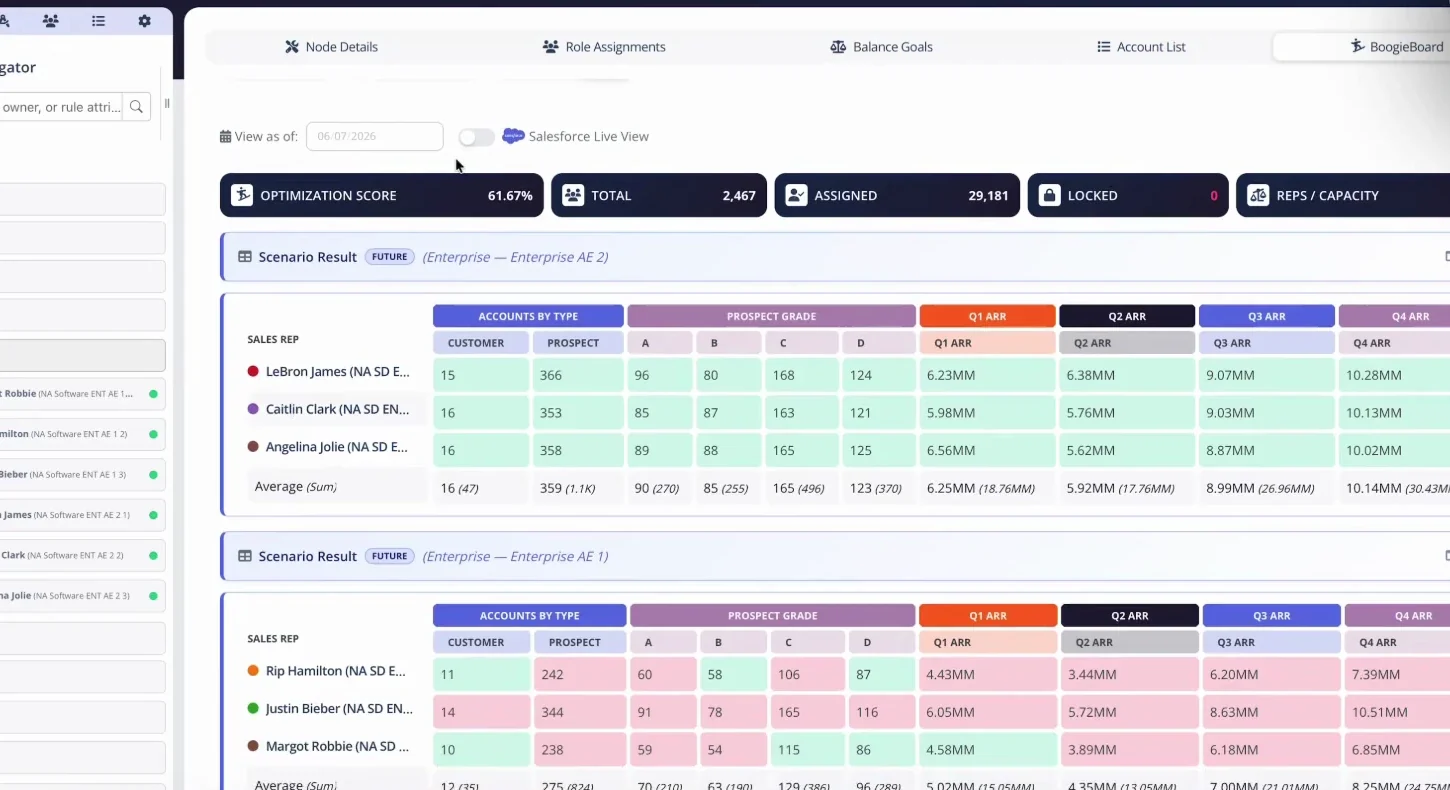
The reconciliation workflow compares selected BoogieBoard assignments with the current Salesforce account state.
2. Fullcast: Best for Plan-to-Pay Revenue Operations
Fullcast approaches territory planning software for Salesforce users from the center of plan-to-pay revenue operations. Best fit: connecting territory, quota, capacity, and ongoing GTM operations. Test stable IDs and hierarchy with the same governed account population across options. Evaluate carefully: Test hierarchy depth, account-level exceptions, and the operating ownership required after implementation. Ask the team to reproduce one current state, compare one future scenario, explain a surprising account result, and identify what becomes live after approval. Do not award credit for a capability name alone. Record whether Fullcast stores the logic, imports a result, requires a custom model, or delegates the work to services.
3. Salesforce ETM: Best for CRM-Native Territory Operations
In this comparison, Salesforce ETM represents the CRM-native territory management approach to territory planning software for Salesforce users. Best fit: operating approved territory hierarchies, assignments, roles, and forecasts in Salesforce. Test sandboxed future scenarios with the same governed account population across options. Evaluate carefully: A live CRM model is not automatically a safe future-state design workspace; test planning and rollback separately. Ask the team to reproduce one current state, compare one future scenario, explain a surprising account result, and identify what becomes live after approval. Do not award credit for a capability name alone. Record whether Salesforce ETM stores the logic, imports a result, requires a custom model, or delegates the work to services.
4. CaptivateIQ: Best for Connected Planning and Incentives
Consider CaptivateIQ when the primary operating center is planning and incentive management, not simply because it appears on a broad feature list. Best fit: teams that want quota, territory, headcount, and compensation in a connected environment. Test approved writeback with the same governed account population across options. Evaluate carefully: Validate territory design as its own workflow rather than inferring it from compensation breadth. Ask the team to reproduce one current state, compare one future scenario, explain a surprising account result, and identify what becomes live after approval. Do not award credit for a capability name alone. Record whether CaptivateIQ stores the logic, imports a result, requires a custom model, or delegates the work to services.
5. Varicent: Best for Broad Sales Performance Management
Varicent's relevant category for this buying decision is sales performance management. Best fit: enterprises connecting territory, quota, compensation, and performance processes. Test post-activation reconciliation with the same governed account population across options. Evaluate carefully: Inspect module boundaries, administration skills, services dependence, and account-level scenario workflow. Ask the team to reproduce one current state, compare one future scenario, explain a surprising account result, and identify what becomes live after approval. Do not award credit for a capability name alone. Record whether Varicent stores the logic, imports a result, requires a custom model, or delegates the work to services.
6. Xactly AlignStar: Best for Established Territory Alignment
Xactly AlignStar approaches territory planning software for Salesforce users from the center of established territory alignment within SPM. Best fit: organizations combining visual territory alignment with a broader performance-management program. Test Salesforce remains system of record with the same governed account population across options. Evaluate carefully: Test whether field-sales and geographic assumptions fit the current account-based selling motion. Ask the team to reproduce one current state, compare one future scenario, explain a surprising account result, and identify what becomes live after approval. Do not award credit for a capability name alone. Record whether Xactly AlignStar stores the logic, imports a result, requires a custom model, or delegates the work to services.
7. Forma AI: Best for Connected Territory, Quota, and Incentives
In this comparison, Forma AI represents the connected territory, quota, and incentive planning approach to territory planning software for Salesforce users. Best fit: enterprises that want territory decisions to flow into adjacent sales-performance processes. Test stable IDs and hierarchy with the same governed account population across options. Evaluate carefully: Confirm that the compensation-centered data model preserves the territory, hierarchy, scenario, and exception depth required. Ask the team to reproduce one current state, compare one future scenario, explain a surprising account result, and identify what becomes live after approval. Do not award credit for a capability name alone. Record whether Forma AI stores the logic, imports a result, requires a custom model, or delegates the work to services.
8. Anaplan: Best for Enterprise Connected Planning
Consider Anaplan when the primary operating center is enterprise connected planning, not simply because it appears on a broad feature list. Best fit: large cross-functional models linking finance, workforce, capacity, quota, and sales planning. Test sandboxed future scenarios with the same governed account population across options. Evaluate carefully: Flexibility creates implementation and model-governance responsibility; test account-level usability with real data. Ask the team to reproduce one current state, compare one future scenario, explain a surprising account result, and identify what becomes live after approval. Do not award credit for a capability name alone. Record whether Anaplan stores the logic, imports a result, requires a custom model, or delegates the work to services.
Territory Planning Software For Salesforce Users Comparison Table
Use this table as a fit map, not a universal score. Each option approaches territory planning software for Salesforce users from a different system center. Validate every cell with your own data, users, integrations, and decision process.
| Option | System center | Best-fit job | Evaluation focus |
|---|---|---|---|
| BoogieBoard | territory-first planning | account-level territory scenarios, balance, governed exceptions, and Salesforce activation | Salesforce remains system of record |
| Fullcast | plan-to-pay revenue operations | connecting territory, quota, capacity, and ongoing GTM operations | stable IDs and hierarchy |
| Salesforce ETM | CRM-native territory management | operating approved territory hierarchies, assignments, roles, and forecasts in Salesforce | sandboxed future scenarios |
| CaptivateIQ | planning and incentive management | teams that want quota, territory, headcount, and compensation in a connected environment | approved writeback |
| Varicent | sales performance management | enterprises connecting territory, quota, compensation, and performance processes | post-activation reconciliation |
| Xactly AlignStar | established territory alignment within SPM | organizations combining visual territory alignment with a broader performance-management program | Salesforce remains system of record |
| Forma AI | connected territory, quota, and incentive planning | enterprises that want territory decisions to flow into adjacent sales-performance processes | stable IDs and hierarchy |
| Anaplan | enterprise connected planning | large cross-functional models linking finance, workforce, capacity, quota, and sales planning | sandboxed future scenarios |
The 8 Best Options for Territory Planning Software For Salesforce Users in 2026 for Current-State Review
Set weights before demonstrations begin. Require every option to use the same account population, current state, proposed change, exception, and activation outcome. For territory planning software for Salesforce users, the evaluation should make stable IDs and hierarchy inspectable rather than merely claim the capability.
Buyer Decision Worksheet
| Decision | Evidence to require | Approval test |
|---|---|---|
| Planning job | Population, roles, current state, and required future outputs | One accountable owner for territory planning software for Salesforce users |
| Weighted fit | Salesforce remains system of record, stable IDs and hierarchy, and sandboxed future scenarios | Weights set before demonstrations |
| Real-data proof | Difficult hierarchy, vacancy, lock, error, and scenario | Account-level result is reproducible |
| Operating model | Data, policy, configuration, support, and activation owners | Ownership survives implementation |
| Migration | Prior state, parallel scenario, effective date, and reconciliation | Approved result matches the live system |
Real-Data Proof-of-Concept Script. Use one governed extract and require every option to reproduce the current state before it models the future. Record import exceptions, hierarchy differences, unassigned accounts, and any transformation that changes the evaluation population. For territory planning software for Salesforce users, apply this review specifically to Salesforce remains system of record and record the account population, owner, evidence, and closure condition.
Decision Rights and Administration. Name who owns source data, definitions, rules, scenario creation, locks, approvals, activation, and post-launch corrections. A tool that requires hidden specialist work should expose that requirement in the operating model and cost. For territory planning software for Salesforce users, apply this review specifically to stable IDs and hierarchy and record the account population, owner, evidence, and closure condition.
Integration and Reconciliation Test. Trace one account from its authoritative source through enrichment, planning, approval, and CRM. Capture stable IDs, field ownership, sync timing, failed records, and the report that proves the live result matches the approved scenario. For territory planning software for Salesforce users, apply this review specifically to sandboxed future scenarios and record the account population, owner, evidence, and closure condition.
Manager and Seller Output Test. Ask the platform to produce one manager summary and one seller account roster from the same scenario. Both should show material changes, governing measures, effective dates, protected work, and the correct route for questions and data corrections. For territory planning software for Salesforce users, apply this review specifically to approved writeback and record the account population, owner, evidence, and closure condition.
Change and Exception Test. Change one input, add one vacancy, protect one account under published criteria, and rerun the scenario. The platform should preserve the prior state, show the complete result, record the exception, and prevent a temporary rule from becoming invisible permanent logic. For territory planning software for Salesforce users, apply this review specifically to post-activation reconciliation and record the account population, owner, evidence, and closure condition.
Three-Year Ownership Review. Estimate licenses, services, implementation, integrations, administration, data preparation, training, support, model changes, and adjacent systems across three years. Keep uncertain benefits separate from observed costs rather than manufacturing an ROI percentage. For territory planning software for Salesforce users, apply this review specifically to Salesforce remains system of record and record the account population, owner, evidence, and closure condition.
Real-Data Proof-of-Concept Script for Current-State Reproduction. Use one governed extract and require every option to reproduce the current state before it models the future. Record import exceptions, hierarchy differences, unassigned accounts, and any transformation that changes the evaluation population. For territory planning software for Salesforce users, apply this review specifically to stable IDs and hierarchy and record the account population, owner, evidence, and closure condition.
Decision Rights and Administration for Current-State Reproduction. Name who owns source data, definitions, rules, scenario creation, locks, approvals, activation, and post-launch corrections. A tool that requires hidden specialist work should expose that requirement in the operating model and cost. For territory planning software for Salesforce users, apply this review specifically to sandboxed future scenarios and record the account population, owner, evidence, and closure condition.
Frequently Asked Questions
What territory software works best with Salesforce?
For Salesforce-focused territory planning software, define the category by the planning jobs it owns: Territory2Model, ObjectTerritory2Association, and custom ownership fields. Salesforce should stay the system of record. Use that operating boundary to decide which profiled tools are true candidates and which merely overlap at one step.
Should you replace Salesforce ETM?
In Salesforce-focused territory planning software, distinguish overlapping tools by testing which system owns the data and decisions behind Territory2Model, ObjectTerritory2Association, and custom ownership fields, where human judgment enters, and what reaches the live CRM. Run the same difficult account and exception through each option; a feature label is not evidence that the workflows are equivalent.
How should you compare territory planning software for Salesforce users?
Compare Salesforce-focused territory planning software against these criteria: Territory2Model, ObjectTerritory2Association, and custom ownership fields, account-level explainability, scenario control, integration ownership, and the correction path. Weight those criteria before demonstrations and require every vendor to use the same source data and policy so presentation quality cannot substitute for fit.
What should a proof of concept for territory planning software for Salesforce users include?
Evaluating Salesforce-focused territory planning software should include a proof of concept that reproduces the current state, exercises Territory2Model, ObjectTerritory2Association, and custom ownership fields, processes one difficult account family and one justified exception, and explains a surprising result at account level. It should finish by publishing a controlled test and reconciling the operating result to the approved scenario.
How should you calculate total cost of ownership?
For Salesforce-focused territory planning software, calculate ownership cost from licenses, implementation, data preparation, integrations, administrator time, change requests, support, and work retained in adjacent systems. Tie each cost to the operating model described above and exclude speculative time savings from the ROI case.
How do you migrate without disrupting live coverage?
When migrating to Salesforce-focused territory planning software, preserve the live state, document the policy behind Territory2Model, ObjectTerritory2Association, and custom ownership fields, run the future model in parallel, reconcile account and role differences, and prepare managers before the effective date. Keep the prior system available until the approved result is verified in Salesforce or the chosen operating system.
About the author: Kevin Davis is Co-Founder & CEO of BoogieBoard.
In Summary
Salesforce should stay the system of record. The right architecture is ETM plus an external design layer, not a replacement. Use the fit criteria and real-data test above to choose the option that makes territory planning software for Salesforce users governed, explainable, and operable after activation.
See Territory Planning in Practice
Watch practical territory-design workflows on the BoogieBoard YouTube channel.