5 Key Takeaways
- Spreadsheet-based territory changes create recurring work because account logic, assignments, approvals, and deployment live in separate files and conversations.
- No-code territory automation does not remove governance; it gives RevOps a controlled workflow for data synchronization, design rules, scenarios, approvals, pre-flight checks, and CRM updates.
- Implementation follows five steps: map the current process, select an operator-owned platform, establish the data pipeline, translate policy into design logic, and roll out the operating model.
- The most valuable automation happens before the CRM write: teams can test alternatives, measure balance, protect exceptions, and inspect exactly what will change.
- A mature system reduces dependency on engineering while preserving clear ownership for source data, territory policy, approval authority, and the live Salesforce model.
Territory changes should not require a new spreadsheet, a chain of Slack messages, and a ticket to Salesforce every time a rep joins, leaves, or changes roles. Yet that is how many teams operate. RevOps identifies the change, a manager proposes account moves, someone updates a workbook, another person checks the math, and an administrator eventually changes records in the CRM.
The work is manual because the business logic and the execution layer are disconnected. Modern no-code territory platforms connect them. They let the operators who understand the coverage model design and validate changes while keeping Salesforce controls, permissions, and deployment rules intact.
The goal is not to remove IT from governance. It is to stop using IT as the translation layer for every ordinary territory decision.
The Hidden Costs of Managing Territory Changes Manually
Spreadsheets are useful during early planning because they are familiar and flexible. They become fragile when they are asked to function as the territory system of record.
One file contains the current accounts. Another contains proposed assignments. A third has manager feedback. Exceptions arrive through email. The person holding the master workbook becomes the only one who can explain which version is correct. By the time the changes reach Salesforce, the source data may have changed again.
This is not merely an inconvenience. Spreadsheet research using operational workbooks found errors in 0.8% to 1.8% of formula cells in a 50-workbook study, depending on the definition used, and documented that some errors had substantial effects on important outputs (Powell, Lawson, and Baker). That does not mean every territory spreadsheet is wrong. It means a consequential, changing process needs controls beyond manual confidence.
Manual territory changes also create four operating costs:
- Slow response: A simple coverage change waits behind data exports, workbook updates, reviews, and CRM administration.
- Weak traceability: The final assignment may be visible, but the rejected options and decision rationale disappear.
- Inconsistent policy: Different managers receive different exceptions because the rules are not embedded in the process.
- Production risk: A bulk update can move more accounts or roles than the team intended.
From Manual Burden to a Strategic Capability
The goal is not to automate bad decisions faster. It is to give RevOps more time for the work that requires judgment: defining healthy territories, comparing tradeoffs, protecting customer continuity, and helping leadership choose among viable scenarios.
BoogieBoard customer evidence illustrates that shift. Fundraise Up described moving from failed spreadsheet attempts to a process where leadership could visualize alternatives and make planning decisions with confidence (Fundraise Up case study). The value was not a faster cell update. It was a better decision process.
What Is No-Code Territory Automation?
No-code territory automation is a governed workflow that lets business operators design, review, and deploy territory changes without writing custom code for each adjustment.
The end-to-end lifecycle has six stages:
- Data synchronization: Read the current accounts, ownership, roles, pipeline, customer attributes, and territory labels from Salesforce or another source system.
- Policy and design logic: Define segmentation, hierarchy, account eligibility, Balance Goals, locks, holdovers, and role rules.
- Scenario calculation: Apply the logic to one or more future-state scenarios without changing the active model.
- Review and approval: Let the right managers inspect, comment, propose changes, and approve the selected design.
- Pre-flight validation: Show the accounts, territories, owners, and supporting roles that will change before deployment.
- CRM synchronization: Write only the approved values into the chosen Salesforce objects and fields.
That workflow is different from an automated spreadsheet. A script that refreshes rows still leaves the team responsible for version control, access, scenario separation, exception rationale, and deployment safeguards.
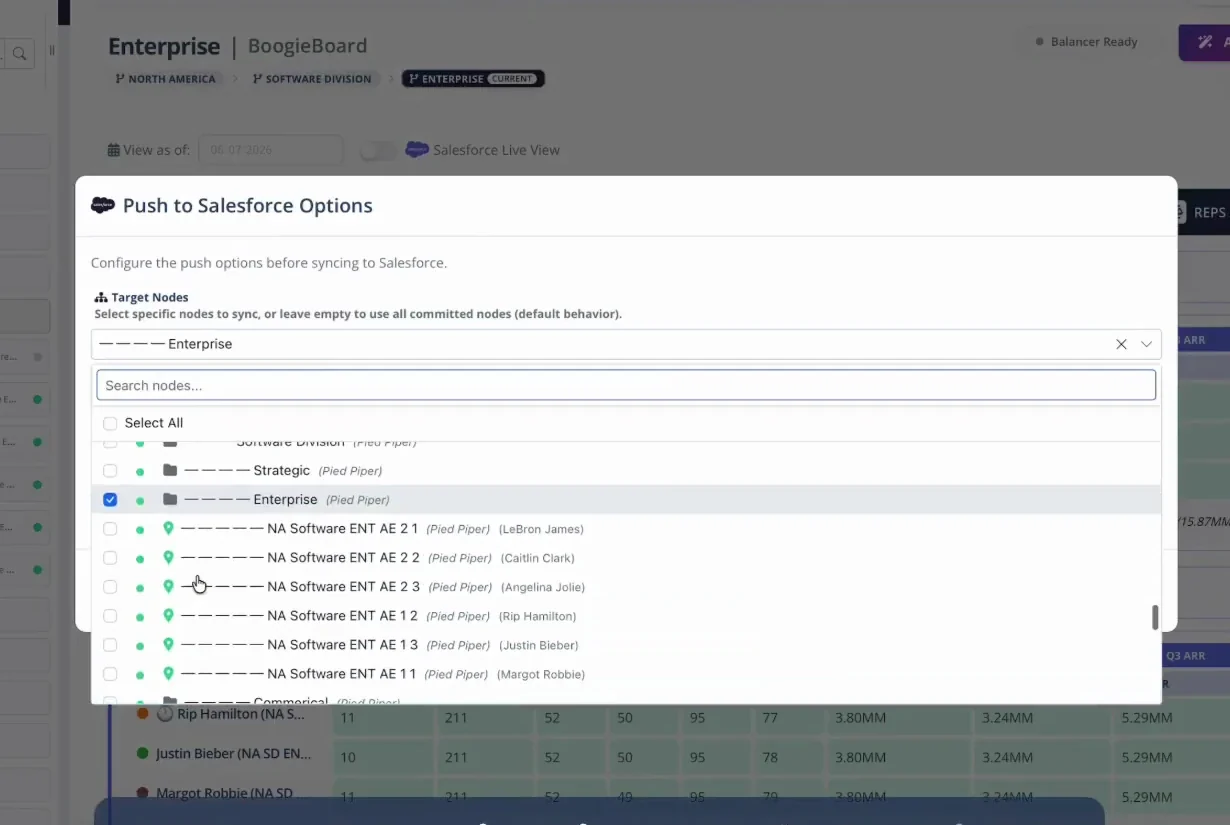
The Salesforce push workflow lets operators select the target node and confirm which territory changes will be activated.
How to Automate Territory Changes Without IT in 5 Steps
Step 1: Map Your Current Territory-Change Process
Document the process before choosing the tool. The objective is to find where decisions, data, and execution separate.
- List the triggers: Rep departure, new hire, promotion, segment change, account reclassification, customer conversion, acquisition, or broader redesign.
- Identify the source systems: Salesforce objects and fields, enrichment providers, HRIS records, finance data, and customer-health systems.
- Map decision authority: Who proposes a change, who validates it, who approves it, and who is informed?
- Document the policies: Account locking, holdovers, customer continuity, capacity, balance standards, and exception handling.
- Locate the pain: Where do versions diverge? Which steps require engineering? Where do managers wait? Which changes are hardest to reconstruct later?
Start with the Ultimate Guide to Territory Planning when the current process is undocumented. Its preparation, current-state, design, validation, and deployment stages give the automation effort a complete operating frame.
Step 2: Select a Platform Built for Operators
The evaluation should focus on the complete workflow, not on whether the product can move accounts.
- No-code design controls: Can RevOps define hierarchies, segments, account logic, Balance Goals, locks, and roles without custom development?
- Scenario isolation: Can the team work in draft and compare alternatives without touching the active model?
- Native data access: Can the platform read the Salesforce objects and fields that actually drive your territories?
- Collaboration and permissions: Can different stakeholders receive the right scenario, node, comment, or approval access?
- Deployment controls: Does the system show a pre-flight change set before writing to Salesforce?
- Auditability: Can the team see who changed what, why, and in which scenario?
- Scalability: Can the same model support new regions, segments, overlays, and future hires without a rebuild?
The most revealing demonstration is your hardest ordinary change. Ask the vendor to show how a rep departure, protected late-stage opportunity, supporting BDR assignment, and Salesforce write would be handled from start to finish.
Step 3: Establish the Automated Data Pipeline
Connect the source system and define the data contract.
For Salesforce, specify:
- which account, opportunity, user, and custom-object fields are read
- how parent-child account relationships are represented
- which field holds the durable territory label
- which roles are stored as owners, custom user fields, teams, or ETM assignments
- how frequently the current state is reconciled
- which approved fields the platform is allowed to write
BoogieBoard's Salesforce reconciliation workflow can compare the planning model with live ownership before a change begins. That prevents a scenario from being built on a stale export.
Garbage in, governed garbage out: Automation cannot decide that a blank region, stale employee, duplicate account, or broken hierarchy is wrong unless the data policy defines the expected state. Use the RevOps and Sales Account Data Strategy to assign ownership for those inputs.
Step 4: Translate Territory Policy into Design Logic
Turn the rules from Step 1 into explicit, testable configuration.
For example:
- Define the eligible account universe for an Enterprise AE role.
- Group accounts by region and approved segment logic.
- Set Balance Goals for ICP account count, revenue potential, open pipeline, and workload.
- Lock strategic accounts and active opportunities that should not move.
- Add the required AE, BDR, manager, and specialist roles.
- Generate multiple scenarios with different balance-versus-disruption tradeoffs.
- Compare the scenarios and preserve the rejected options.
This is where no-code matters most. Operators should be able to adjust a Balance Goal or lock policy and immediately inspect the consequence. The logic should be visible enough for Sales leadership to understand, not buried in formulas or custom code.
Step 5: Roll Out, Train, and Empower the Team
Automation changes the operating process, so the rollout must cover more than the tool.
- Explain the why: Show which business change required the new coverage model.
- Train managers first: Managers need the design rationale, territory-level evidence, and escalation path before reps ask questions.
- Review the pre-flight change set: Confirm the expected accounts, territories, owners, and overlays before deployment.
- Deploy with a validation window: Reconcile the written records, reporting, access, and routing after the first sync.
- Publish the support process: Tell users where to report data issues, policy questions, and exception requests.
- Gather feedback: Separate genuine data defects from policy disagreements and design-learning opportunities.
The current pilot, How to Communicate a New Territory Plan Effectively, is the natural internal link for this stage once published. Until then, the existing territory-change communication template can support the rollout.
Beyond Account Movement: The Strategic Impact of IT-Free Automation
Improve Sales Focus and Confidence
When the logic is visible, managers and reps can distinguish a business rule from a one-off judgment. They can see what defines a healthy territory, why an account belongs in a patch, and which tradeoffs leadership approved.
That transparency matters. Automation does not create trust on its own, but it makes a consistent and explainable process possible.
Improve Planning Control and Auditability
For RevOps, automation creates a reusable current-state-to-future-state process. Scenarios remain separate from production. Comments and locks are associated with the relevant model. Approvals occur before the CRM write. The before-and-after state remains available for analysis.
The BoogieBoard collaboration and audit-trail demo shows draft scenarios, account locks, comments, permissions, and an activity stream before changes are merged into the active Salesforce model.
Automating territory changes without IT is not about bypassing technical governance. It is about giving RevOps an operating system that matches the work. IT and Salesforce administrators can define the integration boundary once. Sales Ops can then manage ordinary coverage changes inside that boundary with clear policy, visible scenarios, and controlled deployment.
The result is a territory process that can move at the speed of the business without making every adjustment a production experiment.
Territory automation readiness check
Before rollout, confirm that your team can answer yes to each question:
- Do we know which source fields define account eligibility, hierarchy, segment, ownership, and supporting roles?
- Are locks, holdovers, exceptions, and customer-continuity rules documented outside individual spreadsheets and inboxes?
- Can RevOps create and compare future-state scenarios without changing the active Salesforce model?
- Is approval authority clear for territory design, exceptions, and final deployment?
- Can reviewers inspect the complete pre-flight change set before any records are written?
- Do we have a named owner and validation process for the post-deployment Salesforce state?
A "no" identifies the control to design before automating the workflow. It is not a reason to preserve the manual process.
Controls That Keep No-Code Automation Governed
No-code should remove implementation bottlenecks, not remove accountability. Put explicit controls around every stage of the change lifecycle.
| Control | Question it answers | Evidence to retain |
|---|---|---|
| Role-based access | Who may design, approve, and activate? | User, permission, action, timestamp |
| Draft Scenario | Can changes be tested outside production? | Inputs, logic version, proposed assignments |
| Account-level diff | Exactly what will change? | Prior and proposed territory and role values |
| Approval | Who accepted the business tradeoff? | Approver, rationale, date |
| Pre-flight validation | Will writes fail or create conflicts? | Missing users, fields, territories, and permissions |
| Controlled deployment | Which scope was activated? | Batch, status, errors, effective date |
| Reconciliation | Does Salesforce match the approved model? | Differences, classification, owner, resolution |
The operator should be able to pause before activation, inspect the actual records affected, and separate design errors from CRM configuration failures. A successful API response is not sufficient evidence that the territory change was correct.
Create an escalation path for the cases that do require IT or a Salesforce administrator: new objects or fields, permission changes, integration credentials, platform limits, security review, and unusual failure recovery. The objective is to make routine business change operator-owned while keeping technical and security boundaries explicit.
After deployment, review both the territory result and the automation itself. Track failed writes, manual overrides, repeated data defects, unapproved drift, and the time between approved decision and live state. These measures reveal whether the workflow has actually reduced risk or simply moved manual work into a new interface.
Retain the rejected proposal and the final account-level deployment record. Together they show which alternatives were considered, which tradeoff leadership approved, and whether the operating system ultimately matched that decision.
Keep both records accessible.
Frequently Asked Questions
How long does it take to implement no-code territory automation?
The timeline depends on data quality, hierarchy complexity, number of roles, policy clarity, and Salesforce configuration. A clean organization with documented rules can move quickly. A team with disputed ownership, missing fields, and undocumented exceptions should resolve those issues before treating speed as the primary objective.
Will we still need spreadsheets?
Spreadsheets can remain useful for ad-hoc analysis, exports, and one-time review. They should not remain the authoritative place for live territory logic, scenario versions, approvals, and production assignments once a governed platform is in place.
Does territory automation replace Salesforce?
No. Salesforce remains the operational system of record for accounts, opportunities, users, access, and the approved live assignments. The territory platform handles design, scenarios, balance, collaboration, validation, and controlled synchronization.
How do we keep a no-code process secure?
Use role-based permissions, separate draft and active scenarios, restrict who can approve or deploy, define the allowed Salesforce write paths, review pre-flight changes, and preserve activity history. "No code" should change who can operate the process, not remove controls from it.
About the author: Tyler Thompson is Co-Founder & CTO of BoogieBoard.
In summary: No-code territory automation gives RevOps a governed path from current data through scenarios, approvals, validation, and controlled Salesforce updates.
Watch territory planning in action
See product walkthroughs and practical territory workflows on BoogieBoard's YouTube channel.
Customer proof: Fundraise Up had lost its RevOps leader and had already struggled to complete territory planning internally. Its team used BoogieBoard to compare build options and create transparent assignments the sales organization could trust (read the Fundraise Up case study).