
Step #0: 🤗 Author’s Note
**Death, taxes, and…Territory Planning?!? **
Surely, Benjamin Franklin, one of the most innovative minds in American history, could overcome the turmoil of Territory Planning? Was he so frustrated in his role as Postmaster of the American Colonies that he broke his quill in exasperation over drawing manual maps? Did complaints of inequity distress him, a champion of personal freedom? Was Territory Planning taking away from his other responsibilities? Or was he simply so fed up with spreadsheets that he couldn’t bear to do another CRM export and transform the data?

Okay… Ben Franklin didn’t really include Territories in his quote. But the bad vibes surrounding Territory Planning are so pervasive that he might as well have. Territories are described as inevitable problems that revenue organizations can’t shake. And like all inevitable problems, they can leave you feeling hopeless and frustrated.
When I was a Seller, my Territory was my life. I spent all day researching, calling, and visiting my accounts. My compensation and ability to get promoted were dependent on the success of these accounts. So, like any good Seller, I became adept at comparing my Territory to others and angling for the best one. But the ambiguity and delays of Territory Planning really frustrated me. I was told to always be selling, but often my Territory delivery delayed my ability to do so. In addition, it was not clear that Sellers were being measured from the same starting line. Were successes from the Territory or the Seller? The chicken or the egg? These issues impacted me severely, but it was hard to get any feedback into the process. Surely there had to be a better way?
When I became a Sales Leader, I started thinking more systemically and partnering more closely with Operations. I quickly realized that the problems with Territories weren’t only impacting me. The perception of unfair Territories drove cultural problems and made it difficult to measure Seller performance. When delays happened, Sellers got into bad habits of sitting on the sidelines, and the lost selling time was exacerbated. Understanding that time is money and Seller retention is paramount, I tried to fix Territories with my Ops counterparts. But when Territory Planning season rolled around, it was during the busiest time of the year. I was trying to close deals, and had trouble participating in the confusing spreadsheets that housed the process. There were meetings to review spreadsheets, instructions to input data into spreadsheets, and emails attempting to clarify questions related to the spreadsheets. But the versioning and collaboration were so messy that I felt hopeless. Surely there had to be a better way?
When I moved into Operations, I thought I could be the Territory hero. I had experience as a Sales Leader and Seller, so I felt I understood Territory problems better than anyone else. But when I got a look under the hood, I realized that Territory Planning was much more complicated than I had given it credit for. There was ‘bad’ data everywhere: duplicates, hierarchies, inaccuracies, and difficult-to-manage partnerships with third-party providers. There were also more cooks in the kitchen than I had realized. Every Seller and Sales Leader had strong opinions about why their Territory was unfairly designed. Even Systems, Marketing, Finance, Solutions Engineering, and Technical Account Management teams had opinions (often competing opinions) about how Territories should be designed. The design effort was even mathematically complicated. There were all sorts of changing variables (Segments, Geos, Sellers, Industries, Technographics) to manage and understand the trade-offs between. This meant that there were endless permutations for how Territories could be designed and I had to design them in the least disruptive way possible. So, like all processes I had been a part of before, I ended up delayed, moving accounts around in spreadsheets late at night. I tried to design options to satisfy all stakeholders but ultimately pleased none of them. Surely there had to be a better way?
The search for Territory Design utopia led me to talk to peers and friends at other companies and industries. Exactly zero of them said that they were happy with their Territory processes. At best, some were indifferent. “It is what it is…” they’d say “Territories are just never going to be fixed.”
I did not accept this fatalism. The amount of data that companies were accessing about markets and teams was growing rapidly. The pressures on revenue organizations to operate efficiently were ramping up. And with remote work, the makeup of Territories started to look very different. There was an opportunity to change the way the world feels about Territories.
So a few years ago I assembled a team and started to design Territories for other companies. We built our own technology to transform the process. We conducted consulting work and interviews with 300+ companies. We worked alongside CROs, Operations Leaders, Analysts, and Sellers in B2B sales orgs across various industries.
This Territory Guide is born from these experiences, successes, and many failures. We created this process to transform the speed, equity, and precision of Territory design. And maybe most importantly, to change the vibes.
The goal of this Territory Guide is to help your team flip its Territory design process on its head and turn it into a delight. Your stakeholders might say something like, “I’ve never worked for a company with such an excellent Territory design process.”
We wrote this Guide in Notion to crowdsource from your expertise. If you are reading this, we hope that you will add your suggestions directly so that we can make it the most useful Territory Planning asset in the world.
Sincerely,
Kevin Davis
Co-Founder & CEO of BoogieBoard
If you are willing to believe that Territories can be a delight, please keep reading 👇👇👇
👆 Click the dropdown triangle for each step to view the step details
Step #1: 🎬 Tactically Prepare Your Stakeholders
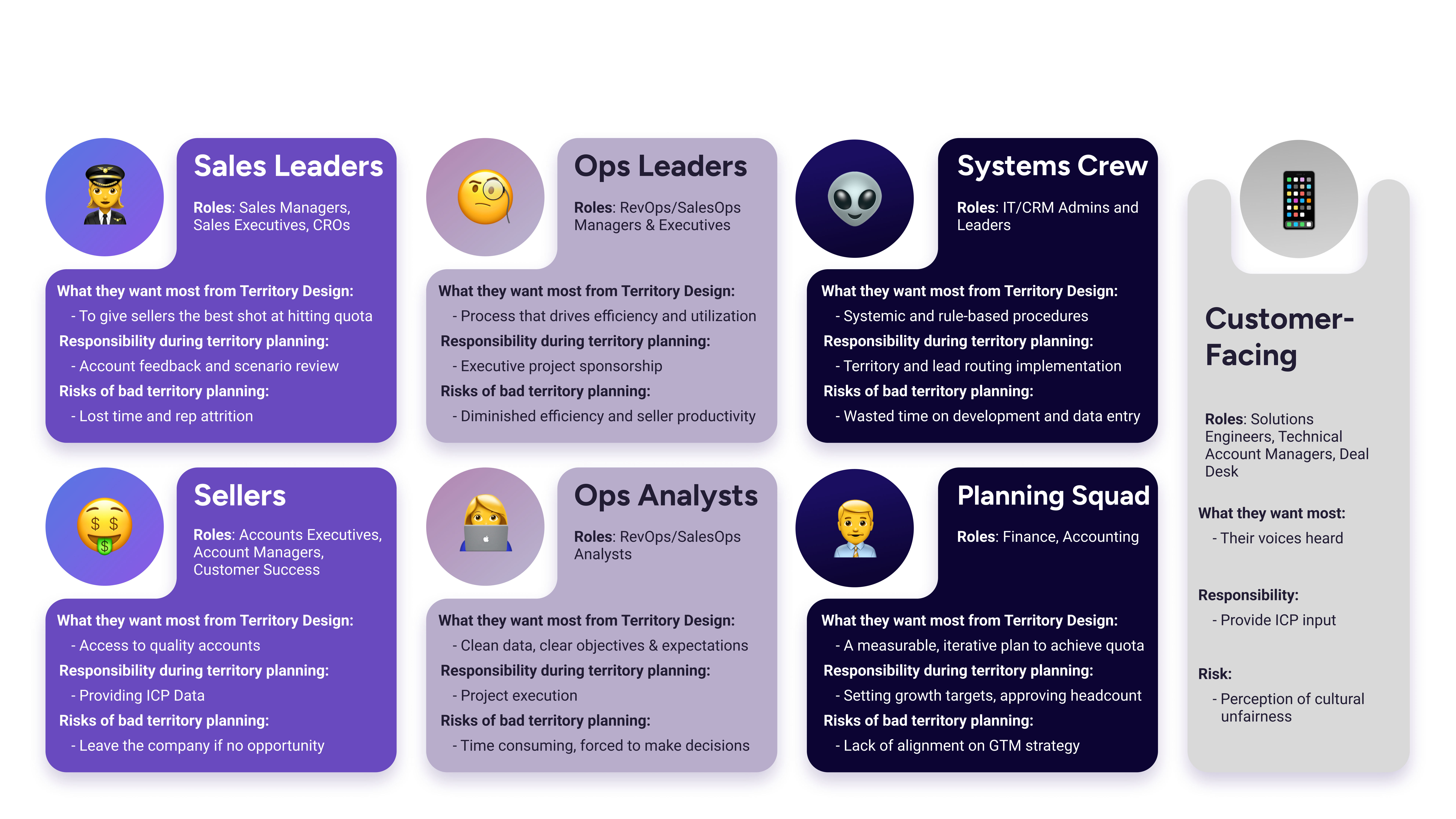
📓 Territory Planning Stakeholders to consider
📓 What is tactical preparation?
Territory Planning is fundamentally a change management project. Accounts and geographies change from one Territory to another. Sellers change roles. The entire strategy & design of your revenue organization may look different by the end of Territory Planning.
Tactical preparation of your Stakeholders means leading them through an easy-to-partake-in process that achieves this change and its objectives.
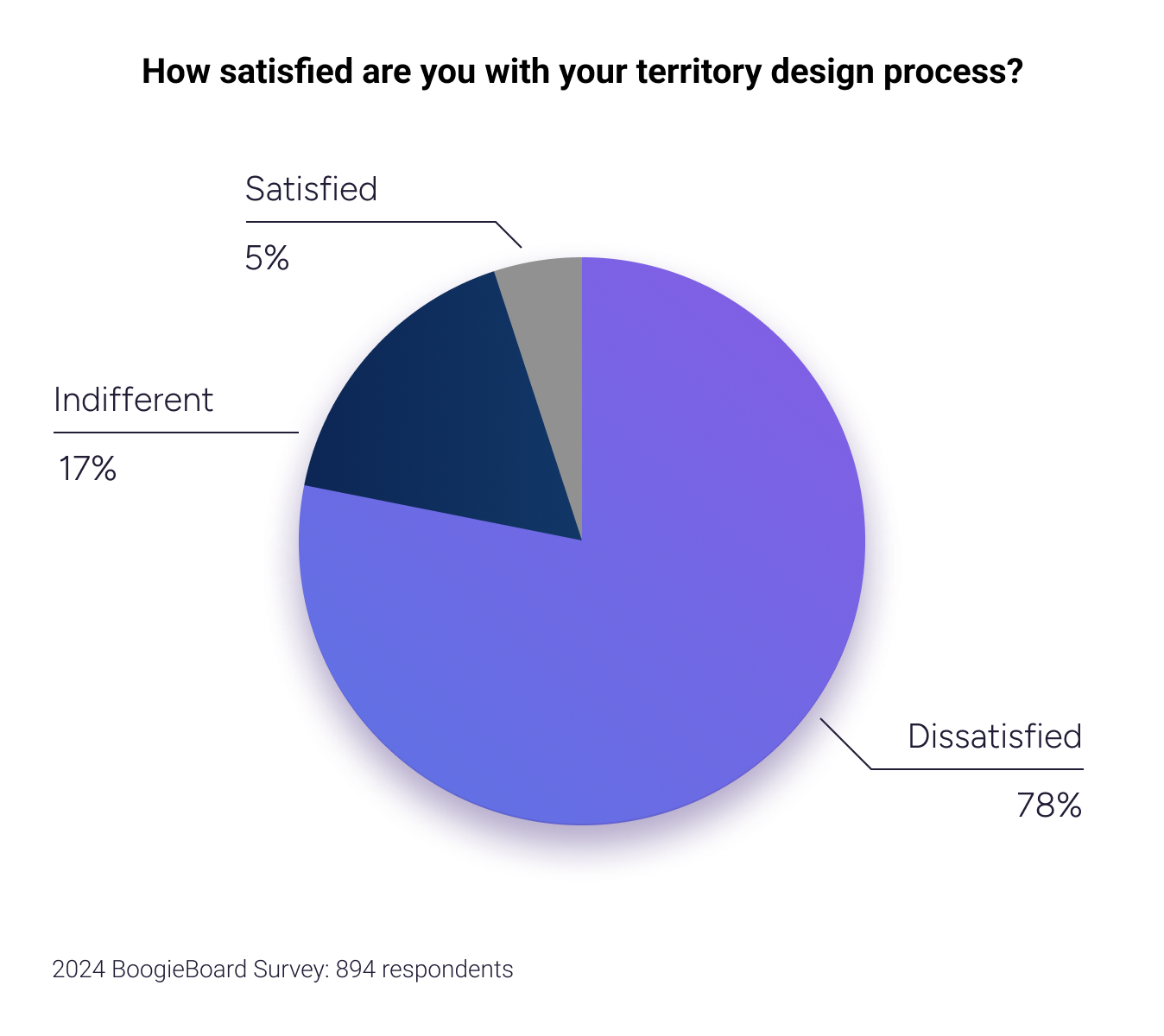
This preparation requires a deep understanding of each Stakeholder role and their relevant goals. It requires polished project management, including clear communication, defined tasks, and assigned responsibilities. Additionally, it requires a thorough knowledge of the Territory Planning flow, so you can anticipate dependencies and tackle problems upstream.
🤔 Why is this step important for Territory Planning?
One of the reasons that Territory Planning is broken is because there are many different cooks in the kitchen, each with competing priorities. Not only do you have to run a complex, multi-variable process, you have to do it while being pulled in different directions. Sellers might ping you to request a certain account. A Sales Leader might not take the time to understand how your spreadsheet is structured. Finance or Systems might drop in with a request from seemingly out of nowhere. By understanding the needs of each Stakeholder, engaging them upstream, and tightening your project management, you can run a better process with fewer fireworks. Stakeholders want to help, but they are busy and probably not as spreadsheet-skilled as you. Use the steps below to align your Stakeholders.
❌ Common pitfalls which lead to unprepared stakeholders
Pitfall 1.1: Bad Project Management
Companies neglect the project management of Territory Planning. It usually occurs during the busiest times of the year for Stakeholders. It’s also a complex process with many variables. Rogue spreadsheets and emails simply don’t cut it. Stakeholders have trouble understanding the basics of your Territory Planning process.
Pitfall 1.2: Unclear Decision Authority and Roles
If you don’t know what’s expected of you in any process, it is very difficult to participate in a helpful way.
- Sales Leaders often think they have authority to enact ideas into Territory Planning, but sometimes they don’t.
- Sellers can sometimes request Holdover Accounts, and sometimes they can’t.
- Systems Stakeholders often don’t realize you need them to advise on exports or formats.
- It is frustrating to have feedback ignored. Communication and dependencies get murky when it’s unclear who has authority for each part of the process.
Pitfall 1.3: Missing Leadership from Operations
Operations Leaders often hand over Territory Planning to Operations Analysts without providing sufficient support or direction. Analysts are forced to make strategic decisions (e.g., Who should own this account? What should the Segment lines be?) throughout Territory Planning, decisions that should be informed by Leaders.
This results in the Analyst being pulled in all directions by other, usually more senior, Stakeholders (e.g., Don’t move this account there. Draw these Segment lines instead). The Analyst executes these requests, resulting in wasted time modeling Scenarios that could have been prevented with proper leadership direction.
Pitfall 1.4: Missing Leadership from Sales
The partnership between Sales and Operations starts at the top. Participation from Sales is needed for many of the steps below. If Sales Leadership is not bought into the process or does not demonstrate that it values Territory Planning, the sales team will not participate actively. This results in major stakeholder conflicts related to market direction, time allocation for Territory Planning, and end-state satisfaction regarding the Territories.
Pitfall 1.5: Not Enough Time
A thoughtful, collaborative, and analytical approach to Territory Planning requires time. Companies fail to allocate adequate time in their calendars for Territory Planning. Operations Analysts end up working late into the night, trying to get results out the door.
✅ Steps to tactically prepare your Stakeholders
Step 1.1: Use BoogieBoard’s Territory Planning Project Hub Template (Or create your own)
To flip your Territory Planning process on its head, you need excellent project management. BoogieBoard assembled the template below to help you align with your Stakeholders and effectively document your process. Simply duplicate the template and engage your team accordingly. If you run into any issues or have ideas to share, please comment directly in the Hub template.
BoogieBoard Territory Planning Project Hub | Template
Step 1.2: Set Clear Territory Planning Objectives
Be clear and measurable about what your company is trying to achieve through Territory Planning.
- Are you creating new Territories?
- Are you bringing new products to market?
- Are you opening new geographies?
- Are you increasing Seller efficiency?
- Are you refocussing Seller to existing business or to prospecting?
- What day do the new territories go live?
Align with your Leadership and clarify these objectives.
Step 1.3: Decide What’s on the Table
Your Territories involve many components, such as Segments, Regions, Sub-Regions, Account Scores, Roles, Territory Types, Equity, Customer Turnover, Seller Promotions, and Industries.
Ask your Leaders, “Which of these are we willing to change to achieve our stated goals?” Make it clear that the cost of change is disruption to prospects, customers, and internal structures. Many Ops teams are asked to make sweeping changes to Territories. New strategies, new markets, and new team dynamics necessitate changes, just like with any GTM motion. However, leadership often adds one caveat without fully understanding the implications: 'Make the changes in the least disruptive way possible.’
Limiting disruption makes sense. If a Seller has developed a Territory, undoing that work represents a cost. Disruption is especially bad for existing customers. You don’t want to keep changing the associated Seller and give a bad customer experience.
By deciding what’s essential and what’s not, you can limit the amount of modeling needed to reach your objectives.
Step 1.4: Identify Clear Roles & Responsibilities
Every task in a well-managed process needs to have a Driver and an Approver (these terms come from the DACI method for project management). Leave no room for ambiguity about who owns tasks and who can make decisions.
e.g., Who is the final approval on Regional lines, Segment lines, Territory balance?
e.g., Is a Seller able to ping you to request that they keep ABC account because they have a great relationship with the executive team?
Note: If you prefer a different Role & Responsibility framework, that’s fine. Just be sure to clearly implement it in your Project Hub.
Step 1.5: Agree on a Holdover policy
A Holdover Opportunity allows a Seller to continue working on an Opportunity that would otherwise be moved out of their ownership. You allow this because it limits disruption to the deal cycle and gives a Seller credit for their work.
Example Holdover Policy Accounts with an open opportunity <90 days old will remain with current account owner until December 31st (for the next three months). Starting January 1, these accounts will be transferred to the appropriate account owner.
An easy way to let stakeholders participate in Territory Planning is by deploying a clear Holdover Policy. It gives Sellers and Sales Leaders agency in the process and improves data hygiene because your Policy won’t allow Holdover Opportunities unless they meet a certain threshold (e.g., Stage 3 Opportunity with all requisite information filled in).
Step 1.6: Align with Capacity Planning
A full 'how-to' on Capacity Planning is beyond the scope of this guide. Check out the 'Additional Resources' section for some of our favorite content on the topic.
To optimize Territory Planning, you need to be aware of your dependencies on Capacity. Make sure that you are prepared for these:
Capacity Plan: How many reps & Territories do you need? ➡️ Territory Plan: How many Territories do you need to design?
Capacity Plan: What is the ramp schedule? ➡️ Territory Plan: When do you need a % accounts in the hands of the seller?
Capacity Plan: How will you define Territory Viability? ➡️ Territory Plan: How many ICP accounts does the Territory need to have?
Capacity Plan: How will you define Territory Viability? ➡️ Territory Plan: How many deals will reps need to close?
Capacity Plan: How will you define Territory Viability? ➡️ Territory Plan: How much MRR or ARR should our Account Managers manage?
Step 1.7: Align with Quota Planning
Like Capacity Planning, a full 'how-to' on Quota Planning is beyond the scope of this guide.
But again, you should be aware of the dependencies between Territory Planning and Quota Planning. One of the goals of Territory Planning should be to make Quota Planning easy. Quota Planning involves quantifying how much revenue should be expected from each Seller and Territory. Refer to the section below on Balance Goals for more details.
Step #1 Action List
Step #2: 🤯 Defeat the “Our Data is Bad” Problem
📓 What is the “Our Data is Bad” Problem
When Stakeholders dismiss their Account Data as fundamentally flawed, we call it the 'Our Data is Bad' problem.” Companies spend hundreds of thousands, even millions, on third-party data providers and yet feel extremely dissatisfied.
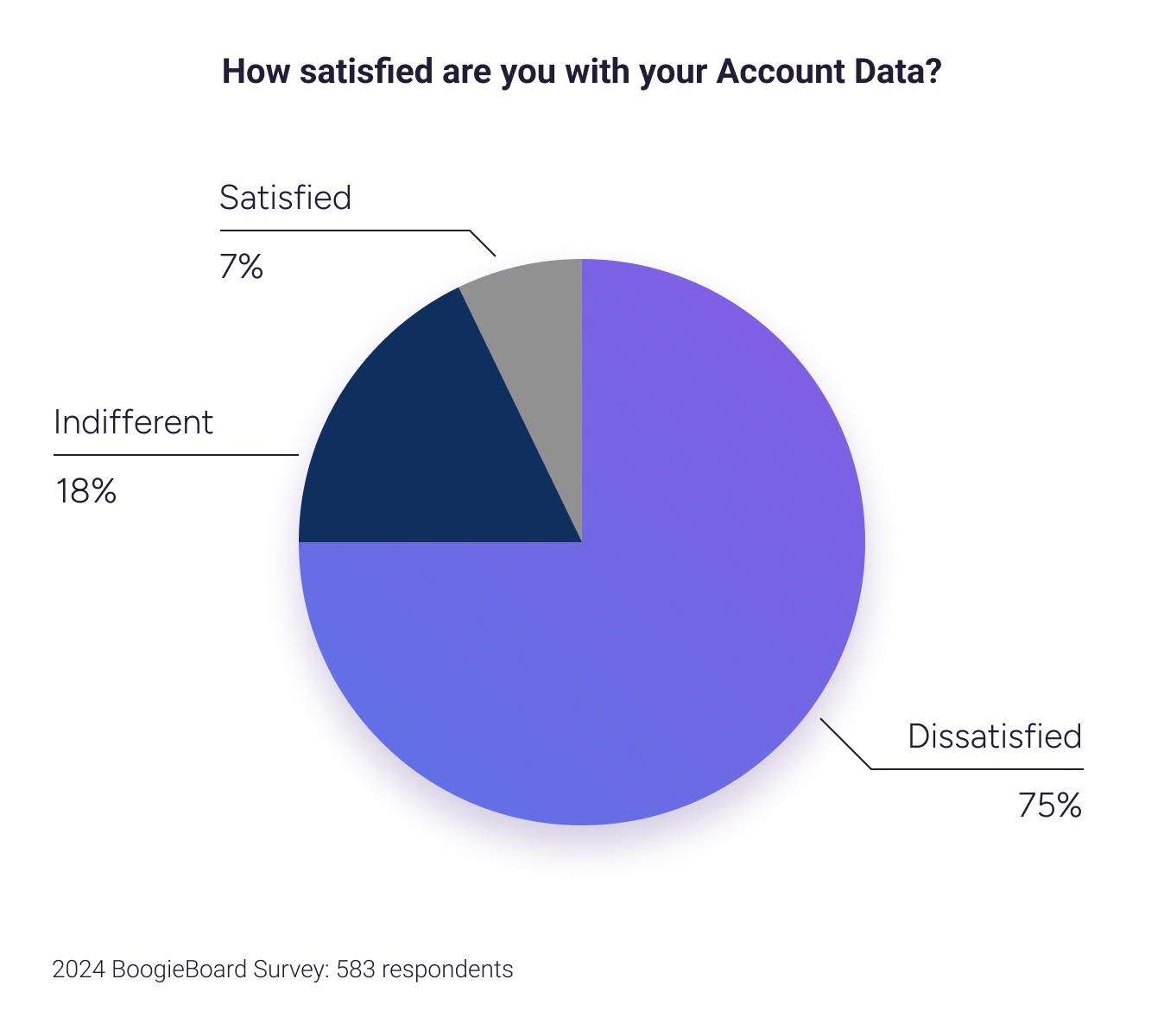
“Our data is bad” is a phrase heard from nearly 100% of BoogieBoard’s consulting clients and prospects, and it’s a concerning statement for companies investing so heavily in data strategies.
🤔 Why is this step important for Territory Planning?
Territories rely heavily on Account Data. If the data used to design Territories is unreliable, inaccurate, or missing, it causes major stakeholder conflict and wasted time (”This account should be in my Territory,” or “This account is not a good target!”). This reliance makes data strategies so expansive and complex that they become the top priority for Ops teams. Some companies become so defeated by the conflicts, time, and investment that they forego using serious precision in Territory Planning. They throw their hands up and say, “Let’s just carve Territories alphabetically,” or “Let’s just let reps choose the accounts.” This can make for simple Rules of Engagement, but it doesn’t help Sales focus. If this sounds like you, remember that your competition is targeting the market with precision, not leaving it to junior Sellers.
❌ Common pitfalls which lead to the “Our Data is Bad” problem
Pitfall 2.1: Expecting Perfect Account Data
If I told you that Steph Curry was a horrible three-point shooter, you’d tell me that I was way wrong.
I could counter, “He only makes 4 out of every 10 tries! That’s not even half. It would be better if he made all of them.”
You would then remind me that shooting three pointers in the National Basketball Association is incredibly difficult, and that expecting a 100% efficiency is ludicrous.
The same is true for Account Data. I'm constantly impressed by the Ops teams we work with, who normalize, de-dupe, override, scrub, automate account creation, and integrate data, and more. But they do it behind the scenes. They try to prevent Sales from dealing with the uncleanliness. As a result, Sales doesn’t understand the challenge and gets frustrated by imperfections. The company then has the expectation that perfectly clean CRMs and target account lists exist. Do not expect 100% perfection from your Account Data Strategy; doing so sets the wrong expectation internally and frustrates Stakeholders.
Pitfall 2.2: Trying to Boil the Ocean
In pursuit of perfection, Ops teams over-engineer Account Data Strategies. This looks like:
- Developing too much custom Hierarchy Logic: Available hierarchy data is imperfect. It’s hard to define types of hierarchies and know how buying decisions are made. Trying to perfectly identify all Account hierarchies is a recipe for wasted time and unnecessary complexity.
- Enriching too many accounts: Aiming for a perfectly enriched Total Addressable Market in CRM wastes time and money on accounts that will not be utilized.
Pitfall 2.3: Misunderstanding Third Party Data
Most Account Data from third parties is obtained through scraping public information, manual research, user-generated data (e.g., LinkedIn), and sometimes AI. These methods rely on live, unstructured data, which is inherently imperfect. If the source data is imperfect, the downstream data will be as well.
✅ Steps to defeat the “Our Data is Bad” problem
Step 2.1: Demystify the Account Data Strategy
To avoid the “Our Data is Bad” problem, the best Ops teams are transparent. They treat their data strategy like a 5th-grade math test by showing their work. They publish their efforts internally, speak about them at Sales Kickoff (SKO), and demystify the problem. Once Sales understands all the work that Operations is doing, the nature of third-party data, and the progress being made, they become empathetic.
Communicate your Account Data Strategy to stakeholders via BoogieBoard’s Account Data Strategy Template
Create a Data Hygiene Dashboard
Create a transparent place where both Stakeholders and Ops can submit and view the status of data quality issues. You can break this down into multiple dashboards or views, but the concept remains the same. We recommend full transparency regarding Data Hygiene.
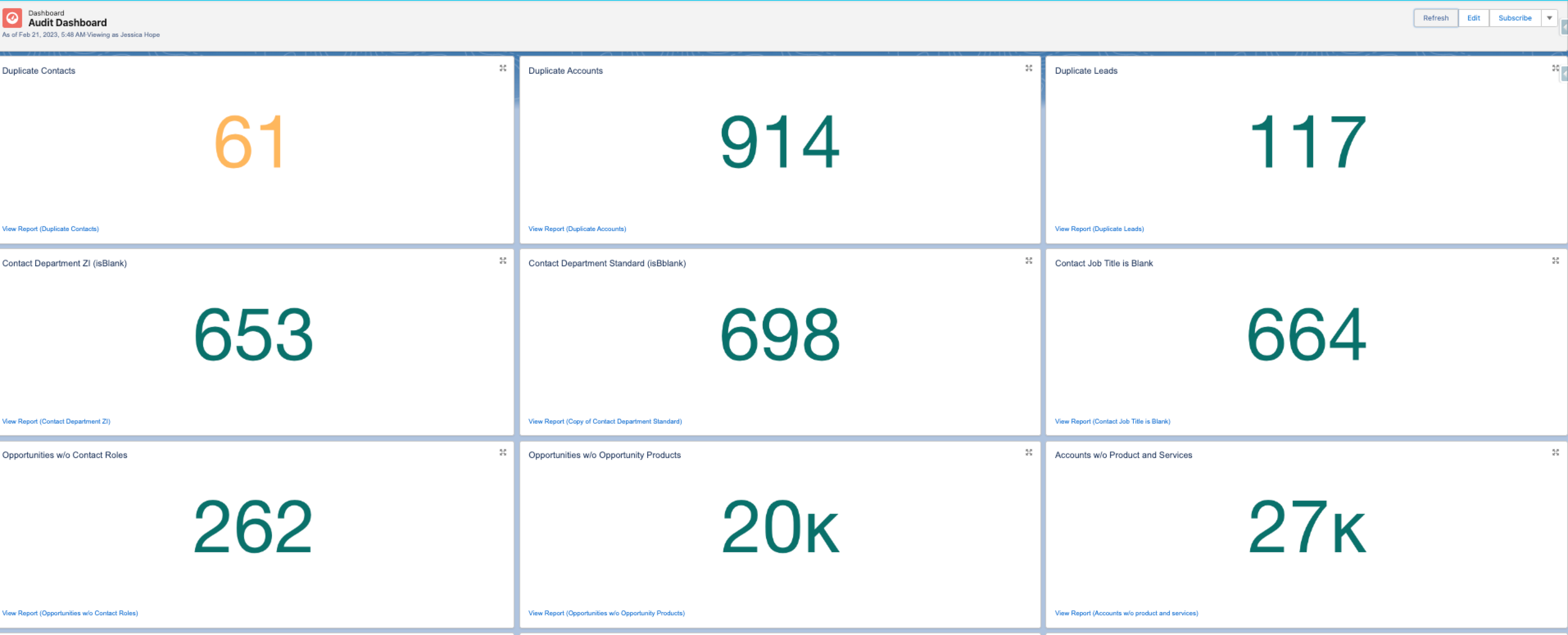
Here’s a very simple example of a Data Hygiene Dashboard.
Example Reports:
- Duplicate Accounts
- Duplicate Contacts
- Duplicate Leads
- Leads and Contacts without Job Titles
- Leads and Contacts without Emails
- Bad (Invalid) Emails
- Leads and Contacts without Phone Numbers
- Opportunities without Contact Roles
- Opportunities without Opportunity Products
- Opportunities without an Amount
- Accounts without a Website
- Accounts without an Address, City, State/Province, and/or Country
- Accounts without Contacts
- US Account with Bad State: Accounts with a billing country of ‘US’ but have an invalid state (doesn’t include records with a blank state).
- Accounts with Country Mismatch from Enrichment Provider
- Accounts with State Mismatch from Enrichment Provider
- Accounts with Hierarchy Mismatch from Enrichment Provider
- Accounts with Missing Parent from Enrichment Provider
- Sales Leader views by Team and Data Issue Type
Step 2.2: Implement continuous data improvement processes
Keep Hierarchies Simple
Your Hierarchy Logic should be based on how your customers buy. Ask questions like:
- Do your customers typically have multi-entity setups?
- Do your customers buy through a centralized procurement process?
- Do your customers require local reps for each entity?
Next, consider which hierarchy data are readily and consistently available to you.
After considering the data, make the actual links in CRM.
For most B2B companies in Territory Planning, the best option is to commit to a single hierarchy strategy (either move all accounts under a hierarchy to a single owner or treat them all separately).
Scrub Duplicates
Duplicate Accounts cause confusion for Sales. You need to make sure that your Account Creation process is avoiding the creations of Duplicates upstream. And you need to use the Data Hygiene Dashboard to identify and tackle Duplicate Accounts continuously.
See the below posts for more detail about managing Duplicates.
- https://www.salesforceben.com/salesforce-duplicate-rules/
- Look into Duplicate Check by Plauti or Demand Tools by Validity.
Ready Backups
When you merge accounts in CRM, you’re selecting one account as the winner, copying field data from the losing accounts to the winner, reparenting child objects to the winner, and deleting the losing accounts as-is (which may be a hard-delete if Apex is used).
For example, Salesforce doesn’t provide a way to unmerge records out-of-the-box. That’s why it’s recommended to have a tool like OwnBackup before performing any deduplication exercise.
Whatever tool you use, it’s highly recommended to have a way to 'unmerge' records and restore relationships in case of a bad merge, which is bound to happen. This tool will:
- Save snapshots of your CRM data and metadata on an ad-hoc or daily basis
- Allow you to compare the same record(s) at two different points in time
- Allow you to restore a record, its field level data, and its object relationships as they were at a certain point in time
- Be useful to seed a sandbox with data from other environments.
Review all Account-related Automations, Configurations, Code, and Data Entry Points
- Account Creation Process
- Object Relationships
- External Fields
- Process Builder
- Flows
- Workflows
- Apex Triggers and Classes
- Relevant systems that are integrated via External ID fields
Step 2.3: Focus the Scope to Serviceable Available Market
Avoid the trap of using your Total Addressable Market (TAM) to design Territories. You will spend time enriching, scrubbing, and organizing thousands of accounts that are not pertinent to your focus today. Instead, focus on your Serviceable Available Market (SAM) to filter out accounts you can't currently serve. Then use your Ideal Customer Profile (ICP) to narrow your focus even further. By being more targeted, Sellers will spend more time selling to the right accounts.
Step 2.4: Implement BoogieBoard’s Third Party Data Provider Best Practices
Third Party Data Providers | Best Practices
Step #2 Action List
Step #3: 🎯 Define & Implement Your Ideal Customer Profiles (ICP)
📓 What is your Ideal Customer Profile?
Your Ideal Customer Profile (ICP) is a detailed description of a hypothetical organization that would benefit the most from your product or service and, in return, provide the most value to your business.
This profile includes specific attributes such as industry, company size, location, technology usage, budget, pain points, and decision-making processes. The ICP is used to guide marketing and sales efforts, ensuring a focus on the most promising and profitable business leads.
🤔 Why is this step important for Territory Planning?
Territory Planning is about focusing your revenue organization. This means prioritizing the right accounts at the right time. However, if you’ve ever had to compile target account lists, monitor intent data, and handle competing views, you know that this is easier said than done. The gold standard of this process is to quantify how much a customer will spend with you, how likely they are to do so, and when it will happen. This standard applies to both prospects and existing customers.
❌ Common pitfalls when defining/implementing the ICP?
**Pitfall 3.1: Not Consistently Implementing ICP **
Your Ideal Customer Profile should not just be sitting in a Doc to be used as reference or training materials. It needs to be implemented. This means Account Based Marketing, Branding, Territory Design, and Product Development should all be using the exact same definitions of Ideal Customer Profiles.
Pitfall 3.2: Focusing too Much on the Past
Your ICP should focus on who is the best fit for your product going forward. Historical data can be helpful in that analysis, but it needs to be balanced with forward-looking insights.
Pitfall 3.3: Relying too Heavily on a Single Score
Scoring is a big part of account prioritization. However, Sellers need to understand the ‘why’ behind the scores. Accounts should be simply categorized as good or bad. Ensure that the reasoning makes its way to the team.
Pitfall 3.4: Missing a Feedback Loop
ICP is not a one-and-done exercise. Markets, companies, and products change, and hypotheses are proven wrong. Companies only conduct an ICP exercise when something is wrong or not working. They don’t continually evolve their ICPs over time. This leads to a lack of alignment around company direction.
✅ Steps to define & implement the ICP
Step 3.1: Engage ICP Data Sources
Customer & Prospect Interviews
Even in the highest volume B2B businesses, there is no replacement for an intimate and deep understanding of your top 3-5 strategic customers. You need to learn what problems they have, why they need your product, and what things are most important to them. Your company's product and strategy are heavily informed by these top customers, and your market orientation (Territories) should take the same approach
Example Insights from Customer & Prospect Interviews
Executives Interviews/Surveys
Every C-level executive at your company - even those with more of an internal focus (CFO & COO) - should have strong points of view about which Accounts are the top targets. Ask them all to submit their top 5 or top 10 Accounts. If they are starkly different, you just uncovered a significant gap in alignment that you can iron out. This is not only a simple and easy data source but also an excellent career opportunity for Operators to engage executives regarding the direction of the business.
Product Leaders
Building products requires intimate knowledge of the user. You should therefore ask Product, “Who are you building this for?” It should match what your executives are saying. If it doesn’t you’ve again uncovered a significant gap in alignment.
Sellers & Sales Leaders (And Their Recordings)
No one has more direct feedback from customers and prospects than Sales. They have to deliver the ultimate fit test for accounts, “Are you willing to pay for this?” The answers to that question, and the rationale behind it, are important to understand in an ICP investigation.
Historical Customer & Prospect Data
Regression analysis across CRM and customer databases is useful for testing attributes at scale.
Use Intent Data to Determine Timing
Understanding where an account is in its buying journey is challenging. A whole new world of ‘intent’ providers exists that can give interesting insights. You also have access to engagement history in CRM or other customer databases which can be utilized for the same purpose.
Step 3.2: Score Accounts
Account Scoring exists to quantify the quality of opportunity represented by an account. This involves assigning weights to different ICP fields to qualify accounts you want to target.
You may also have separate scores related to where the account is in the customer journey, or for specific attributes.
We have worked with several models and recommend the approach detailed by Adam Schoenfeld (CEO of Keyplay.io) in the blog post below:
Step 3.3: Conduct BoogieBoard ICP Implementation Test
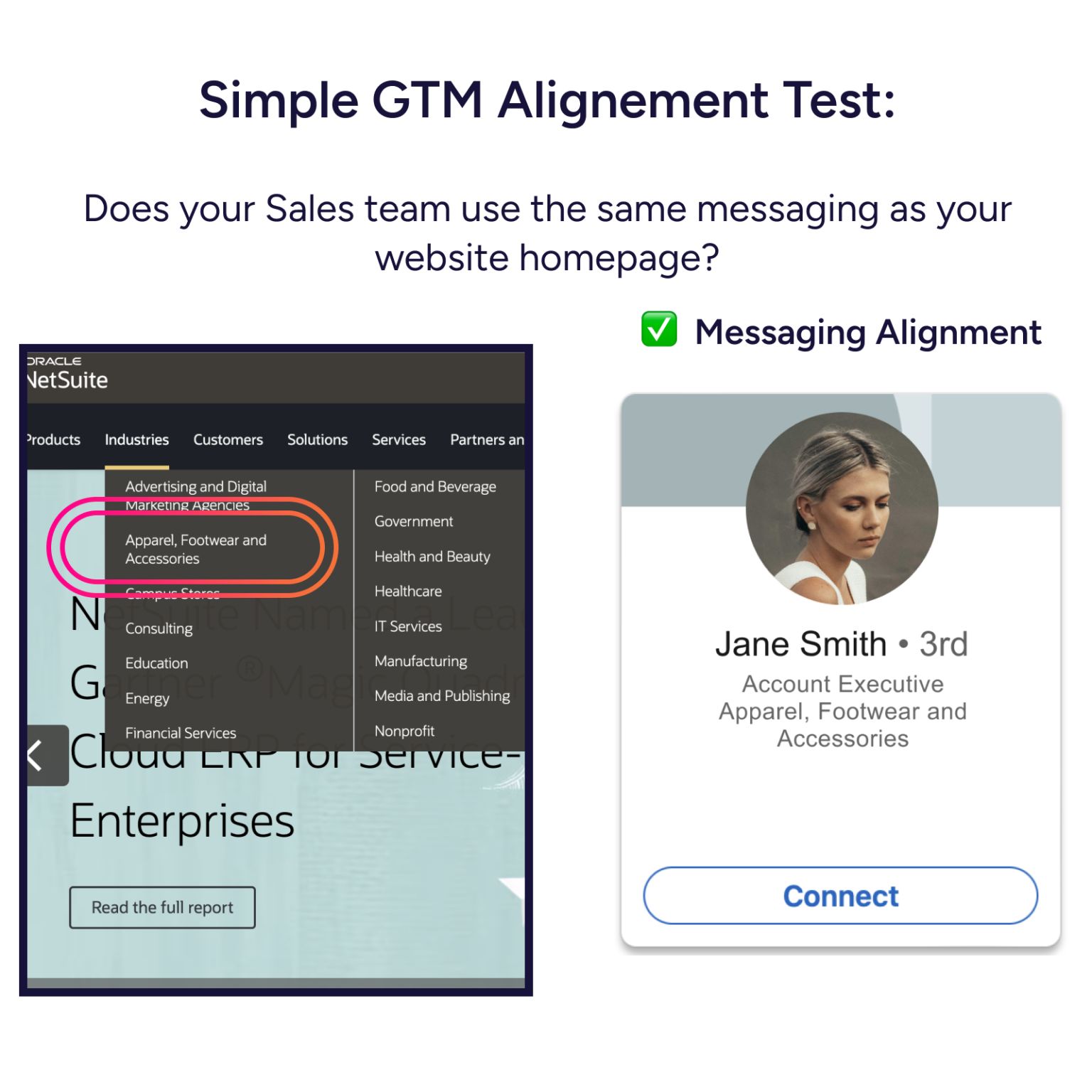
During Territory Planning, companies often discover internal misalignment around ICP. A litmus test for misalignment involves checking if your Sales team uses the same messaging as your website homepage.
Homepages are the front door to potential customers and a company’s most important first impression. They receive a lot of attention from Marketing, Design, Executives, and Product. Your homepage categorizes potential customers by use case, role, or industry. All GTM functions should align to speak directly to potential customers, and Product should build accordingly. If Sales isn’t using these same definitions, it becomes a problem.
- NetSuite is an example of excellent alignment. On their homepage, you see really specific definitions of the industries NetSuite serves, use cases, and benefits for each role. Their Sales team on LinkedIn is organized using the same definitions. When Sales and Product talk about Apparel, Footwear, & Accessories, they refer to the same types of companies, use cases, users, and product features.
How does this alignment help?
- Build a better product - The most important company functions are building products and talking to users. User needs must quickly make their way into the product. If there’s misalignment, user needs get lost, and so do the eventual product enhancements. NetSuite has built industry and role-specific functionality into its product with a tight feedback loop.
- Speak clearly to users - SaaS buyers face too much noise and confusing messaging. Unfortunately, many sellers don’t fully understand what their product does and how it helps users, leading to flat messaging or forcing customers to do their own research. Alignment focuses sellers on the right accounts with the right message.
- Test market hypotheses - Testing a GTM approach is impossible if it’s inconsistent across departments. Instead of understanding user feedback, you end up fixing internal breakdowns, making iteration slower and less clear.
If your Sales team fails this test, it’s time to connect with internal peers and executives to realign your approach.
Step #3 Action List
Step #4: Define ⚖️ Balancing Goals and Account 🔐 Locking Criteria
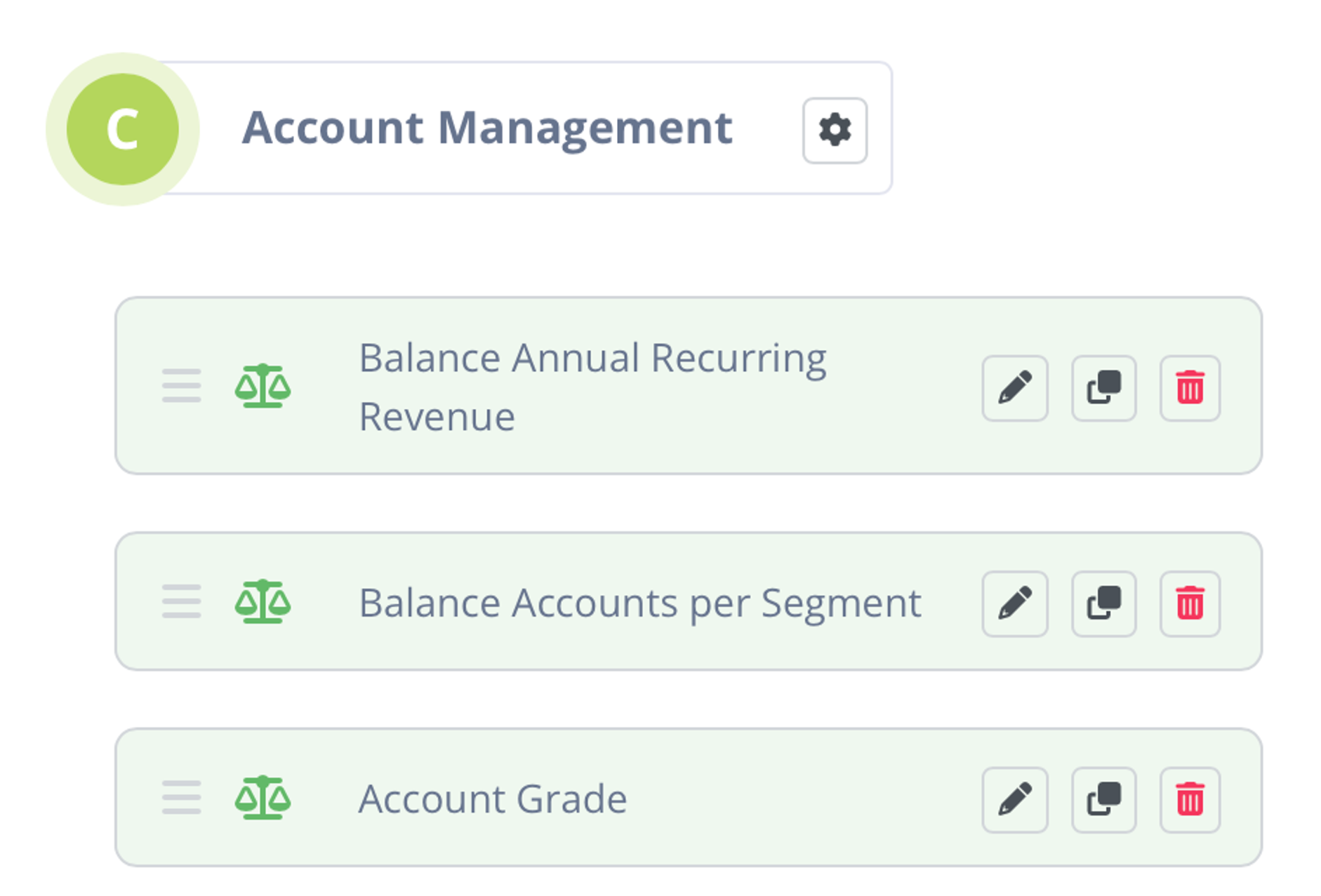
⚖️ What are Balance Goals?
Balance Goals are objectives used in Territory Planning to ensure the distribution of accounts across different territories is fair and optimized for performance using existing account data.
It is not uncommon to define different Balance Goals for each Region, Roles (e.g., Direct Sellers v Account Managers), Segments, etc…
Balance Goals Examples:
Each Territory in the North American Mid-Market Segment should have the same number of accounts.
Companies use this…
Each Territory contains a balanced number of Small, Medium, and Large accounts where size is defined by Annual Revenue or Employee Size.
Companies use this to estimate account revenue potential and service complexity.
Other ways to define Size: # of potential users, size of a persona department, product usage potential (e.g., Emails Sent, TB of Data, Number of Construction Sites)
Each Territory contains a balanced number of A / B / C accounts
Companies want Sellers to have a fair distribution of quality accounts to balance workload an opportunity
Each Account Management Territory on XYZ Team should have the same number of accounts within Annual Recurring Revenue bands (e.g., Accounts that spend between 10k - 20k, 20k -30k, 1m - 2m).
Companies use a multiple of revenue metrics to set quotas.
Every Account Management Book of Business should have a balanced number of renewals each quarter.
Companies don’t want one Seller to have all of her renewals in Q1, while another has them all in Q4. It makes it difficult to provide a strong customer experience if renewals all happen at once.
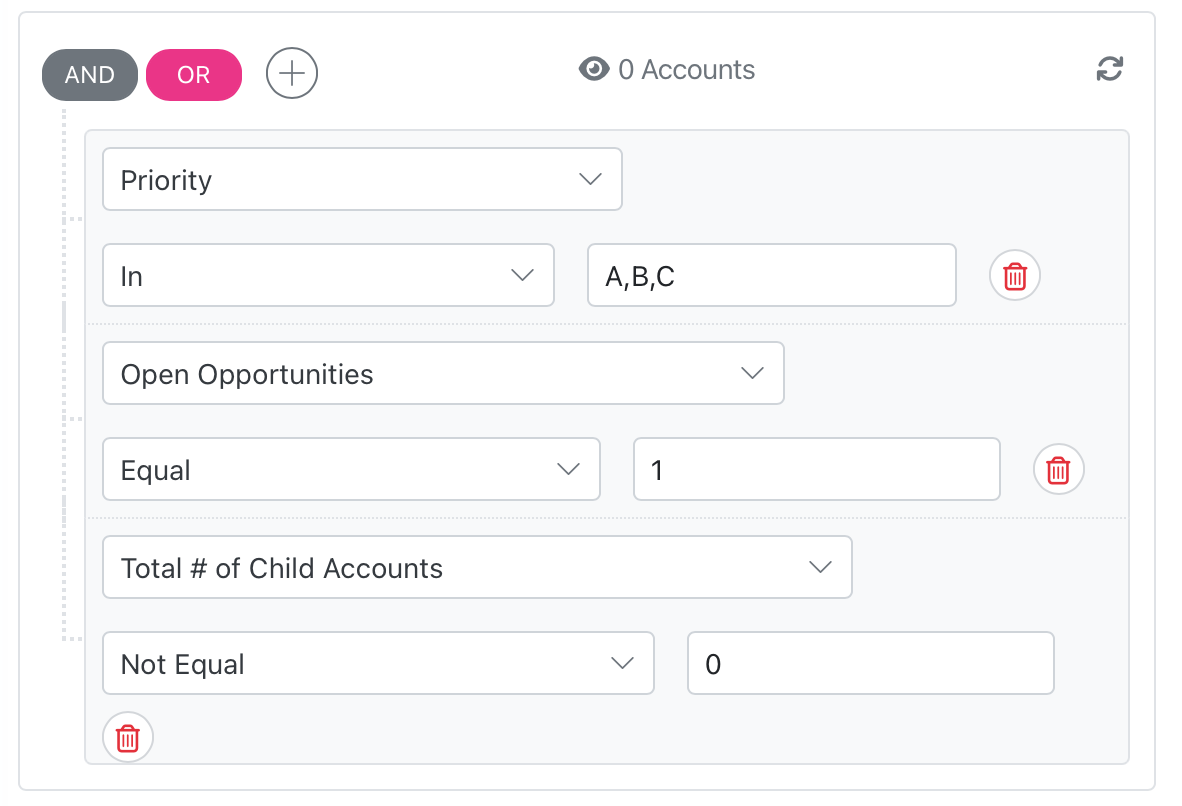
🔐 What is Account Locking Criteria?
Account Locking criteria are rules in a Territory Planning process to decide which accounts shouldn't move between territories.
These criteria can vary but may include factors like open opportunities, special projects, existing relationships, and strategic accounts.
Account Locking Criteria Examples:
Lock all accounts to the Account Owner with an associated Opportunity where the Stage is 2 or 3.
Companies use this to keep Accounts with in-flight Opportunities from being disrupted
Lock all states to Territories where the Seller lives.
Companies use this to prioritize in-person interactions.
Lock all customer accounts that have already been moved once in the past year.
Companies want to prevent accounts from constantly receiving new representation.
Lock Account X where Seller Y has a strong personal relationship.
Companies lock individual accounts using feedback from Sellers and Sales Leaders that are not obvious as Account Data fields.
Lock all accounts with outstanding support tickets.
Companies use this to ensure that ongoing support issues are handled by the representatives who are already familiar with the account and the specific problems being addressed, minimizing disruption and ensuring continuity in customer service.
Lock all accounts that have a renewal contract due within the next 6 months.
Companies use this to ensure that accounts approaching a renewal period are managed by the current account owner who is already familiar with the account’s history, increasing the likelihood of renewal.
🤔 Why is this step important for Territory Planning?
Balancing Goals By defining Balance Goals, you can clearly explain what constitutes a viable Territory. This means that you can measure equity instead of dealing with arbitrary debates. During Territory Planning, Balance Goals provide clear direction on how to move accounts from one Territory to another. Account Locking Criteria Locking Accounts prevents unnecessary modeling, stakeholder conflict, and delays. Making these decisions upstream shrinks the number of design permutations, thus making modeling and downstream decisions simpler. Proper Account Locking—like your Holdover Policy—also prevents customer and opportunity disruption.
❌ Common pitfalls when defining balancing goals and locking criteria
Pitfall 4.1: Not Socializing Balance Goals
Balance Goals can’t prevent equity disagreements if nobody knows what they are. Too many Ops Teams use Balance Goals to design Territories but never publish them internally. Sellers and Sales Leaders are left to decide for themselves what constitutes a viable Territory, which leads to confusion.
Pitfall 4.2: Making Balance Goals too Simple
Do you really think two Territories are balanced in opportunity just because they have the same number of accounts? Be careful about making overly simple statements like this because Sellers will call BS quickly.
Pitfall 4.3: Waiting to Lock Accounts
Companies wait until design proposals are made to ask for Seller and Sales Leader feedback. This results in statements like “This account can’t move because of reason X,” which causes delays, inconsistencies, and conflicts between Stakeholders.
Pitfall 4.4: Missing a Feedback Loop
Account Locking Criteria is an easy way to give Sellers and Sales Managers agency in Territory Planning. By not allowing them to request the locking of a few accounts, you miss opportunity to strengthen buy-in for your project.
✅ Steps to define your Balance Goals and Account Locking Criteria
Step 4.1: Convert ICP Attributes to Balance Goals:
You’ve defined your Ideal Customer Profile in Step #3 above. Now it is time to implement it into Territory Planning. Ensure that you select reliable, consistent, and accurate Account Data to use in your design. Look for fields that allow you to balance Territories based on opportunity, workload, quota, product fit, customer churn risk, etc.
Step 4.2: Get Leader Approval on Balance Goals:
Your Sales Leader and Operations Leader need to approve all Balance Goals. Get this approval before you waste time designing Once Leaders have signed off, announce the Balance Goals to all Stakeholders. This buy-in and clarity will align the entire process.
Step 4.3: Determine Account Data for Account Locking
Make sure you select Account Data fields that are reliable, consistent, and accurate. This step is usually simple; refer to the Account Locking Criteria examples above.
Step 4.4: Get Stakeholder Approval of Account locking Criteria
Just like in Step 4.2, get approval from your Sales and Operations Leaders on the Account Locking Criteria. Agree on the goals for the design before you start. Once Leaders have signed off, announce the Account Locking Criteria to all Stakeholders. This buy-in and clarity will align the entire process.
Step #4 Action List
Step #5: 🛠️ Document Territory Logic to Build Your Design Assets
📓 What is Territory Logic?
Territory Logic is a way to divide and assign accounts into specific Territories using business rules and components. This process makes sure each account goes to the right territory based on set rules, helping to manage and organize accounts better.
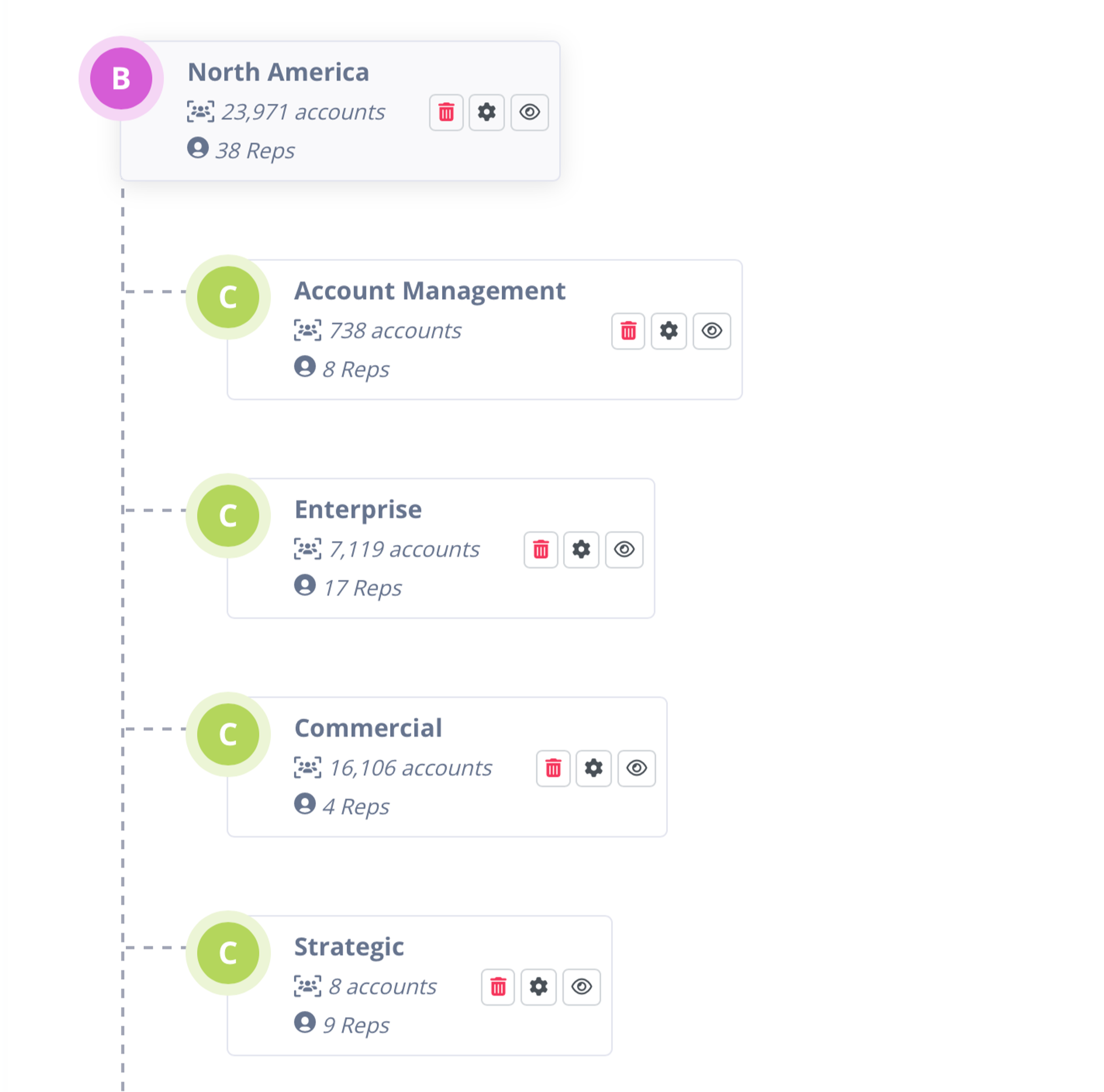
BoogieBoard Territory Hierarchy w/ Roster
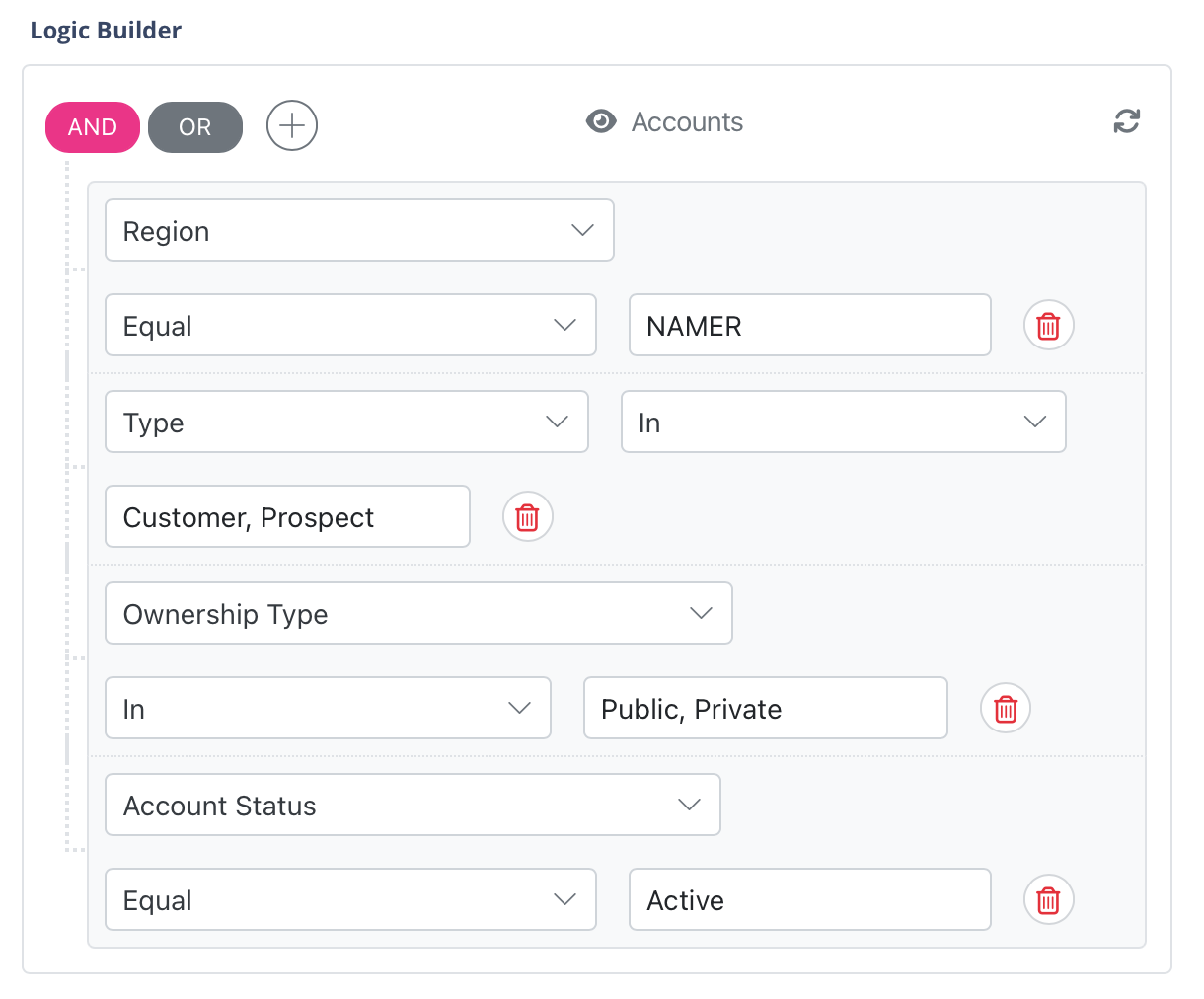
BoogieBoard Territory Logic Builder
Territory Logic Components:
- Territory Roster - This is your list of Territories and their corresponding Account Owners and Roles. This contains geographical information about the Territories and Account Owners.
- Hierarchy Logic - Companies use parent-child relationships to determine Territory assignment. Based on selling motions, some companies will put an entire account hierarchy in the same Territory (e.g., Whole Foods and Amazon need to have the same Account Owner). Some companies will distribute the accounts separately (e.g., Whole Foods and Amazon will have separate Account Owners).
- Segmentation Logic - Companies slice their markets to work with different ICPs and different selling motions. (e.g., Accounts with over $1 billion in Annual Revenue are in our Strategic Segment)
- Region Logic - Companies slice their markets into geographical regions to accommodate different business practices and cultures. (e.g., The countries USA, Canada, and Mexico make up our North American Region).
- Sub-region Logic - Companies slice their markets within larger slices. (e.g., Within the North American Region, we have a Southeast Sub-region).
- Industry Logic - Companies slice their markets based on attractive industries for their product or service. (e.g., These accounts makeup our FinTech Industry).
📓 What is a Current State Analysis?
This is a representation of your currently implemented Territory Logic, measured by the Balance Goals. It shows how your Territories look today and is used to assess the deviation of different planning Scenarios.
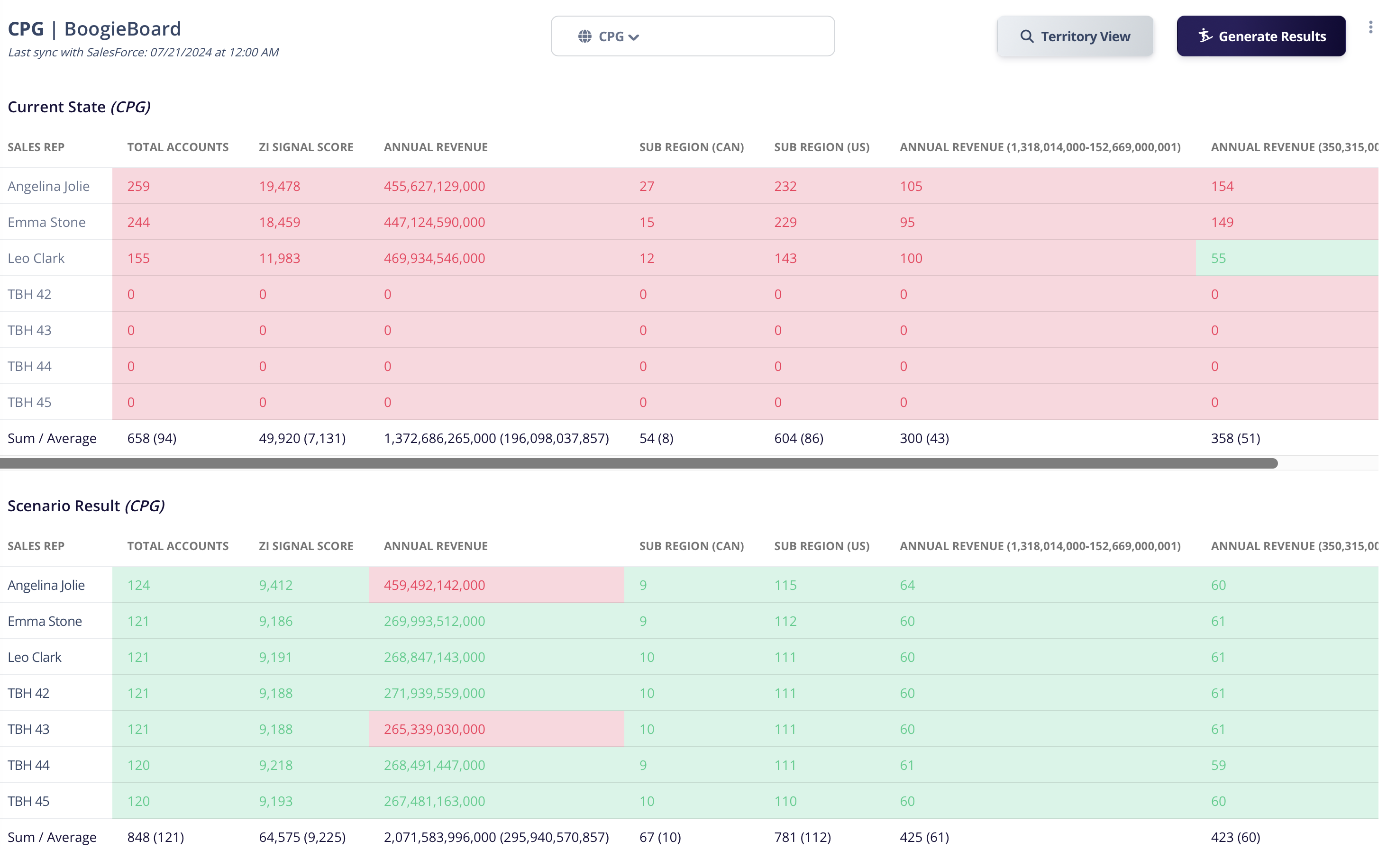
BoogieBoard Current State vs Scenario Results Comparison
A Current State Analysis provides a baseline from which to measure the impact of any proposed changes to the territory structure (see above ‘BoogieBoard Current State vs Scenario Results Comparison’ as an example).
📓 What are Territory Design Assets?
These are the reports that you will use to assess different Territory Scenarios and socialize them with Stakeholders. Territory Design Assets include analytical and visual tools that help you understand and communicate how territories are structured and performing.
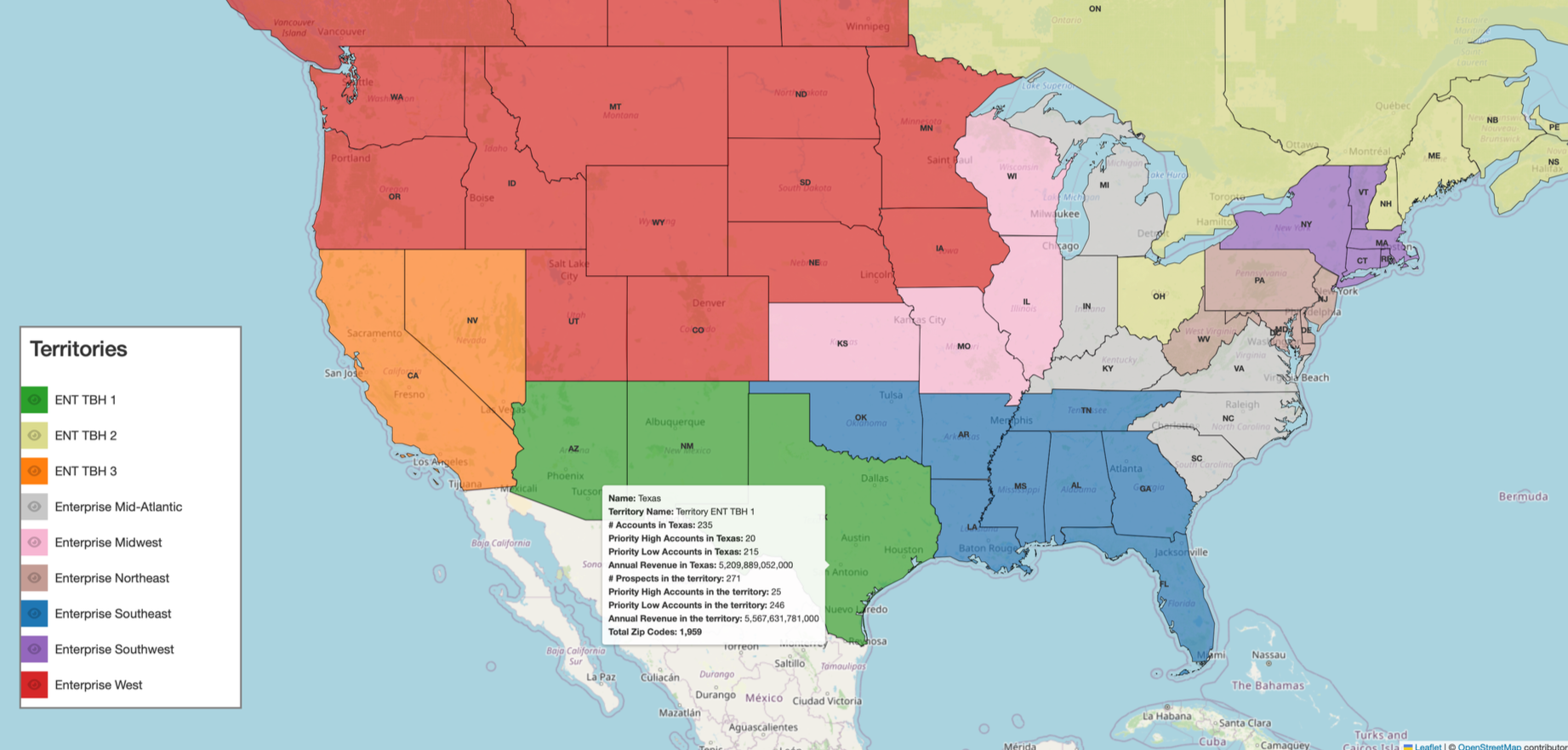
Interactive Geo Territory Map Design Asset
Examples of Territory Design Assets include:
- Territory Current State Reports: These reports show how each territory is balanced against other territories based on its balancing goals — typically highlighting territory inequity.
- Scenario Comparison Charts: These charts allow stakeholders to compare different Territory Planning scenarios, illustrating the potential equity impact of each option.
- Geo Maps (if applicable): Visual representations of territories that show a map colored by territory with overlay information such as number of accounts, revenue, or other balancing metrics, helping to identify areas or inequity.
🤔 Why is this step important for Territory Planning?
Document Territory Logic Without clear documentation, Territory Logic is impossible to track. You need a source of truth for collaboration and future implementation into systems. Build Design Assets Earlier in the Guide, we talked about how hard it is for Stakeholders to participate in Territory Planning. Your Design Assets and Project Hub fix this. Clear and consistent reports that reinforce Balance Goals make it easy for Stakeholders to interpret the data. Analyze Current State Most companies are not Territory Planning from scratch. They are making changes to an existing model. Success criteria often depend on how the existing model is changed or preserved. Changes usually need to be approved. It is paramount that all existing Territory Logic is documented in the Project Hub. In this exercise, we are always surprised by how many of our clients detect that they have conflicting Territory Logic, incomplete Territory Logic, or undocumented exceptions to Territory Logic.
❌ Common pitfalls companies when documenting Territory Logic & Design
Pitfall 5.1: Not Documenting Thoroughly
If your Territory Logic only exists in a spreadsheet formula, Stakeholders will not understand it.
Pitfall 5.2: Socializing Inconsistently
Stakeholders need to be able to interpret assets quickly and provide feedback. Assessing Territories through different views will lead to inconsistent analyses and waste time creating custom reports.
Pitfall 5.3: Not Visualizing the Current State
If you can’t view how a design Scenario differs from the current state, it will be difficult for Stakeholders to interpret.
✅ Steps to build Design Assets and analyze Current State
Step 5.1: Document all existing Territory Logic into the Project Hub
Use our template here: Untitled.
Step 5.2: Build Account - Level report
The Account-Level report is used for more granular Territory Planning work by reviewing each Account within a Territory. The Account-Level view will be used to track each account and make overrides. This is where you will catch data errors and situations like "Oh...this account shouldn’t have moved." It’s the place where you can give Sellers and Sales Managers agency, if you so choose.
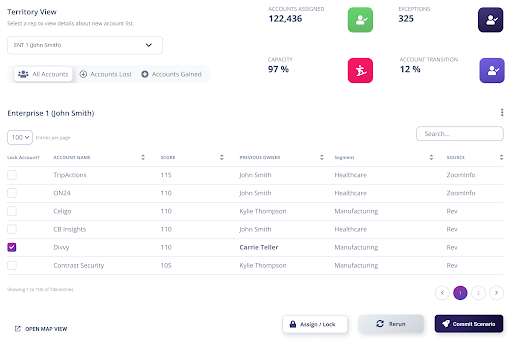
Here is an example in BoogieBoard (which automatically generates these)
Step 5.3: Build Summary report
Your Summary View of the Territories will help you analyze them relative to one another. This view will be used to assess the viability of different design Scenarios. Most of your stakeholder feedback should be sourced from this report, which can also be used to guide meetings.
Your reps/Territories will make up the Y-axis and your Balance Goals (see below how these are used to define equity) will make up the X-axis.
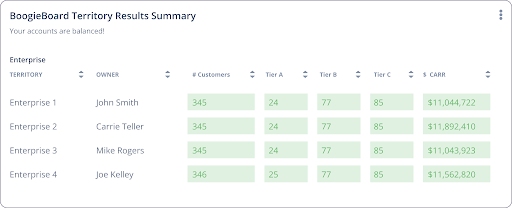
Here is a sample from BoogieBoard (which automatically produces Summary reports).
Step #5 Action List
Step #6: 👩🎨 Design & Socialize Using Scenarios
📓 What is a Scenario?
Territory Planning involves experimentation. At the start of the process, you won't know exactly how the end-state Territories will look. You will need to experiment with various ideas from different Stakeholders. You will need to experiment with changes to Account Data and the other components of Territories. You will need to be able to answer questions that start with, “What if we did…”
A Scenario represents your vehicle for this experimentation. It is your way of codifying the different experiments, testing them, and sharing them with Stakeholders. Each Scenario represents a holistic Territory design, combining all of these components:
- Territory Logic
- Account Locking Criteria
- Balance Goals
- Account Data
Scenarios are used for drafting and socializing each potential design with Stakeholders to get feedback and iterate.
🤔 Why is this step important for Territory Planning?
It is time to put your Project Hub, Design Assets, Territory Logic, Balancing Goals, and Account Locking Criteria all to use. You now have a framework to gather inputs and produce different ‘what if’ Scenarios to iterate. Each Scenario should be evaluated and socialized through the Project Hub using the Assets. A Scenario is the combination of your Territory Logic, your Balance Goals, your Account Data, and your Account Locking Criteria.. Therefore, changing these components results in a new Scenario. Your existing combination of these components is called your Current State Scenario. You will likely measure not just the metrics of a new Scenario, but how it compares to the Current State.
❌ Common pitfalls when Territory Planning
Pitfall 6.1: Creating Too Many Scenarios
A single change to any one of the Scenario components results in a new Scenario. This is how versioning gets out of control during the design process. You already prepared in Step #1 for decision-making. Instead of allowing a single ping to derail you into a new Scenario or version, gather inputs holistically.
Pitfall 6.2: Not Making Feedback Easy
If a Stakeholder can’t provide feedback about a Scenario, it will result in delays and one-off requests. If you need to have a meeting every time Stakeholders need to review reports, the reports are not working.
✅ Steps to design Territories
Step 6.1: Socialize Scenarios to Stakeholders Using Summary View
When you present Scenarios to Stakeholders, leveraging the Summary View will reinforce your already agreed-upon Balance Goals. t will also help demonstrate the trade-offs that exist between them. Given constraints, it may not be possible to achieve perfect balance. However, the Balance Goals need to be assessed as a whole, not separately.
Step 6.2: Allow Stakeholder Overrides Using Account Level View
Depending on how much agency Sellers and Sales Leaders are given in the process, you will need this more granular view. Sellers and Sales Leaders will input feedback like:
- Acme Corp needs to be assigned back to Jane Smith. We have an opportunity there that is not logged.
- I want Acme Corp to stay with Jamal Nelson. He has a good relationship there.
- Let’s move Wisconsin back to the Midwest Region. It should have the same Seller as Minnesota and Illinois for cultural reasons.
If a Stakeholder overrides an assignment, lock this account or geo going forward.
Step #6 Action List
Step #7: 🏁 Operationalize Your Territories
📓 What does it mean to Operationalize Territories?
At the end of any planning cycle, it’s time to enact the plan. For Territory Planning, this means implementing the Territories into your go-to-market strategy and all of the various business systems. These technical implementations require support from Systems Stakeholders. Implementing these changes into daily business activities requires clear communication with Sales Stakeholders about next steps and expectations.
🤔 Why is this step important for Territory Planning?
Once ‘live,’ Territories have many roles within your business. Leads will be routed by Territory. Your Sellers will organize and approach each Territory. Customer handoffs will take place by Territory. Marketing budgets will be allocated by Territory. Reports will be reviewed by Territory. Teams will be structured by Territory.
❌ Common pitfalls when operationalizing Territories
Pitfall 7.1: Poor Communication with Systems Stakeholders (Especially CRM Admins)
There should be no surprises when it is time to implement Territories into CRM. But many companies fail to involve, or even inform, their CRM admins of expected timelines and formats. This leads to delays and reformatting exercises.
Pitfall 7.2: Failing to get Sellers & Sales Leaders Excited
Sellers & Sales Leaders won’t understand when their Territories will go live, how they were created, or what comes next without explicit communication. Ops Teams fail to give themselves enough credit or show their work to clearly align with Sales. This leads to apathy and delays.
✅ Steps to Operationalize Territories
Step 7.1: Approve Final Scenario
You designed multiple Scenarios and now need to decide which to implement. Because you identified your approvers in Step #1, getting formal approval should be simple.
Step 7.2: Tag Exception Accounts to Territory Logic
If you have accounts that are going to live outside of Territory Logic, tag them (e.g., This account falls under our Mid Market Segment but is in an Enterprise Territory due to a manual override). The goal over time is to have 0 exceptions to Territory Logic, so you need to track and manage them going forward.
Step 7.3: Reconcile Data
If you were designing Scenarios based on Account Data that was a few weeks old, you need to check if any new Opportunities were created in the interim. In this case, or similar situations, you may need to make a few final overrides.
Step 7.4: Implement Territories in CRM
You already have a target go-live date. You have been communicating and working with your CRM Admin and other Systems Stakeholders throughout the process. Now it is time to take your approved Scenario and upload it into CRM.
Step 7.5: Implement Territories in Lead Routing Tools
You already have a target go-live date. You have been communicating and working with your Systems Stakeholders throughout the process. Now it’s time to take your approved Scenario and upload it into Lead Routing Tools.
Step 7.6: Use BoogieBoard’s Sales Kickoff Template to Deliver Territories to Sellers
To make the Territories work, Sellers and Sales Leaders need to be bought in. It is time to show them all of the work that you did to help them focus and achieve success. Be explicit about the strategy and expectations! Sales will surprise you with empathy for your work and excitement for the Territories.
How to Launch Your Territories at Sales Kickoff | Template
Step 7.7: Convert Project Hub Documentation into Rules of Engagement Template Using BoogieBoard’s Template:
Rules of Engagement or Sales Policies (ROE) are a set of internal company rules, principles, and workflows that define and govern the sales process. Just like opening the box to a new board game, these are the rules. And just like when you’re playing a board game (for money in this case), things can get heated. Sales organizations need clear ROE to inform all the players in the sales process how it is meant to run. Territories are a big part of this. The documentation in your Project Hub can now be used to build your Rules of Engagement. Use our template below.
Rules of Engagement (ROE) for Your Sales Organization | Template
Step 7.8: Task Sellers to Scrub Data
As part of their initiation into the Territories, ask Sellers to complete a data scrub against the accounts in CRM. Give them a set number of weeks to report data issues and maximize hygiene within their Territory. Use your Hygiene Dashboard for this.
Step 7.9: Measure Performance & Prepare to Evolve
Territories are a hypothesis for how your company should approach the market. Your company will evolve. Your market will evolve. Therefore, your Territories must evolve. Measure results to understand if you selected the correct Balance Goals, Territory Logic, and Account Locking Criteria.
Step #7 Action List
Additional Resources
The Guide can only cover so much. Here are links to some of our other favorite resources. Do you have a video/post/article/etc… that you love?! Please leave a comment and we will add it to the list.
🔗 Step #1 Additional Resources
🔗 Step #2 Additional Resources
Check out this webinar about normalizing account data.
Strategies for Data Clean-up Post
Ops Co-op’s take on normalizing ………
🔗 Step #3 Additional Resources
Account Scoring Framework Alternative 1
https://www.vainu.com/blog/account-scoring/
Salesforce Data Hygiene 101 Guide
Account Scoring Framework Alternative 2
Account Scoring Framework Alternative 3