
How do you handle temporary coverage in to-be-hired territories?
To-be-hired territories still need coverage before the final owner is in seat. The territory plan has to show who is responsible today without losing the future hiring plan.
This walkthrough shows how BoogieBoard can model temporary coverage while keeping the open territory visible. Teams can assign interim responsibility, preserve the target territory structure, and avoid burying the exception in a spreadsheet.
That gives RevOps and sales leadership a cleaner way to manage coverage gaps while hiring plans are still in motion.
How BoogieBoard chooses supporting roles during temporary coverage
Temporary coverage can change the account owner without automatically replacing every member of the account team. On each Salesforce push, BoogieBoard evaluates every mapped supporting role—such as BDR/BDA, Solutions Engineer, or Channel Manager—independently.
A role assignment is current when: it is active, its start date is blank or on/before the push date, its end date is blank or on/after the push date, and a rep is assigned.
Selection order
- Current assigned-territory role. If the account’s assigned territory has a current supporting-role assignment, BoogieBoard keeps that rep.
- Current temporary-coverage role. If the assigned-territory role is future, expired, inactive, or vacant, BoogieBoard uses the matching current role from the highest-priority temporary-coverage territory.
- No eligible role. If neither territory has a current assigned rep for that role, BoogieBoard does not select a future, expired, inactive, or vacant assignment.
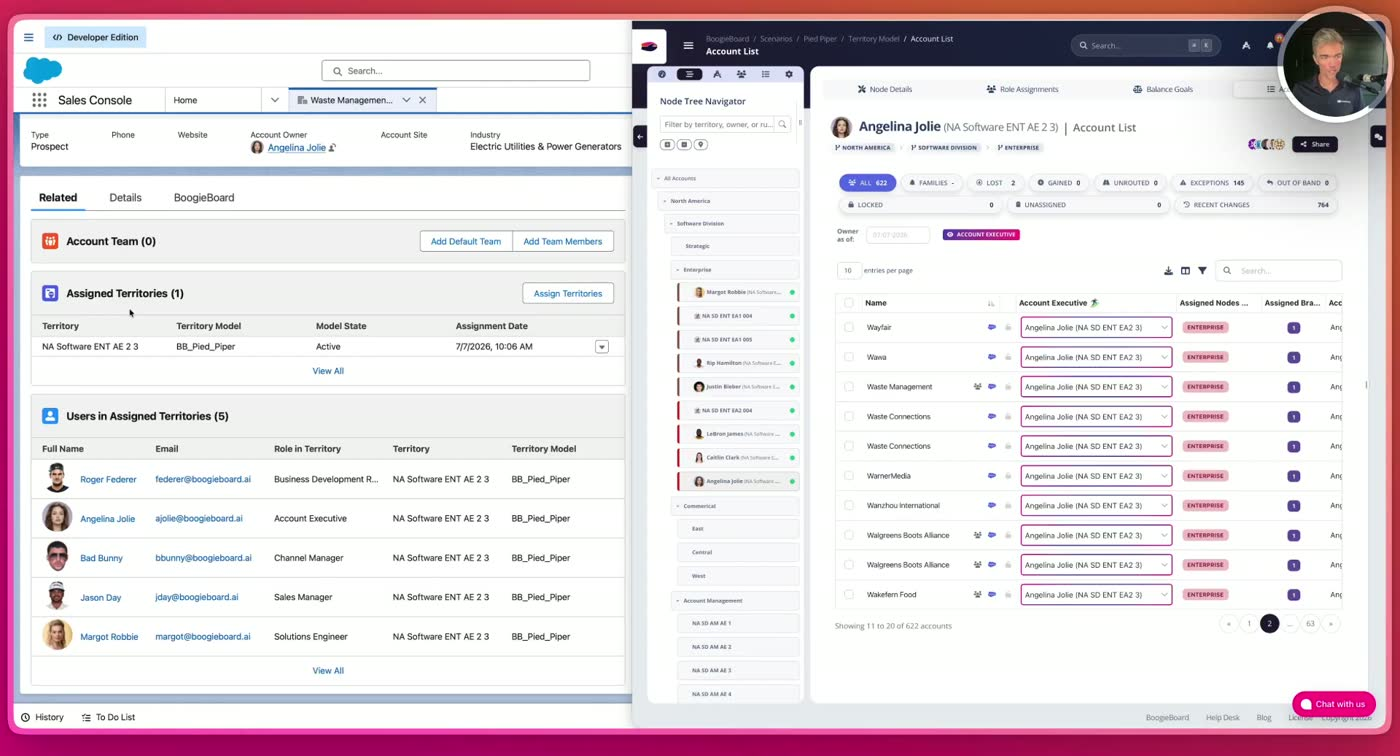
Pied Piper example: Waste Management is assigned to Angelina Jolie’s territory. Salesforce receives the users assigned to that territory, including Roger Federer as the Business Development Representative.
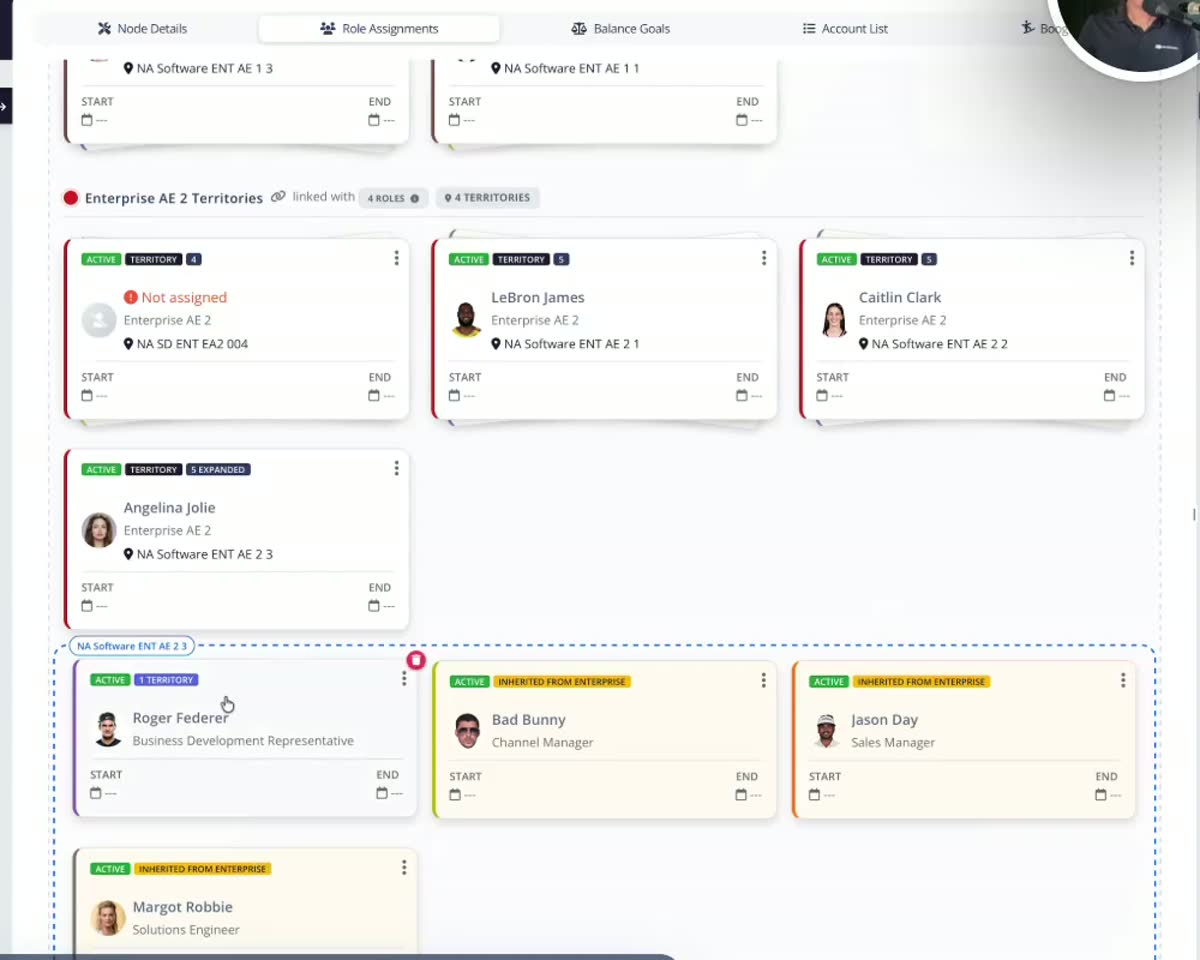
The Pied Piper Role Assignments view models the owner and supporting roles separately. Each role card’s active state and start/end dates determine whether it is current.
Decision table
| Assigned-territory role | Temp-coverage role | Supporting role pushed to Salesforce |
|---|---|---|
| Current | Current | Assigned-territory rep |
| Future, expired, inactive, or vacant | Current | Temp-coverage rep |
| Current | Future, expired, inactive, or vacant | Assigned-territory rep |
| Not current | Not current | No eligible rep |
Pied Piper example
Assume Angelina Jolie’s territory is the future-state territory, Roger Federer is its BDR, and another territory provides temporary coverage:
- If Roger’s BDR assignment is current, Roger remains the account BDR even while the temporary territory supplies the account owner.
- If Roger’s assignment starts in the future—or is expired, inactive, or vacant—BoogieBoard uses the active BDR from the temporary-coverage territory.
- When Roger’s assignment becomes current, the next Salesforce push selects Roger automatically.
Temporary account ownership and supporting-role coverage are evaluated separately. This lets RevOps stage a future owner without replacing an already-current supporting rep too early.
Related documentation: Role Types and Salesforce ETM with BoogieBoard.
Updated August 11, 2026.
Transcript
Temporary coverage in to be hired territories. Using Boogie Board I'm designing my enterprise sales territories here. You can see I've already designed all six of them. Everything is really green and balanced. One of my territories is unassigned. I do not yet have a rep allocated to those accounts. That's what the little ghost means. I'm going to figure out who the rep is later on when the rep joins. I've also got a little clock here which means that these accounts are ready for a temporary assignment. I'm going to figure out who's going to take care of the accounts in the interim. To do that, I have a few options. The simplest option is to take the sales manager, Jason Day and just plug him into this territory. It's vacant and if I put him in there, he'll own all the accounts. Option two is to manually go through my account list. There's 274 accounts in this territory. Let's say I want to select them and filter on some criteria and choose the temporary coverage one by one. Or maybe I want to have a sales manager do this. In this case I I'm going to assign the temporary coverage to the current owner. So just saying. Hey, don't move the account until the new rep joins later on.
and these accounts are now temporarily assigned to the person that's currently holding them. Or I can run the balancer and let Boogie Board's algorithms decide who should own these accounts temporarily based on our balance goals. When it's all done, I can change the view as of date to see what my territory balance looks looks like based on when those accounts are going to be moved. So here I'm looking at June. That rep hasn't joined yet. So those accounts are being held across the team. If I move to November, I've now got my temporary coverage ended and my sales team is full.
Watch more BoogieBoard product demos on YouTube.