

Compare Guideflow, Navattic, Storylane, Supademo, Walnut, and Reprise by the demo your buyers need and the work your team will maintain.
5 Key Takeaways
- Guideflow is our first pick for teams that want website tours, sales follow-ups, and other demo formats in one platform. Confirm which formats your proposed plan includes.
- Choose the experience before the software: a short guided tour, an account-specific walkthrough, and an open environment require different preparation.
- Navattic fits website-led evaluation; Storylane fits campaign demos; Supademo fits instruction; Walnut fits account personalization; Reprise fits deeper product replicas.
- A useful pilot includes a product change. Measure how long the second version takes, not just how quickly someone creates the first.
- Connect engagement to a clear next step. A completed demo can inform a conversation; it does not prove that someone is ready to buy.
A prospect asks how a particular workflow works. The account executive records a video, sends it, and gets the same question from another buyer two days later. Meanwhile, product marketing has a website tour that shows an older interface. Both teams are explaining the same product and maintaining separate versions of the story.
Interactive demo software gives them a reusable way to show that workflow. Buyers can move through it on their own, return to a specific step, and share it with colleagues. For RevOps and enablement, the purchasing decision is about who creates those experiences, how they stay accurate, and what happens when a buyer engages.
This shortlist is based on published product capabilities and documentation reviewed in November 2026. The recommendations describe fit, rather than results from a hands-on performance test. Guideflow comes first because its range of demo formats suits a shared sales and marketing program. The other options address more specific requirements worth testing alongside it.
What is interactive demo software?
Interactive demo software turns a product workflow into an experience a viewer can click through. A captured tour usually combines product screens, explanations, and a chosen path. It can be shared through a link or embedded on a webpage without giving the visitor a production login.
That distinction matters during evaluation. A convincing capture can show where to click without proving that the underlying calculation, integration, or permission works. A sandbox gives the buyer more freedom to explore; a product replica may reproduce more of the application's behavior. Vendors increasingly offer several of these formats, so evaluate the specific package being proposed.
Use a guided tour to answer a focused question, such as how to review an account assignment. Use a live session or an appropriate test environment when the buyer needs to validate their own data, a complex exception, or an integration. The two experiences can support the same sale.
Decide where the demo will be used
A website visitor needs enough context to understand the product without a presenter. Start with one recognizable problem, show the result, and offer a relevant next step. A sprawling tour of every menu makes that visitor do the work of finding a reason to care.
A sales follow-up serves a different purpose. The rep already knows what the buyer asked. The demo should revisit that question, use suitable terminology, and remain understandable when a champion forwards it to someone who missed the call. Account personalization helps only when it clarifies the workflow; swapping a logo adds little by itself.
A technical evaluation needs a clear boundary between a representation and a working system. List what the demo demonstrates and what still needs validation. If the buyer must change inputs, exercise permissions, or inspect an integration result, include that requirement in the trial rather than discovering the limitation after purchase.
Interactive demo software at a glance
| Tool | Best fit | Why it belongs on the shortlist | Purchase check |
|---|---|---|---|
| Guideflow | Shared sales and marketing demo programs | Multiple demo formats, editing, distribution, and analytics | Which formats, seats, and integrations are included? |
| Navattic | Website product exploration | Interactive demos that visitors can explore before a call | How does engagement become useful sales context? |
| Storylane | Campaign and launch demos | Interactive demos, sandbox experiences, and content hubs | Can the team update every campaign version efficiently? |
| Supademo | Onboarding and workflow instruction | Guided experiences and step-by-step content | Can an unfamiliar user complete the task unaided? |
| Walnut | Account-specific sales experiences | Buyer personalization and rep-led demo experiences | Who maintains shared material after reps personalize it? |
| Reprise | More detailed product replicas | Product tours, cloning, and demo data capabilities | Which interactions remain functional in the replica? |
These are different buying situations, not six interchangeable products. Request a quote for the actual experience and team size you intend to support. Entry plans can be useful for a trial while excluding the format or administration features needed for rollout.
The six tools to evaluate
1. Guideflow: Best for a shared sales and marketing demo program
Guideflow supports captured interactive demos alongside sandbox, mobile, live-demo, and demo-center offerings. Teams can edit captured content, share links or embeds, and inspect engagement. That breadth makes it our first recommendation when several customer-facing teams need demos and would otherwise buy separate tools.
The practical advantage is a common starting point. Product marketing can explain a workflow on a public page, while sales can send a more focused version after discovery. Decide which parts of that story are shared and which a rep may change before building a large library.
What to test: capture one workflow, adapt it for two buyer roles, and change a screen in the original. Have a second employee update both versions without coaching from the creator. Then check whether the reporting distinguishes the experiences clearly enough to guide follow-up.
Buying consideration: Guideflow's pricing page separates screenshot, HTML, sandbox, and other capabilities across plans. Price the package that supports your required formats and contributors. A small introductory plan is not a reliable estimate for a multi-team deployment.
2. Navattic: Best for website product exploration
Navattic offers interactive product demos with no-code editing and personalization. It is a sensible shortlist choice when the central problem is letting a website visitor understand the product before booking time with sales.
For this use case, the page and the demo need to tell the same story. A visitor arriving from an integration page should see that integration's workflow, rather than the generic homepage tour. Ask marketing to choose the entry point and sales to define what would make the resulting engagement useful.
What to test: place a short tour on a test page and ask someone unfamiliar with the product to explain the outcome. Inspect the experience on a smaller screen, follow the next-step link, and check how identified and anonymous activity appear in reporting.
Buying consideration: confirm the reporting and CRM connection available in your package. A named account, a known contact, and an unidentified visitor are different signals. The follow-up process should preserve those distinctions instead of treating every view as a qualified lead.
3. Storylane: Best for campaign and launch demos
Storylane combines interactive demos with sandbox experiences and hubs for buyer content. It fits product marketing teams that need a demo to accompany a launch, campaign, or sales resource.
A launch creates several distribution points at once: the announcement page, a follow-up email, a sales presentation, and perhaps a partner page. The operational question is whether those versions remain manageable after the launch team moves on. Assign an owner to the reusable story before distributing copies.
What to test: build a campaign demo and a follow-up destination containing the other material a buyer needs. Change the feature name, replace an outdated screen, and inspect the links that were already distributed. Record the editing and review time, including checks outside the demo itself.
Buying consideration: establish which capture types, hubs, and collaboration features the proposed subscription covers. Ask the person who will maintain the content to perform the trial. A polished example prepared by a specialist does not show how much work a busy product marketer will face.
4. Supademo: Best for onboarding and workflow instruction
Supademo provides guided interactive experiences, step-by-step content, and additional formats including sandbox and mobile demos. Its instructional use cases make it worth considering when customers repeatedly ask how to complete the same task.
Here, success has a concrete definition: the reader can do the task afterward. A short explanation of a required input or a common mistake may matter more than elaborate branding. Separate instructions for administrators from instructions for everyday users so neither audience has to skip irrelevant steps.
What to test: turn one recurring support question into a guide. Give it to a colleague who has not completed the task before. Watch where they hesitate, whether they understand the outcome, and whether the guide makes clear when they must return to the real application.
Buying consideration: estimate how many people will create and maintain guides, then check the plan against that contributor model. Include review time from product or support. Fast capture does not remove the need to verify that the instructions are correct.
5. Walnut: Best for account-specific sales experiences
Walnut emphasizes personalized buyer experiences across embedded demos, rep-led playlists, sandbox experiences, and live sales interactions. It belongs on the shortlist when demos need to reflect a particular opportunity rather than a single public product narrative.
Personalization should change the buyer's understanding. For example, showing the reporting structure relevant to the account can help; replacing a company name while leaving unrelated examples rarely does. Give reps a small set of approved changes and retain an owner for the underlying product explanation.
What to test: ask two reps to adapt the same workflow for different accounts. Check that neither version introduces an unsupported promise. Then update the shared explanation and establish how the team identifies personalized copies that need review.
Buying consideration: ask for the full cost of the workflow, including the required editor and presenter access and any separately priced capabilities. Evaluate the review process alongside personalization. A large set of convincing but inconsistent demos creates more work for sales engineering later.
6. Reprise: Best for detailed product replicas
Reprise offers product tours, application cloning, and demo-data capabilities. It is relevant when a guided sequence of screens cannot adequately explain how a complex application behaves.
A replica can give a presenter or buyer more room to explore. That makes the acceptance criteria more demanding: which inputs work, which screens connect, and which results are representative? Write those requirements before evaluating visual fidelity. A convincing interface can still leave an important workflow unproven.
What to test: select a workflow with several branches and an awkward edge case. Ask the vendor to show what remains functional, what is simulated, and what must be rebuilt after an application change. Have the intended maintainer repeat part of the update.
Buying consideration: include implementation and ongoing technical work in the comparison. Teams that need a simple website tour may not benefit from a deeper replica. Teams demonstrating a complex product should verify that the additional maintenance buys the specific interactions their buyers need.
Run a pilot that includes the second version
Give finalists the same source workflow and a short written brief. Specify the audience, the question the demo must answer, the distribution channel, and the next step. Use approved sample data and inspect every screen for details that should not be public.
Assign three roles: a creator builds the demo, a reviewer checks product accuracy, and a user tries to understand it without help. Record time separately for capture, editing, review, and publishing. Combining those numbers hides where the workload actually sits.
Next, change something meaningful: a field label, a calculation explanation, or a screen layout. Ask another creator to update the experience. Check existing links, branches, embedded versions, and any translated material. This is the part of the pilot that exposes whether the library will remain manageable.
Finally, test the handoff. Submit a test inquiry through the approved flow and inspect the resulting context in the team's sales workflow. Confirm the correct account or contact association, what the rep receives, and who acts when the visitor cannot be identified. Do not configure automatic outreach from a view alone.
Measure understanding and useful next steps
Define the denominator before reporting a conversion rate. Starts, unique viewers, known contacts, and accounts are different populations. Internal testing and repeat sessions should not inflate the result you present to leadership.
| Measure | Question it answers | What to investigate |
|---|---|---|
| Starts from the intended page | Are visitors choosing to explore? | Placement, introduction, and audience relevance |
| Completion by step | Where does the explanation lose people? | Unclear language, excessive steps, or a broken interaction |
| Relevant next-step requests | Does the experience produce useful conversations? | CTA fit and the quality of the inquiry |
| Time to maintain an approved demo | Can the team keep it current? | Ownership, branching, duplicated assets, and release changes |
For example, 20 meeting requests from 400 distinct demo starters is a 5% observed request rate. That calculation does not show that the demo caused all 20 requests. Compare consistent audiences and time periods, and inspect meeting quality before calling the program a success.
Keep a simple register with each demo's owner, audience, location, last review date, and affected product area. A release that changes that area should trigger a review. Retirement is part of maintenance: remove an obsolete experience when updating it no longer serves a useful buyer question.
Frequently Asked Questions
How is an interactive demo different from a sandbox?
A captured demo presents a selected version of the interface and its paths. A sandbox allows broader exploration of an environment. Product names vary across vendors, so ask which actions and calculations work in the exact experience being sold. Test the buyer's required interaction rather than relying on the format label.
Can interactive demos replace live sales demos?
They can answer repeat introductory questions and give a buyer something to share. Discovery, unusual requirements, and validation with the buyer's data still benefit from a conversation. Use the self-guided experience to make the live discussion more specific, then measure whether that is happening.
How long should building a demo take?
The answer depends on the workflow and the review needed. Capture time alone omits scripting, safe sample data, editing, accessibility checks, and approval. Time one complete example during the trial, then time an update. Those two observations are more useful for staffing than a vendor's fastest capture claim.
When should demos be updated?
Review a demo whenever a release changes something it shows or a policy changes something it promises. Give each asset an owner and a product area. A recurring review can catch neglected material, but it should not replace a release-triggered check for known changes.
Can sales and marketing share one platform?
Yes, when their required formats, permissions, distribution methods, and reporting are included. Test a website embed and an account-specific follow-up in the same pilot. Agree which content is shared, who may personalize it, and who approves changes before the library grows.
What should a free trial prove?
It should prove that the team can create, review, share, and maintain one useful experience. If the trial excludes a critical paid feature, ask to evaluate that feature separately. A successful screenshot tour does not validate a sandbox, CRM handoff, or enterprise administration requirement.
Show the business decision, not just the screen
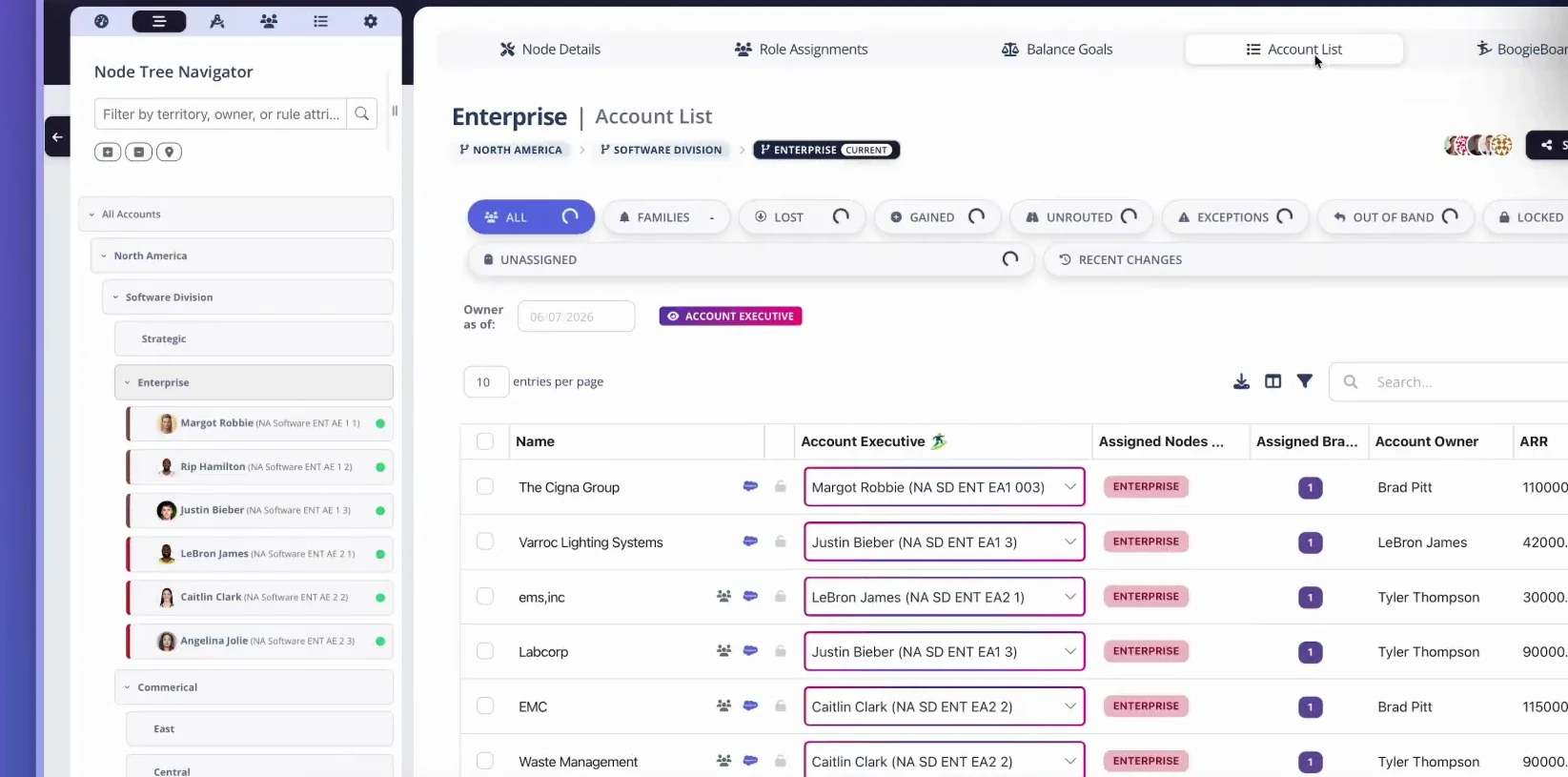
BoogieBoard's published account-routing walkthrough in our RevOps tools guide shows an account list used to inspect unassigned records. It is a useful example of what a product demo should explain: the problem an operator sees, the decision they make, and the resulting assignment.
A tour can introduce that workflow. A serious territory-planning evaluation should also inspect the account data and proposed changes in BoogieBoard. Keep that distinction clear when choosing how to demonstrate your own product.
See Territory Planning in Practice
Watch the BoogieBoard YouTube channel for examples of territory workflows and the decisions behind them.
Related Content
Schedule a Live Demo to review your territory-planning workflow with BoogieBoard.