5 Key Takeaways
- Revenue Operations should evaluate territory software for account-level control, scenario depth, explainability, deployment, and governance; Finance should test target, capacity, quota, and auditability workflows.
- The right category depends on the primary planning job: territory-first systems, sales performance suites, enterprise planning platforms, or CRM and mapping tools solve different parts of the process.
- A credible evaluation uses the buyer's real account hierarchy, assignments, locks, capacity, quotas, and edge cases instead of relying on a polished sample-data demonstration.
- Territory and quota planning must share governed inputs: Balance Goals define healthy books, locks preserve justified continuity, and quota relativity exposes material differences in opportunity.
- Implementation quality depends on decision rights, data ownership, current-state reproduction, scenario approval, controlled activation, seller communication, and an operating cadence after launch.
Territory planning software sits between two operating worlds. Revenue Operations needs to turn account data, coverage strategy, assignment rules, seller context, and exceptions into a working design. Finance needs to understand how the resulting territories connect with capacity, quota, growth assumptions, and the corporate plan. Sales leadership needs a decision it can defend, and sellers need a roster they can understand and execute.
Those needs are related, but software categories approach them from different directions. A mapping product may draw boundaries without modeling account potential. A compensation suite may allocate quotas while treating the territory as an imported total. An enterprise planning platform may connect financial scenarios but require a custom model for account assignment. A CRM may activate ownership while providing limited support for comparing future-state designs.
That is why "best territory planning software" has no useful answer without a buying framework. The strongest platform is the one that solves the organization's primary planning job, integrates with the rest of the operating stack, and makes the required tradeoffs visible before deployment.
This guide evaluates ten current options and, more importantly, shows RevOps and Finance how to test them. The product set reflects platforms appearing in G2's current Sales Planning category and adjacent tools commonly considered in a territory-planning buying process. G2 defines sales-planning products around capabilities such as territory, quota, capacity, scenario modeling, CRM connection, and continuous planning; its Sales Planning category is a useful neutral starting point for market discovery, not a substitute for a real-data evaluation.
Why Manual Territory Planning Fails
Administrative Burden Consumes the Cycle
Operators spend weeks collecting manager spreadsheets, reconciling CRM exports, rebuilding corporate hierarchies, adjusting formulas, and producing account rosters. Every change triggers another round of exports and checks. The project becomes a version-management exercise at precisely the moment when the team should be examining strategic choices.
BoogieBoard has observed companies budgeting roughly $120,000 to $180,000 annually for a specialist dedicated to territory-related planning and administration. That range is not a universal salary benchmark and software does not eliminate the need for skilled ownership. It indicates the scale of expert labor organizations can commit to running a manual or fragmented process.
Administrative effort matters because it crowds out judgment. When Operations spends the cycle repairing files, it has less time to challenge segment thresholds, model hiring delays, verify account families, test seller capacity, or prepare leaders for the change.
Systemic Inconsistency Hides in Correct Formulas
Each team may have a logically correct spreadsheet built from a different source date, hierarchy, or definition. Finance models annual capacity by role. Sales leadership maintains named-account exceptions. Revenue Operations applies geographic and segment rules. Managers annotate local account ownership. The totals can reconcile while the underlying decisions conflict.
A territory platform should connect the decisions and preserve their provenance. It should distinguish input data, business policy, assignment logic, approved exceptions, and deployment status. Otherwise automation merely produces inconsistent results faster.
Iteration Becomes Too Slow to Inform the Decision
A good planning process compares several defensible scenarios. One may minimize disruption, another may improve opportunity balance, and another may preserve customer or account-family continuity. Manual workflows often consume so much time building the first future state that leaders see only one option.
Independent research explains why this deserves executive attention. Piercy, Cravens, and Morgan found territory design can influence sales-organization effectiveness directly and through salesperson behavior. Read their field investigation of sales territory design. Territory design is not an administrative afterthought; it is an operating decision whose alternatives should be inspectable.
How to Evaluate Territory Planning Software
Use a weighted framework tied to the work the organization needs to perform.
| Evaluation area | What RevOps should test | What Finance should test | Suggested weight |
|---|---|---|---|
| Territory design and control |
Hierarchies, assignment rules, account families, locks, overlays, vacancies |
Consistent segment and coverage assumptions |
25% |
| Scenario depth | Current versus future comparison, account movement, exceptions, distributions |
Growth, headcount, ramp, target and sensitivity scenarios |
20% |
| Territory-quota-capacity connection |
Opportunity, workload, seller capacity, quota relativity |
Reconciliation to financial and workforce plans |
20% |
| Audit and deployment | Versions, approvals, effective dates, CRM activation, rollback |
Controls, sign-off, source lineage and reconciliation |
15% |
| Data and integration | CRM, warehouse, enrichment, hierarchy and account-level sync |
Planning, HR, quota, finance and reporting systems |
10% |
| Usability and communication | Operator workflow, manager review, seller outputs |
Executive summaries and assumption transparency |
5% |
| Implementation and ownership |
Time to value, required specialists, support, maintenance |
Services cost, operating model and long-term administration |
5% |
Adjust the weights before demonstrations begin. If global financial modeling is the main problem, increase connected planning. If the core issue is complex account assignment and activation, increase territory design. The scoring process should prevent the broadest demo from winning by default.
Design and Control
Test whether the platform can represent the actual coverage architecture: regions, segments, role types, named accounts, customer books, overlays, parent-child relationships, temporary coverage, vacancies, and exception rules. Ask whether the system stores the business logic or only the resulting owner field.
Look for a visible distinction among:
- Territory Logic: the rules that determine where accounts belong;
- Balance Goals: measurable objectives for healthy opportunity, quality, workload, and continuity;
- Account Locking Criteria: rules for accounts that should not move because transition cost is unusually high;
- Rules of Engagement: policies for ownership, handoffs, overlaps, opportunities, changes, and disputes.
If these concepts live only in notes beside the platform, the system may not govern the process.
Scenario Depth
Require a reproducible current-state scenario and several future states. Compare account movement, unassigned records, account-family splits, goal variance, locked accounts, quota, capacity, and affected sellers. Test whether an input change updates all relevant levels or forces a manual reconciliation.
Scenario planning should preserve assumptions and decision history. A new scenario should not overwrite the prior proposal or current state. Finance should be able to see which capacity and target version corresponds to the territory RevOps is reviewing.
Territory, Quota, and Capacity
Quota and territory are one connected decision. The platform should allow buyers to inspect territory potential and workload, usable capacity, ramp, vacancies, and proposed quota together.
Quota relativity makes the relationship between differences in territory conditions and differences in targets explicit. It does not claim an algorithm can calculate a perfect quota. It helps leaders spot cases where materially different books carry identical numbers or where similar books carry unexplained differences.
Auditability and Deployment
Ask who can change inputs, logic, locks, assignments, and approved scenarios. Test comments, approvals, versions, effective dates, exports, APIs, CRM updates, and rollback. Separate correction of bad data from a policy exception that requires business approval.
An activation feature is not enough. The company needs evidence that the approved scenario became the live roster without losing account families, supporting roles, dates, or downstream workflow behavior.
Usability and Implementation
The system should support specialists without making every small change dependent on consultants. Evaluate the skills required to build and maintain the model, not only the interface shown during the sale. Ask who will own data, policy, configuration, scenario production, approval, and post-launch monitoring.
The 10 Best Territory Planning Software Options for 2026
The following platforms represent different approaches. This is a fit guide, not a universal ranking. Competitor names are presented in plain text; use neutral review sources and your own evaluation rather than vendor marketing claims.
1. BoogieBoard: Best for Territory-First Scenario Planning
BoogieBoard is designed around account-level territory planning. Teams can model hierarchy and segment structure, define Balance Goals, apply account locks, compare current and future scenarios, examine quota relativity, and prepare assignments for activation.
Best fit: Revenue Operations teams whose primary job is to design and compare territories, govern exceptions, and connect account assignments with quota and workload.
Why RevOps may choose it: The workflow begins with accounts, roles, territories, and planning rules rather than treating territory as an output of a broader financial or compensation model. Operators can inspect account-level changes and Territory Health before activation.
Why Finance may care: Scenarios can surface how territory potential, workload, quota, and capacity relate. Finance retains ownership of corporate targets while reviewing the field design those targets depend on.
Evaluate carefully: Confirm the required connections with the company's financial-planning, compensation, warehouse, and CRM stack. Buyers seeking one global suite for every incentive and enterprise-planning process may still use adjacent systems.
BoogieBoard Scenario Planning supports quota-relative territory design and side-by-side scenario review.
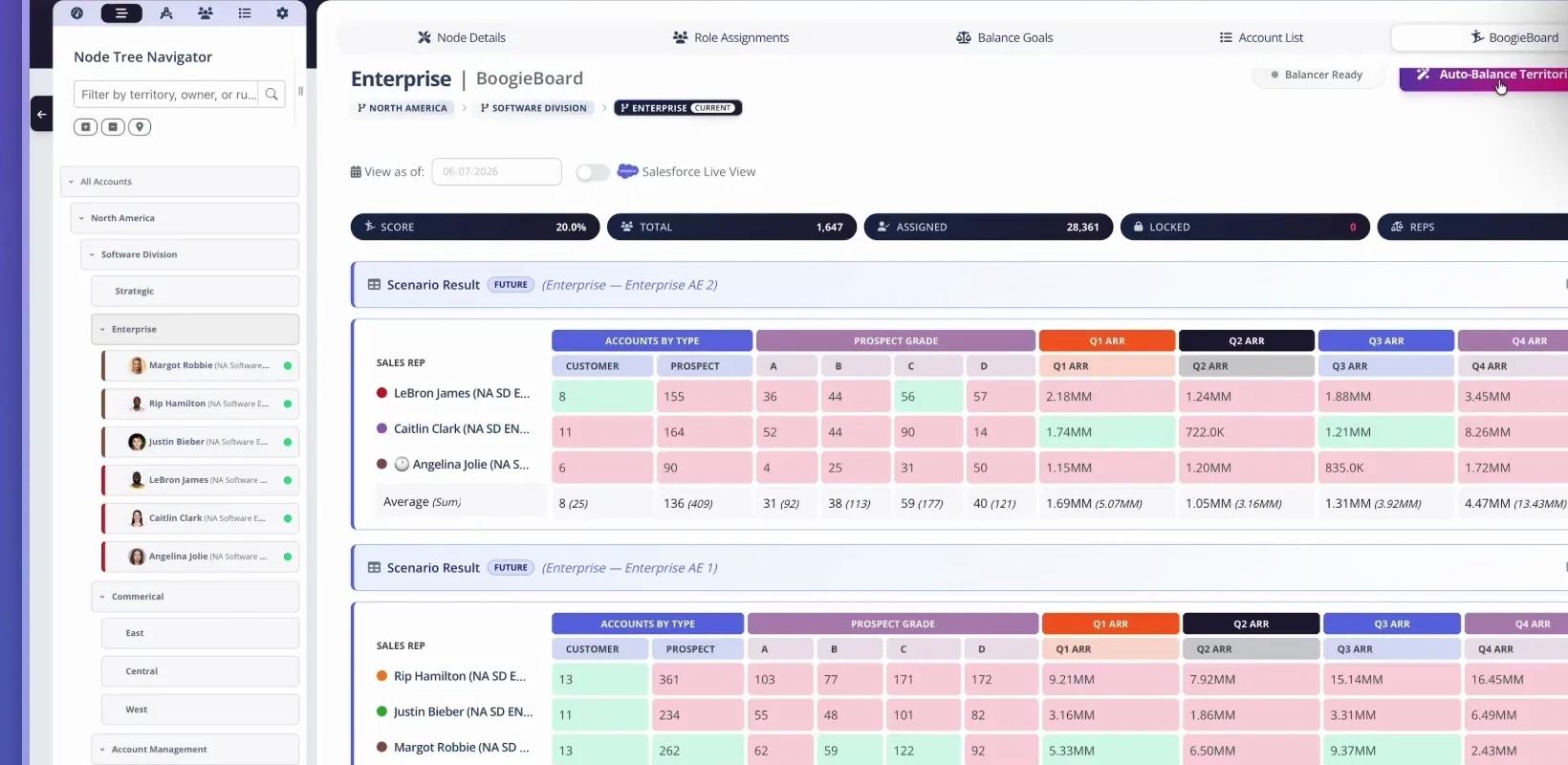
A scenario result compares quota-relative territory measures across reps before the proposed design goes live.
Watch Design Territories with Quota Relativity for a short example.
2. Salesforce Sales Cloud and Maps: Best for CRM-Centered Execution
Salesforce is often part of the evaluation because account ownership, hierarchies, users, opportunities, and workflows already live there. Sales Cloud provides the system of record, while mapping and territory capabilities can support geographic visualization, assignment, and field execution.
Best fit: Organizations that prioritize keeping territory execution close to their CRM and have relatively straightforward design needs or internal resources to extend the platform.
RevOps consideration: Test whether the planned configuration supports future-state scenario comparison, complex account families, locks, Balance Goals, quota relativity, and temporary coverage before changing live ownership. CRM configuration is not automatically a planning workspace.
Finance consideration: Determine how target, capacity, and scenario assumptions connect to the CRM records. The live system may hold the approved result while another tool governs financial planning.
Evaluate carefully: Sandbox strategy, deployment sequence, custom-object dependence, administrative ownership, and what happens when the territory model changes mid-cycle.
3. CaptivateIQ: Best for Compensation-Centered Revenue Planning
CaptivateIQ is commonly evaluated by teams seeking incentive-compensation management with adjacent planning capabilities. Its natural center of gravity is the relationship among performance data, crediting, plans, and payouts.
Best fit: Organizations where quota and territory planning must connect closely to commission administration and compensation operations.
RevOps consideration: Validate account-level territory design, hierarchy treatment, assignment scenarios, locks, and CRM activation as distinct workflows. Do not infer that quota or compensation support automatically supplies deep territory modeling.
Finance consideration: Evaluate approval, audit, reconciliation, and the ability to trace quota and compensation inputs to the corporate plan.
Evaluate carefully: Run one complex territory and one compensation edge case end to end. Confirm which team owns ongoing configuration and how future territory changes flow into crediting and payout systems.
4. Anaplan: Best for Enterprise Connected Planning
Anaplan is a broad enterprise planning platform that can connect financial, workforce, sales, and operational models. Organizations may already use it for corporate planning and extend it to capacity, quota, and territory workflows.
Best fit: Large companies with mature model-building teams, complex cross-functional planning, and a need to connect sales assumptions with enterprise finance.
RevOps consideration: Determine how much account-level assignment logic, hierarchy, scenario review, and CRM deployment must be custom-built. A flexible engine can model nearly any concept, but flexibility creates design and maintenance responsibility.
Finance consideration: Connected planning is the central advantage. Test reconciliation across corporate targets, headcount, productivity, capacity, and quota versions.
Evaluate carefully: Model-builder availability, implementation services, governance of custom logic, user workflow, account-level scale, and the ongoing cost of adapting the model when the go-to-market design changes.
5. Xactly: Best for Broad Sales Performance Management
Xactly is associated with sales performance management, including incentive compensation and adjacent territory, quota, and planning workflows. It may appeal to enterprises seeking established process breadth around targets and pay.
Best fit: Organizations pursuing a wider sales performance program in which quota, territory, forecasting, compensation, and analytics must coexist.
RevOps consideration: Test the depth and usability of territory scenario design with real account data. Examine account hierarchy, named accounts, locks, overlays, vacancies, and controlled CRM activation.
Finance consideration: Review quota reconciliation, approval, audit history, compensation dependencies, and the implementation ownership needed across Finance, Sales Operations, and IT.
Evaluate carefully: Module boundaries, services, time to value, administration skills, and whether the territory workflow is strong enough for the organization's actual complexity rather than simply present in the suite.
6. Varicent: Best for Complex Enterprise SPM Programs
Varicent is another enterprise sales performance management option considered for incentive compensation, quota, territory, and performance processes. It can fit organizations with complex roles, rules, and global governance needs.
Best fit: Large enterprises prepared to implement and operate a broad performance-management environment with substantial configuration and control requirements.
RevOps consideration: Use a full scenario to evaluate account assignment, role and territory hierarchies, policy exceptions, manager review, and activation. Ask which territory changes require specialized configuration.
Finance consideration: Examine auditability, reconciliation, approvals, compensation connections, and how financial assumptions remain synchronized with territory and quota versions.
Evaluate carefully: Implementation scope, specialist dependence, global support model, data integration, and whether everyday scenario iteration is practical for the operators who will run the cycle.
7. Fullcast: Best for End-to-End Revenue Planning Workflows
Fullcast is positioned in the sales-planning category with capabilities spanning go-to-market planning and execution. It is considered by buyers seeking closer linkage among territories, quotas, capacity, and ongoing revenue operations.
Best fit: Teams that want a broad revenue-planning workflow and prefer one operating environment across several annual and continuous-planning activities.
RevOps consideration: Test the account-level depth of Territory Logic, Balance Goals, locks, account families, supporting roles, and current-to-future comparisons. Confirm how live changes are governed after annual planning.
Finance consideration: Review capacity and quota methodology, scenario assumptions, target reconciliation, and how the platform exchanges data with the corporate planning system.
Evaluate carefully: The fit between the platform's opinionated workflow and the company's existing operating model, implementation scope, data readiness, and the precise behavior of CRM deployment.
8. Workday Adaptive Planning: Best for Finance-Led Capacity and Quota Models
Workday Adaptive Planning is a financial and workforce planning platform that can support sales capacity, headcount, target allocation, and scenario modeling, especially in organizations already using it within Finance.
Best fit: Finance-led teams that need quota and capacity planning to remain tightly connected with workforce and corporate financial plans.
RevOps consideration: Identify the separate system or custom model responsible for account-level territory assignment, hierarchy, locks, manager review, and CRM activation. Aggregate capacity planning does not replace territory design.
Finance consideration: Evaluate familiar planning controls, target reconciliation, hiring timing, ramp assumptions, and scenario comparison across the financial model.
Evaluate carefully: Sales-specific implementation effort, granularity, role-based workflows, account-level scale, and the handoff between approved financial outputs and the live territory roster.
9. Lative: Best for Capacity and Revenue-Planning Analysis
Lative appears in the sales-planning category and is evaluated by teams focused on capacity, productivity, quota, and revenue-planning questions. Its fit should be tested against the organization's desired level of account assignment and activation.
Best fit: Revenue Operations and Finance teams seeking analytical linkage among targets, capacity, productivity, and planning assumptions.
RevOps consideration: Verify how the platform represents account-level territories, assignment rules, locks, account families, and future-state deployment. Determine whether it complements or replaces the current territory-design system.
Finance consideration: Test headcount timing, ramp, productivity, quota distribution, and reconciliation to the operating plan.
Evaluate carefully: Source-data requirements, territory depth, scenario governance, integrations, seller-facing outputs, and the line between native workflow and services-supported modeling.
10. Board: Best for Unified Financial and Operational Planning
Board is an enterprise planning platform used for financial and operational modeling. It may enter the territory-software evaluation when Finance wants sales planning connected to a broader performance-management environment.
Best fit: Enterprises with cross-functional planning requirements, implementation resources, and a preference for a configurable platform spanning several operating functions.
RevOps consideration: Demonstrate account-level assignment, hierarchy, exceptions, scenario comparisons, and CRM activation rather than assuming a high-level planning model covers them.
Finance consideration: Evaluate consolidation of assumptions, target and capacity reconciliation, approval controls, and alignment with the existing enterprise-planning architecture.
Evaluate carefully: Custom model design, operator usability, implementation partner dependence, data latency, account scale, and the ongoing work required to keep the sales model current.
Head-to-Head Comparison
The ratings below describe each platform's likely center of gravity, not verified feature guarantees. Buyers should confirm every required workflow using current product documentation and a real-data pilot.
| Platform | Primary orientation | Territory-design depth to test |
Finance-planning fit | Best-fit buying motion |
|---|---|---|---|---|
| BoogieBoard | Territory-first scenario planning |
Native focus | Integrate corporate targets and capacity |
RevOps-led territory redesign and activation |
| Salesforce Sales Cloud and Maps |
CRM execution and mapping | Configuration-dependent | Usually paired with planning system |
CRM-centered ownership and field execution |
| CaptivateIQ | Compensation and revenue operations |
Validate separately | Strong when pay governance is central |
Compensation-connected quota planning |
| Anaplan | Enterprise connected planning |
Often custom-modeled | High | Cross-functional enterprise planning |
| Xactly | Sales performance management |
Validate module depth | Broad quota and compensation context |
Enterprise SPM program |
| Varicent | Complex enterprise SPM | Validate workflow and usability |
Broad performance governance |
Global, rule-heavy SPM program |
| Fullcast | Revenue planning and execution |
Core evaluation area | Connected quota and capacity focus |
Broad RevOps planning workflow |
| Workday Adaptive Planning | Financial and workforce planning |
Usually separate or custom | High | Finance-led capacity and target planning |
| Lative | Revenue and capacity planning |
Confirm account assignment depth |
Analytical planning focus | Capacity, productivity, and quota analysis |
| Board | Enterprise financial and operational planning |
Often custom-modeled | High | Configurable enterprise planning program |
Which Platform Type Fits Your Team?
Choose Territory-First When Account Assignment Is the Hard Problem
Use a territory-first platform when the organization needs to reconstruct account families, model complex assignment rules, preserve customer continuity, compare book quality and workload, manage locks, and activate a selected future state. Finance can remain connected through target, capacity, and quota inputs without forcing the account decision into a financial cube.
Choose SPM When Compensation Is the Program Center
Use a sales performance suite when incentive plans, crediting, quota, territories, and payouts are being transformed together. Confirm that the territory component supports the required planning depth and is usable by the team running scenarios.
Choose Enterprise Planning When Cross-Functional Modeling Is the Advantage
Use a connected-planning platform when the company already has mature Finance models and specialist resources, and when sales capacity and quota must participate in a larger workforce and financial planning architecture. Plan explicitly for account-level territory design and activation.
Choose CRM and Mapping When Execution Is the Main Need
Use CRM and mapping tools when the design is relatively stable and the primary need is assignment, geographic visualization, routing, or field execution. Add a dedicated planning layer if future-state comparison, account-level optimization, and cross-functional scenarios become material.
Implementation Best Practices
1. Define Decision Rights Before Configuration
Use a clear decision model. Revenue Operations may drive territory analysis; Finance may own the corporate target and capacity assumptions; Sales leadership may approve the commercial tradeoff; systems teams may own deployment. Separate Contributors from Approvers so stakeholder input does not become an unlimited veto.
2. Reproduce the Current State
Load real accounts, families, assignments, roles, vacancies, capacity, quotas, open work, and exceptions. Build a scenario that matches current operations. Investigate unexplained differences before using the platform to recommend a future state.
3. Establish Balance Goals, Then Locks
After hierarchy and segment structure are set, define measurable Balance Goals for opportunity, quality, workload, and continuity. Then define Account Locking Criteria, apply qualifying locks, model the movable book, and evaluate the complete territories with locks returned.
This sequence is mandatory because locks are constraints and Balance Goals are objectives. If locks make a goal unattainable, disclose the residual imbalance. The Balance Goals guide provides the complete method.
4. Test Material Scenarios
Do not create alternatives merely to demonstrate the feature. Test choices leadership might make: different segment thresholds, hiring delays, fewer territories, revised named-account treatment, new capacity assumptions, customer-family preservation, or different acceptable variance.
5. Pilot the Complete Workflow
Choose one representative segment. Run data preparation, current-state reproduction, future scenarios, stakeholder review, approval, seller-facing output, CRM deployment rehearsal, and post-launch monitoring. Include difficult cases instead of saving them for implementation.
6. Design Controls and Communication
Set permissions, approval stages, version naming, effective dates, exception handling, and rollback. Prepare manager and seller materials from the same approved scenario. Publish the source of truth and correction path before activation.
7. Operate Continuously Without Constant Disruption
Monitor data quality, unassigned accounts, capacity changes, territory health, and material market events. Use planned review windows and defined triggers. Continuous planning should make the model responsive, not give the organization permission to reshuffle accounts every week.
Questions to Ask Every Vendor
- Can the system reproduce our current account roster, hierarchies, supporting roles, vacancies, and exceptions without flattening them?
- Where do Territory Logic, Balance Goals, locks, quota, capacity, and Rules of Engagement live?
- Can we compare current and future scenarios at account, territory, manager, segment, and company levels?
- How does the platform preserve assumptions, approvals, comments, versions, and effective dates?
- What requires custom modeling, professional services, or a certified specialist?
- How are approved assignments deployed to the CRM, and how is rollback handled?
- How do Finance targets and workforce assumptions stay synchronized with RevOps scenarios?
- What manager and seller outputs are generated from the approved plan?
- How are data corrections separated from policy exceptions?
- What does ongoing administration require after the implementation team leaves?
Frequently Asked Questions
What is territory planning software?
It is software used to design, compare, approve, activate, and maintain account or geographic coverage. Strong platforms connect assignment logic with territory health, capacity, quota, governance, and CRM execution.
What does Finance need from territory planning software?
Finance needs traceable capacity, target, quota, and scenario assumptions; reconciliation with the corporate plan; approval controls; and a clear view of how field territories support or challenge the financial requirement.
Should quota and territory planning use the same platform?
They do not need one system, but they need governed shared inputs and aligned versions. The quota model should evaluate the complete territory the seller will cover, and the territory team should know which target and capacity scenario it is designing against.
How long does implementation take?
The timeline depends on data readiness, territory complexity, platform category, integrations, decision clarity, and services. Require a plan based on reproducing the current state and piloting one real segment, not a generic duration.
Which integrations matter most?
Common needs include CRM, data warehouse, corporate hierarchy, enrichment, HR or workforce planning, financial planning, quota and compensation, identity, and reporting. Evaluate field-level behavior and deployment, not only the presence of a connector logo.
Is territory planning software useful for smaller teams?
Yes when the cost of manual scenarios, bad assignments, leadership time, and seller disruption is meaningful. Smaller teams should prioritize time to value, clear ownership, and the few workflows they will genuinely operate rather than broad suite coverage.
About the author: Tyler Thompson is Co-Founder & CTO of BoogieBoard.
In Summary
The best territory planning software is not the product with the longest feature list. It is the platform that gives RevOps control of the account-level design, gives Finance a traceable connection to capacity and targets, lets leadership compare real tradeoffs, and produces an approved roster the field can execute. Start with the planning job, score the categories, test real data and exceptions, and pilot the full path from current state through activation.
See Territory Planning in Practice
Watch account-level territory and scenario workflows on the BoogieBoard YouTube channel.