5 Key Takeaways
- Quota planning software should model more than last year's number plus a growth rate; it should connect targets to territory potential, seller capacity, ramp, and strategic constraints.
- The strongest platform category depends on the primary job: broad performance management, enterprise financial planning, or territory-first quota and capacity design.
- Quota relativity makes the relationship between comparable territories and targets inspectable without pretending the data can produce one mathematically perfect quota.
- Implementation should begin with a documented methodology and real account-level inputs, then move through scenario testing, one-segment piloting, approval, and ongoing monitoring.
- Operators should evaluate auditability, CRM deployment, version control, exception handling, and seller communication alongside modeling sophistication.
Quota planning often begins with a corporate target and ends with a spreadsheet. Finance allocates growth to regions, Sales leadership negotiates team numbers, and Sales Operations distributes the remainder among sellers. The finished quotas may add up perfectly while saying little about whether each territory contains enough serviceable opportunity or whether each seller has the capacity and ramp to pursue it.
Software can make that process faster without making it better. A system that automates top-down allocation but cannot connect a quota to the accounts, customers, workload, and potential underneath it simply industrializes the old method.
The right quota planning software should help the company make a governed decision across four connected questions: How much does the business need? How much can the market support? How much coverage capacity exists? How should the resulting targets vary across territories and roles? This guide explains the platform capabilities, solution categories, implementation sequence, and buying questions required to answer them.
Why Traditional Quota Planning Fails
Last-Year-Plus Math
Many teams take the prior quota or actual result, apply a growth rate, and distribute the target. That method is convenient, but it can preserve historical territory advantages and punish strong execution. A seller who outperformed in a rich territory may receive a larger increase without anyone checking whether the same opportunity remains. A seller who inherited a weak or vacant book may carry forward a target disconnected from current conditions.
Historical results belong in the analysis. They should not substitute for an explanation of future opportunity.
Territory Blindness
Quota and territory design are often run as separate projects. One team assigns accounts and another sets targets. The quota model receives regional totals or manager estimates instead of the account-level potential, customer commitments, prospect quality, and workload produced by the territory model.
That separation makes attainment variance hard to interpret. A low result can reflect execution, territory quality, quota difficulty, timing, or several factors together. If the target and territory were never examined as one decision, the company has little evidence for distinguishing them.
Neutral category guidance reinforces why the connection matters. G2's Sales Planning category requires products to support functions such as territory, quota, or capacity planning, scenario modeling, and CRM integration. That definition does not prove any platform is right for a buyer, but it supports evaluating these decisions as one connected planning system. See G2's Sales Planning category.
Stale Capacity Assumptions
A headcount plan may treat every approved seat as productive capacity. In reality, territories can be vacant, sellers can be ramping, managers can hold temporary books, and roles can carry different amounts of selling or service work. A quota model that ignores those conditions creates false precision.
Capacity planning should distinguish approved, hired, active, ramping, fully productive, and temporarily covered capacity. It should also include timing. Ten fully productive sellers for twelve months do not equal ten seats filled gradually across the year.
Slow Adjustment and Version Sprawl
When inputs change, spreadsheets multiply. A hiring delay, market change, acquisition, or territory redesign can require several models to be rebuilt and reconciled. Leaders compare numbers produced from different assumptions. Late exceptions alter individual targets without updating the summary logic.
Quota planning software should preserve scenarios and decision history so a change can be modeled without erasing the baseline.
What Is Quota Planning Software?
Quota planning software helps an organization set, distribute, compare, approve, communicate, and monitor performance targets across roles and territories. Depending on the platform, it may also support territory design, capacity planning, financial forecasting, incentive compensation, crediting, or performance management.
The term covers several quota types:
| Quota type | Measures | Territory input to examine | Common risk |
|---|---|---|---|
| Revenue quota | Bookings, ARR, ACV, services revenue | Serviceable potential, open pipeline, customer base | Prior revenue substitutes for future opportunity |
| Gross-margin quota | Revenue after direct cost | Product and customer mix, discount profile | Sellers cannot see or control the inputs |
| Unit or logo quota | Units, customers, meetings, placements | Account count, fit, conversion opportunity | Equal units hide different deal difficulty |
| Activity quota | Calls, meetings, opportunities created | Reachable contacts, account volume, role scope | Activity becomes detached from outcomes |
| Combination quota | Several results or weighted measures | Multiple territory and role characteristics | Weighting becomes too complex to explain |
Quota planning is related to but distinct from incentive compensation. A quota defines the performance target. A compensation plan determines how performance against that target affects pay. Some suites handle both, but buyers should evaluate whether the quota-setting methodology itself is supported rather than assuming compensation functionality solves territory potential.
Four Capabilities That Matter Most
1. Territory Potential and Quota Relativity
The platform should let operators inspect the opportunity and workload in each territory, then compare the target with those conditions. Potential may draw on serviceable market, customer revenue, expansion whitespace, product fit, historical conversion, pipeline, intent, or another documented hypothesis.
Quota relativity is the explicit relationship between differences in territory conditions and differences in quota. It does not mean an algorithm should dictate the number. It means leaders can see whether comparable books have comparable targets and explain intentional differences.
A useful system lets the team:
- define comparable role and territory populations;
- choose and document potential measures;
- separate observed data from leadership assumptions;
- compare relative territory conditions with proposed quotas;
- identify outliers and residual imbalances;
- preserve the rationale for accepted exceptions.
2. Integrated Capacity, Territory, and Financial Inputs
Quota decisions sit between the corporate plan and the field design. The software should represent annual and period targets, role capacity, productivity assumptions, ramp, attrition, vacancies, segment structure, current assignments, and proposed territories.
Integration does not require one system to own every source. It requires governed connections and clear ownership. Finance may own the corporate target and timing. Revenue Operations may own account assignments and Territory Logic. Sales leadership may approve productivity assumptions and quotas. The platform should make those handoffs visible.
3. Scenario Planning
The team should be able to model alternatives without overwriting the current plan. A scenario may test delayed hiring, a new segment threshold, different quota relativity, a territory split, a capacity reduction, or more conservative potential assumptions.
Look for account- and territory-level comparisons, versioned assumptions, side-by-side summaries, and a clear current-state baseline. Scenario planning should expose tradeoffs, not merely generate another total.
4. Transparency, Controls, and Auditability
Quota decisions affect earnings and trust. The system should record input versions, methodology, reviewers, approvals, changes, effective dates, and communication. It should separate a factual correction from a policy exception and preserve both the prior and revised state.
Operators should also evaluate permissions, exports, CRM deployment, APIs, role-level visibility, and whether sellers and managers can receive a clear account roster and quota explanation without gaining access to sensitive planning data.
Connect Quota and Territory Design
BoogieBoard Scenario Planning lets teams compare territories using quota relativity, Balance Goals, capacity, and account-level conditions before assignments are activated.
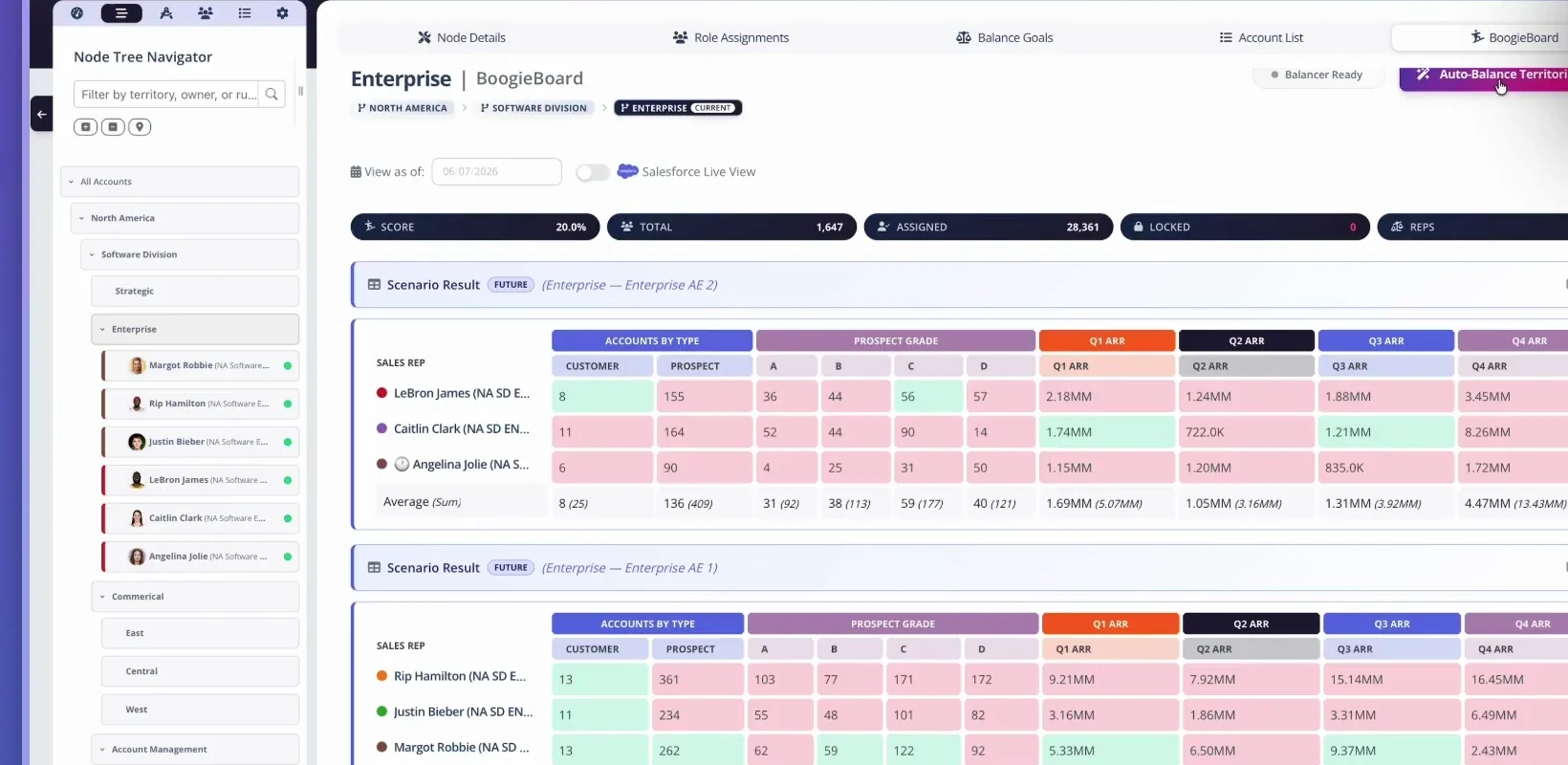
A scenario result compares quota-relative territory measures across reps before the proposed design goes live.
Watch Design Territories with Quota Relativity for a practical product example.
Three Categories of Quota Planning Software
Sales Performance Management Suites
Sales performance management, or SPM, suites typically combine quota, territory, incentive compensation, crediting, forecasting, and performance workflows. They can fit large organizations seeking one vendor across several planning and pay processes.
Strengths may include enterprise permissions, broad workflow coverage, compensation integration, and established implementation partners.
Tradeoffs can include longer deployments, specialized administration, cost, and quota or territory modules that inherit the suite's data model rather than beginning with account-level design.
Choose this category when incentive compensation and enterprise performance governance are central to the same program, and validate the exact depth of territory potential and scenario planning during a real-data evaluation.
Enterprise Planning Platforms
Enterprise performance management and connected-planning platforms are designed for financial, workforce, and operational modeling across the company. They can be powerful when quota planning must connect deeply with corporate finance and headcount plans.
Strengths may include flexible multidimensional models, financial scenarios, enterprise data connections, and familiarity inside Finance.
Tradeoffs can include significant model-building work, dependence on internal specialists or consultants, and limited native account assignment or CRM activation. The platform may model totals well while requiring a separate system for territory design.
Choose this category when the organization already has a mature connected-planning practice and is prepared to build and govern the sales-specific model.
Territory-First Planning Systems
Territory-first systems begin with accounts, account families, roles, Territory Logic, Balance Goals, locks, assignments, and scenarios. Quota and capacity can then be examined against the resulting books.
Strengths may include fast account-level modeling, visible territory tradeoffs, CRM alignment, explainability for Sales, and direct support for activation.
Tradeoffs can include narrower incentive-compensation functionality or the need to integrate with the corporate planning and commission stack.
Choose this category when the main problem is designing viable territories and connecting quota to the opportunity and workload inside them.
The categories overlap. Evaluate the platform's actual workflow with your data instead of selecting from a label alone.
How to Implement Quota Planning Software
Step 1: Establish Data Ownership and a Current State
Identify sources for accounts, corporate hierarchies, assignments, customer revenue, pipeline, product usage, potential signals, quotas, attainment, role capacity, ramp, and financial targets. Name an owner for each source and profile completeness, freshness, duplication, and outliers.
Create a current-state scenario before proposing changes. It should reproduce present territories, capacity, and quotas closely enough that stakeholders trust the baseline. If the system cannot explain today, it is not ready to govern tomorrow.
Step 2: Document the Quota Methodology
Write down how the corporate target becomes role and individual quotas. Separate:
- top-down financial requirements;
- bottom-up market and territory potential;
- capacity and productivity assumptions;
- ramp and vacancy treatment;
- strategic overlays or floors;
- leadership judgment and approved exceptions.
Do not hide disagreement inside a blended formula. If Finance requires a target above the current bottom-up estimate, show the gap and the strategic assumption needed to close it.
Step 3: Define Territory Health Before Locks
Set the hierarchy and segment structure, then define Balance Goals for healthy opportunity, quality, workload, and continuity. Establish the data source and acceptable range for each goal.
Next define Account Locking Criteria for assignments whose movement cost is unusually high. Apply qualifying locks, optimize the remaining book, and evaluate the complete territories with the locked accounts returned. Locks are constraints; Balance Goals are objectives. Read the complete Balance Goals guide for the canonical sequence.
Quota analysis should use the complete proposed territories. Do not calculate relativity from the easy-to-move accounts while excluding the strategic customers and live opportunities that materially shape the seller's book.
Step 4: Configure Scenarios and Controls
Build the model using agreed populations, inputs, methodologies, permissions, and approval stages. Preserve a baseline and create named scenarios for the decisions leadership actually needs to compare.
Configure controls for assumption changes, target overrides, account changes, data corrections, and final approval. Decide what managers can view, comment on, or edit. Define exports and integrations before the final cycle so activation does not depend on a late manual rebuild.
Step 5: Pilot One Segment With Real Data
Choose a segment that is representative enough to reveal integration and methodology problems but limited enough to review thoroughly. Run current-state reproduction, potential modeling, territory scenarios, quota allocation, manager review, seller-facing outputs, and deployment rehearsal.
Test edge cases: vacant territories, ramping sellers, locked accounts, split families, overlays, customer renewals, unusual quota overrides, and mid-cycle changes. Compare the time, error rate, explainability, and decision quality with the existing process.
Do not treat a polished vendor demonstration as a pilot. Your hierarchy, exceptions, and data quality are the test.
Step 6: Activate, Communicate, and Monitor
Approve one scenario and preserve the rationale. Deploy territories and quotas through a controlled sequence. Give managers and sellers the effective date, roster, target, methodology summary, transition rules, and correction path.
Monitor assignment completeness, data synchronization, quota totals, capacity changes, territory health, target changes, and attainment distribution. Use outcomes to test the methodology, not to declare that every difference is caused by the territory.
Evaluation Scorecard
Use a weighted scorecard before selecting a platform.
| Evaluation area | Questions to ask | Suggested weight |
|---|---|---|
| Territory and quota connection | Can the system compare account-level potential, workload, territory health, and target? | 25% |
| Scenario depth | Can it preserve a baseline, test material assumptions, and compare results at several levels? | 20% |
| Capacity planning | Does it represent seats, hiring timing, ramp, vacancies, and role productivity? | 15% |
| Governance and audit | Are approvals, overrides, versions, effective dates, and decision history preserved? | 15% |
| Data and deployment | Can it connect to the CRM, planning stack, warehouse, and downstream systems? | 10% |
| Usability and communication | Can operators work efficiently and produce clear manager and seller outputs? | 10% |
| Implementation and ownership | Is the required expertise, timeline, support, and ongoing administration realistic? | 5% |
Adjust the weights to your operating model. A company with mature enterprise planning may weight financial integration more heavily. A company redesigning complex books may increase territory and scenario depth.
How to Measure Return on Investment
Software value should be measured against the operating problem it replaces. BoogieBoard has observed organizations budgeting roughly $120,000 to $180,000 annually for a specialist dedicated to territory-related planning and administration. That range is not a universal market price or a promise that software eliminates the role. It is a useful reminder that manual modeling, reconciliation, and stakeholder support consume real expert capacity.
Track:
- cycle time from inputs to approved quotas;
- hours spent collecting and reconciling versions;
- number of late target or assignment corrections;
- time required to model a capacity or strategy change;
- percentage of accounts and quotas deployed without error;
- manager questions resolved from a shared source of truth;
- territory-health and quota-relativity outliers identified before launch;
- software, services, and ongoing administration cost.
Avoid claiming ROI from attainment alone. Revenue performance depends on strategy, product, market, execution, timing, quota, and territory. Measure process quality and decision transparency alongside outcomes.
Common Buying Mistakes
Buying the Broadest Suite
Feature count can disguise weak depth in the primary workflow. Run the actual quota and territory process, including exceptions, instead of scoring only the vendor's product map.
Treating Integration as a Checkbox
Ask what object, field, hierarchy, scenario, approval, and change history moves in each direction. A CSV import is not the same as governed deployment.
Automating an Undocumented Method
Software cannot resolve disagreement over potential, capacity, floors, overrides, and decision rights. Document the method first and use the implementation to make it operational.
Ignoring Seller Communication
An approved quota is not finished until the seller receives the target, effective date, territory context, transition rules, and challenge path.
Frequently Asked Questions
What is quota planning software?
It is software used to set, distribute, compare, approve, communicate, and monitor performance targets. Strong products connect quota with territory potential, capacity, scenarios, governance, and downstream systems.
Should quota and territory planning happen in the same system?
They do not have to share one product, but they must share governed inputs and a reconciled decision process. The quota should be evaluated against the complete territory the seller will actually cover.
Can quota planning software integrate with Salesforce?
Many platforms support CRM connections, but depth varies. Test account hierarchies, assignments, fields, scenarios, approvals, effective dates, and deployment behavior with your Salesforce configuration.
Which metrics should drive quotas?
Use metrics tied to the role and business model, such as serviceable potential, customer revenue, expansion whitespace, product fit, historical conversion, pipeline, capacity, and ramp. Label assumptions and avoid treating one score as certainty.
How long does implementation take?
It depends on data readiness, methodology, integration, scope, and platform category. A focused territory-first pilot can move faster than a global SPM or enterprise-planning transformation. Require a plan based on your sources and workflows.
How should a smaller team evaluate ROI?
Compare the platform with the hours, errors, delays, and specialist dependence in the current process. Smaller teams may value faster scenarios and clear CRM activation more than enterprise-wide module breadth.
About the author: Kevin Davis is Co-Founder & CEO of BoogieBoard.
In Summary
Quota planning software should do more than distribute a target. It should connect the financial requirement with market potential, viable territories, real capacity, transparent assumptions, and an operating process that managers and sellers can understand. Choose the category that fits the primary job, test it with real data, pilot the full workflow, and preserve human judgment as an explicit part of the record.
See Quota and Territory Planning in Practice
Watch quota-relativity and territory-design workflows on the BoogieBoard YouTube channel.