5 Key Takeaways
- Spreadsheets are fine until the account universe outgrows the person maintaining it. Here is where that line actually sits.
- Excel remains workable while one governed owner can preserve rules, versions, scenarios, permissions, account detail, approvals, and activation more reliably than the planning complexity grows.
- Test the live workbook against a complete planning cycle: reproduce the current state, create multiple scenarios, compare account-level changes, coordinate reviewers, preserve approvals and exceptions, activate in Salesforce, and recover the prior version without manual reconstruction.
- A spreadsheet has low entry cost and unlimited local flexibility; a planning system creates licensing and implementation work but replaces fragile reconciliation, permission, scenario, and audit labor.
- The switch fails when software merely imports the existing workbook without defining decision rights, source data, durable territories, and activation controls; automation preserves bad process as efficiently as good process.
Spreadsheets are fine until the account universe outgrows the person maintaining it. Here is where that line actually sits. That position is useful only when the planning team can translate it into inputs, decisions, controls, and a result the field can understand.
BoogieBoard treats the move from Excel to territory planning software as part of a governed change process. The model must connect market strategy with account-level evidence, productive capacity, explicit decision rights, and controlled activation. The objective is not to remove judgment. It is to make judgment visible and repeatable.
The central position is: Territory fatalism is a choice; 'it is what it is' is wrong. The sections below turn that position into definitions, alternatives, procedures, examples, controls, and an operating decision.
Working Definitions
- Scenario: one complete current-state or proposed territory design.
- version control: the ability to preserve, identify, compare, and recover distinct planning states.
- Balance Goal: a measurable objective for healthy opportunity, quality, workload, or continuity.
- Current State Scenario: a preserved planning baseline that mirrors the live model before proposed changes.
- planning cycle: the governed sequence from current-state analysis through decision, activation, and monitoring.
BoogieBoard has observed organizations budgeting roughly $120,000 to $180,000 annually for a territory-planning specialist. That is an observed operating range, not a universal salary benchmark or an invented software ROI claim. For the move from excel to territory planning software, use that observation only for the claim and population it directly supports.
Independent evidence provides a separate check for the move from excel to territory planning software: Powell, Lawson, and Baker documented how spreadsheet errors persist in operational models and why review controls matter.
Systems and Tooling: The Move From Excel To Territory Planning Software
The switch fails when software merely imports the existing workbook without defining decision rights, source data, durable territories, and activation controls; automation preserves bad process as efficiently as good process. Evaluate the operating path, not a feature checklist. Ask who can change logic, how managers inspect impact, what happens to exceptions, and how approved records reach Salesforce. No-code should shorten controlled iteration without removing decision rights or auditability. In the move from Excel to territory planning software, test the choice against version control, then record any accepted exception in the decision log.
Technology should preserve territory structure, role assignments, scenarios, approvals, effective dates, and account-level change history, not merely update an Owner field. Test how Scenario, version control, and Balance Goal behave from source data through review and Salesforce activation. The the move from Excel to territory planning software review is complete only when Balance Goal and the affected account roster tell the same story.
Core Components: The Move From Excel To Territory Planning Software
Excel remains workable while one governed owner can preserve rules, versions, scenarios, permissions, account detail, approvals, and activation more reliably than the planning complexity grows. A complete architecture needs stable account identifiers, a current-state baseline, durable territories, explicit roles, repeatable assignment rules, exceptions, effective dates, and an activation record. Scenario, version control, and Balance Goal should connect those elements without turning the current owner into the model itself. The the move from Excel to territory planning software review is complete only when Balance Goal and the affected account roster tell the same story.
Document system responsibilities before configuring features. Name where account facts originate, where scenarios are modeled, where approvals are recorded, and where the live assignment is served to sellers. That division keeps Salesforce authoritative in execution without asking it to perform every planning calculation. Use one current-state baseline to keep every the move from Excel to territory planning software scenario comparable.
Scenario: The Decision Test
A spreadsheet has low entry cost and unlimited local flexibility; a planning system creates licensing and implementation work but replaces fragile reconciliation, permission, scenario, and audit labor. A second failure is treating synchronization as strategy. Moving bad assignments faster does not improve the territory model. Validate the current state, make the policy choice in a controlled scenario, inspect exceptions, and only then activate the approved result in Salesforce. Use one current-state baseline to keep every the move from Excel to territory planning software scenario comparable.
Scenario: The Decision Test: Review 4
For Scenario: The Decision Test: Review 4, make the implicit policy inspectable at account level. Use planning cycle to test whether the live state, future scenario, and approved Salesforce result remain consistent; record exceptions instead of hiding them in a person field.
version control: The Decision Test
For version control: The Decision Test, make the implicit policy inspectable at account level. Use Scenario to test whether the live state, future scenario, and approved Salesforce result remain consistent; record exceptions instead of hiding them in a person field.
Balance Goal: The Decision Test
For Balance Goal: The Decision Test, make the implicit policy inspectable at account level. Use version control to test whether the live state, future scenario, and approved Salesforce result remain consistent; record exceptions instead of hiding them in a person field.
See Scenario Planning in the Planning Workflow
The relevant product workflow is Manage Territory Scenarios in BoogieBoard. BoogieBoard Scenario Planning keeps the account-level assumptions, tradeoffs, and proposed assignments visible while the team completes that work.
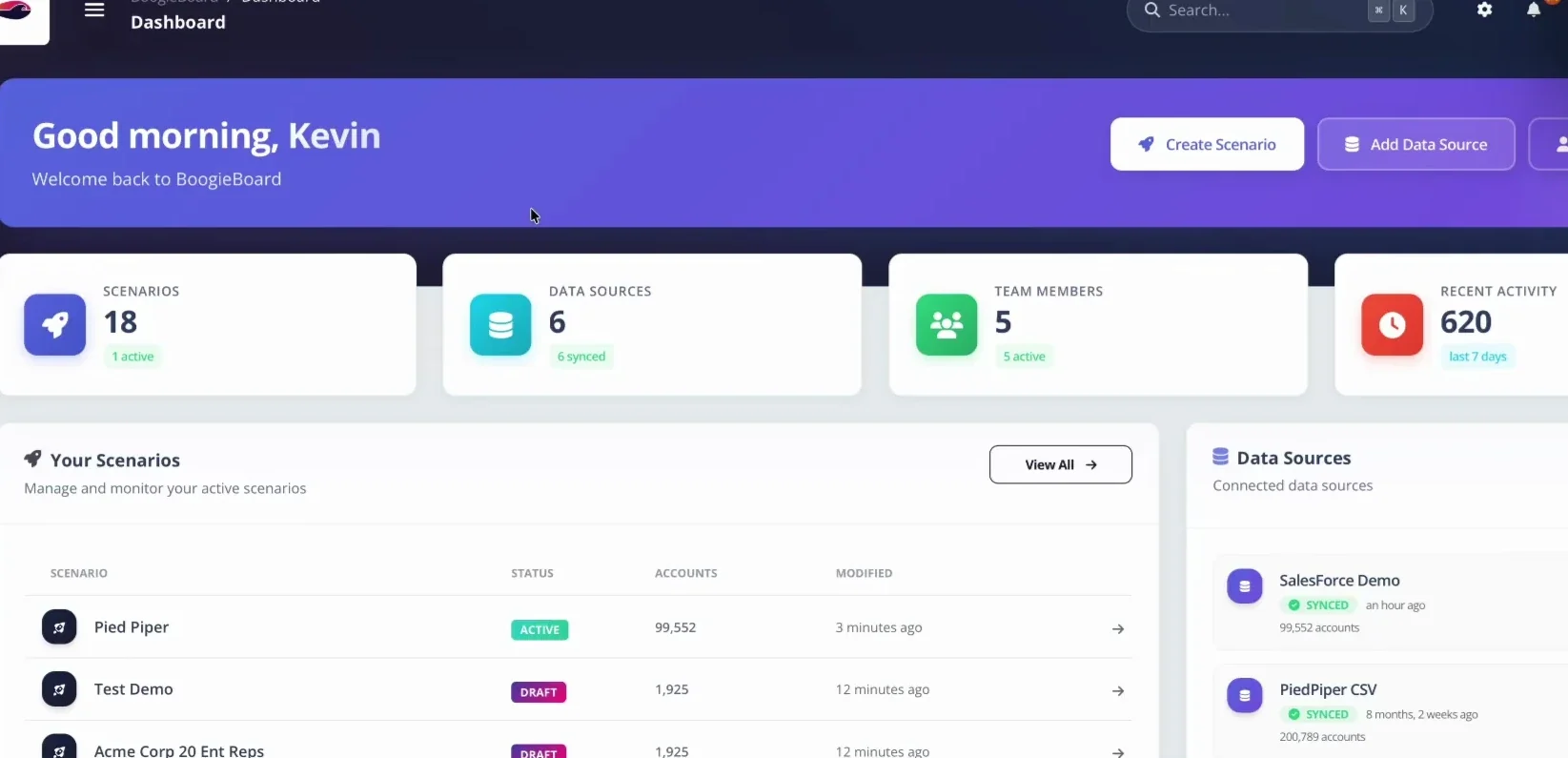
BoogieBoard keeps current and future territory scenarios separate so teams can model changes before activation.
Common Models and Variations: The Move From Excel To Territory Planning Software
No model removes judgment. Geographic, named-account, segment, industry, customer, and hybrid structures each solve a different constraint. Use the fewest logical layers that express the strategy, then state where a deliberate override is allowed. Complexity should correspond to a real customer or operating need, not inherited convention. Before activating the move from Excel to territory planning software, show managers the effect on Balance Goal and every downstream rule that depends on it.
The model in this subsection is useful only when its organizing rule matches the selling motion. Compare options by opportunity, workload, continuity, explainability, and maintenance burden. A structure that looks simple at launch can create expensive exceptions when accounts change segment, sellers leave, or related companies need coordinated coverage. For the move from Excel to territory planning software, document the effect on Scenario before the model advances.
version control: The Decision Test: Review 8
Test the live workbook against a complete planning cycle: reproduce the current state, create multiple scenarios, compare account-level changes, coordinate reviewers, preserve approvals and exceptions, activate in Salesforce, and recover the prior version without manual reconstruction. Technology should preserve territory structure, role assignments, scenarios, approvals, effective dates, and account-level change history, not merely update an Owner field. Test how Scenario, version control, and Balance Goal behave from source data through review and Salesforce activation. For the move from Excel to territory planning software, document the effect on Scenario before the model advances.
Current State Scenario: The Decision Test
For Current State Scenario: The Decision Test, make the implicit policy inspectable at account level. Use planning cycle to test whether the live state, future scenario, and approved Salesforce result remain consistent; record exceptions instead of hiding them in a person field.
planning cycle: The Decision Test
For planning cycle: The Decision Test, make the implicit policy inspectable at account level. Use Scenario to test whether the live state, future scenario, and approved Salesforce result remain consistent; record exceptions instead of hiding them in a person field.
Decision Note: Scenario 2
For Decision Note: Scenario 2, make the implicit policy inspectable at account level. Use version control to test whether the live state, future scenario, and approved Salesforce result remain consistent; record exceptions instead of hiding them in a person field.
Practical Implications
If regional workbooks must be merged after every manager edit and nobody can identify which formulas, locks, or source dates produced the final roster, the team has crossed from spreadsheet flexibility into operational dependency.
Decision Worksheet
| Decision | Evidence to inspect | Control |
|---|---|---|
| Define the population | Scenario and comparable roles | Named data owner |
| Measure the current state | version control and Balance Goal | Source date and baseline |
| Choose the tradeoff | Scenario comparison and complete Territory Health | Recorded approver |
| Activate the result | Account roster, changes, quota, and transition rules | Effective date and correction path |
Source of Truth and Identity Controls
Create a field-level source map for the move from excel to territory planning software. Name the authoritative system for account identity, hierarchy, segment, owner, territory, role, opportunity, and customer obligation. Reconcile records with a stable external ID, flag unmatched accounts, and prevent a local spreadsheet or custom person field from quietly becoming another golden record. Use Scenario as the account-level test for this control.
Current-to-Future Scenario Test
Preserve the live Salesforce configuration as a dated Current State Scenario before evaluating the move from excel to territory planning software. Build the proposed model separately, compare every changed account and role, and keep rejected alternatives available. Reviewers should see both the summary tradeoff and the exact records behind it. For version control, record the assumption that would cause the future state to change.
Approval and Exception Review
Classify feedback on the move from excel to territory planning software as a data correction, policy exception, or preference. Corrections update governed evidence; exceptions require a reason, owner, and expiry or review condition; preferences remain visible without silently changing the model. Name one Approver and use Balance Goal to show which evidence that person considered.
Salesforce Activation Checklist
Turn the approved the move from excel to territory planning software scenario into a deployment package containing territory and role changes, account identifiers, effective dates, exceptions, and rollback instructions. Sync only approved records, capture failures, and compare the activated Salesforce state with the package. Close the change only when Current State Scenario and the affected account roster reconcile.
Monitoring and Change Triggers
Monitor the move from excel to territory planning software through defined triggers: unmatched or unassigned accounts, role vacancies, stale source data, expired exceptions, failed syncs, and material differences between the approved and live states. Use planning cycle to decide whether the event is routine maintenance or evidence that the model itself needs redesign.
Account-Level Reconciliation
Select a sample of changed, unchanged, locked, customer, prospect, parent, and subsidiary accounts from the move from excel to territory planning software. Trace each record from governed source data through the scenario, approval, and Salesforce result. Investigate any case where Scenario, the role assignment, and the documented reason do not tell the same story.
Source of Truth and Identity Controls: Extended Review 2
Create a field-level source map for the move from excel to territory planning software. Name the authoritative system for account identity, hierarchy, segment, owner, territory, role, opportunity, and customer obligation. Reconcile records with a stable external ID, flag unmatched accounts, and prevent a local spreadsheet or custom person field from quietly becoming another golden record. Use version control as the account-level test for this control.
Current-to-Future Scenario Test: Extended Review 2
Preserve the live Salesforce configuration as a dated Current State Scenario before evaluating the move from excel to territory planning software. Build the proposed model separately, compare every changed account and role, and keep rejected alternatives available. Reviewers should see both the summary tradeoff and the exact records behind it. For Balance Goal, record the assumption that would cause the future state to change.
Approval and Exception Review: Extended Review 2
Classify feedback on the move from excel to territory planning software as a data correction, policy exception, or preference. Corrections update governed evidence; exceptions require a reason, owner, and expiry or review condition; preferences remain visible without silently changing the model. Name one Approver and use Current State Scenario to show which evidence that person considered.
Salesforce Activation Checklist: Extended Review 2
Turn the approved the move from excel to territory planning software scenario into a deployment package containing territory and role changes, account identifiers, effective dates, exceptions, and rollback instructions. Sync only approved records, capture failures, and compare the activated Salesforce state with the package. Close the change only when planning cycle and the affected account roster reconcile.
Frequently Asked Questions
When should you stop using spreadsheets for territories?
Excel remains workable while one governed owner can preserve rules, versions, scenarios, permissions, account detail, approvals, and activation more reliably than the planning complexity grows. A spreadsheet has low entry cost and unlimited local flexibility; a planning system creates licensing and implementation work but replaces fragile reconciliation, permission, scenario, and audit labor. Use the published definitions and complete-territory result instead of relying on one universal benchmark.
What does territory software do that Excel cannot?
Test the live workbook against a complete planning cycle: reproduce the current state, create multiple scenarios, compare account-level changes, coordinate reviewers, preserve approvals and exceptions, activate in Salesforce, and recover the prior version without manual reconstruction. If regional workbooks must be merged after every manager edit and nobody can identify which formulas, locks, or source dates produced the final roster, the team has crossed from spreadsheet flexibility into operational dependency. Publish the assumptions so another reviewer can reproduce the answer.
What data is required for the move from excel to territory planning software?
For the move from excel to territory planning software, assemble governed account data, current assignments, role capacity, and decision evidence for Scenario, version control, and Balance Goal. Date the sources and publish the definitions so another reviewer can reproduce the result and separate a factual correction from a policy exception.
How often should the move from excel to territory planning software be reviewed?
Review the move from excel to territory planning software on the formal planning cadence and whenever the inputs behind Scenario, version control, and Balance Goal change materially. Keep customer and pipeline ownership stable between reviews; reopen the model when strategy or new evidence changes the decision, not merely because a manager prefers a different assignment.
How should Salesforce and the planning layer divide responsibility?
For the move from excel to territory planning software, keep the governed source data behind Scenario, version control, and Balance Goal in its approved system, compare current and future states in the planning layer, and operate only approved assignments in Salesforce. Stable identifiers, field ownership, and a dated sync prevent competing records of truth.
How should territory changes be tested before activation?
Changes to the move from excel to territory planning software should be tested by freezing the live Salesforce state, validating the inputs behind Scenario, version control, and Balance Goal, modeling the proposed future scenario, inspecting account-level differences and exceptions, and recording approval. Activate on a defined date and reconcile the deployed result to the approved scenario.
About the author: George James is Co-Founder & CPO of BoogieBoard.
In Summary
Spreadsheets are fine until the account universe outgrows the person maintaining it. Here is where that line actually sits. Use the sequence above to keep the decision governed, evidence-based, and inspectable at both the account and territory levels.
See Territory Planning in Practice
Watch practical territory-design workflows on the BoogieBoard YouTube channel.