
A key component to data quality in Salesforce is data enrichment from 3rd-party providers. Most B2B companies that we work with have well over 100K accounts in Salesforce, which is too many accounts to be maintained and kept up-to-date manually. Instead, companies will opt to enrich their data using 3rd-party providers. Use the below criteria to evaluate about these providers:
Business Considerations
Many companies feel a low return on investment from 3rd party enrichment providers. These providers charge substantial subscription and usage-based fees (per field or record enriched), which can balloon quickly as companies seek to have a fully representative CRM.
In pursuit of an all encompassing CRM database, companies may enrich too many accounts, enrich at too high of a frequency, or use too many providers. Enriching too many accounts leads to a lack of focus. Enriching too frequently creates a high number of accounts and a high-maintenance schedule. Using too many providers causes headaches with vendor management and duplicative costs for narrow margins of quality improvement.
It is therefore important to view all below analysis and recommendations through the lens of you’s business goals and the associated costs of enrichment.
Matching
Generally, all 3rd-party providers maintain a database of company information that they themselves obtained either through scraping public information, manual research, customer feedback or user generated data (i.e. LinkedIn), and in some cases AI. All of these methods rely - to some degree - on live, unstructured data and therefore will not be perfectly accurate or uniform.
The bare minimum a provider needs to match on are the standard Account Name and Website fields:
- Providers will attempt to fuzzy match on Account Name. For example “Salesforce, Inc.” and “salesforce” will both likely match to the company “Salesforce”.
- Providers usually do an exact match, or url fuzzy match on Website. Although Account Name cannot be null in Salesforce, the standard Website field is not usually a required field. Missing website info can lead to inaccurate matches or failure to enrich data in general.
In addition to company name and website, data providers may also use address information to match companies. In some cases they may let you choose whether to use ShippingAddress or BillingAddress for matching.
Enrichment
Universal amongst providers is to enrich with a Provider ID and Last Enrichment Date:
- Examples of a Provider ID are ZoomInfo Company ID or DUNS Numbers. Provider IDs are helpful for troubleshooting, but can also be useful as a deduplication strategy, essentially offloading duplicate identification to your data provider
- Last Enrichment Date is another useful troubleshooting tool. Not only can it be used to let your sales team know how fresh your data is, it can also be used to identify issues with the integration to your data provider. An old Last Enrichment Date can help explain why the employee count for an Account doesn’t reflect a recently publicized layoff at a company. In the case of null or old values, it could also indicate that your provider is hitting errors when trying to enrich that particular account.
Enrichment providers usually need a Salesforce account to authenticate as. It’s recommended to use an integration user that is excluded from validation rules.
When looking at providers, BoogieBoard recommends not just evaluating the quality of data they provide, but also their mechanism for delivering that data.
- Can accounts be enriched on-creation or on-update (i.e. in real time)? What is the latency for those updates?
- Can accounts be enriched ad-hoc in bulk (bulk create or bulk update)?
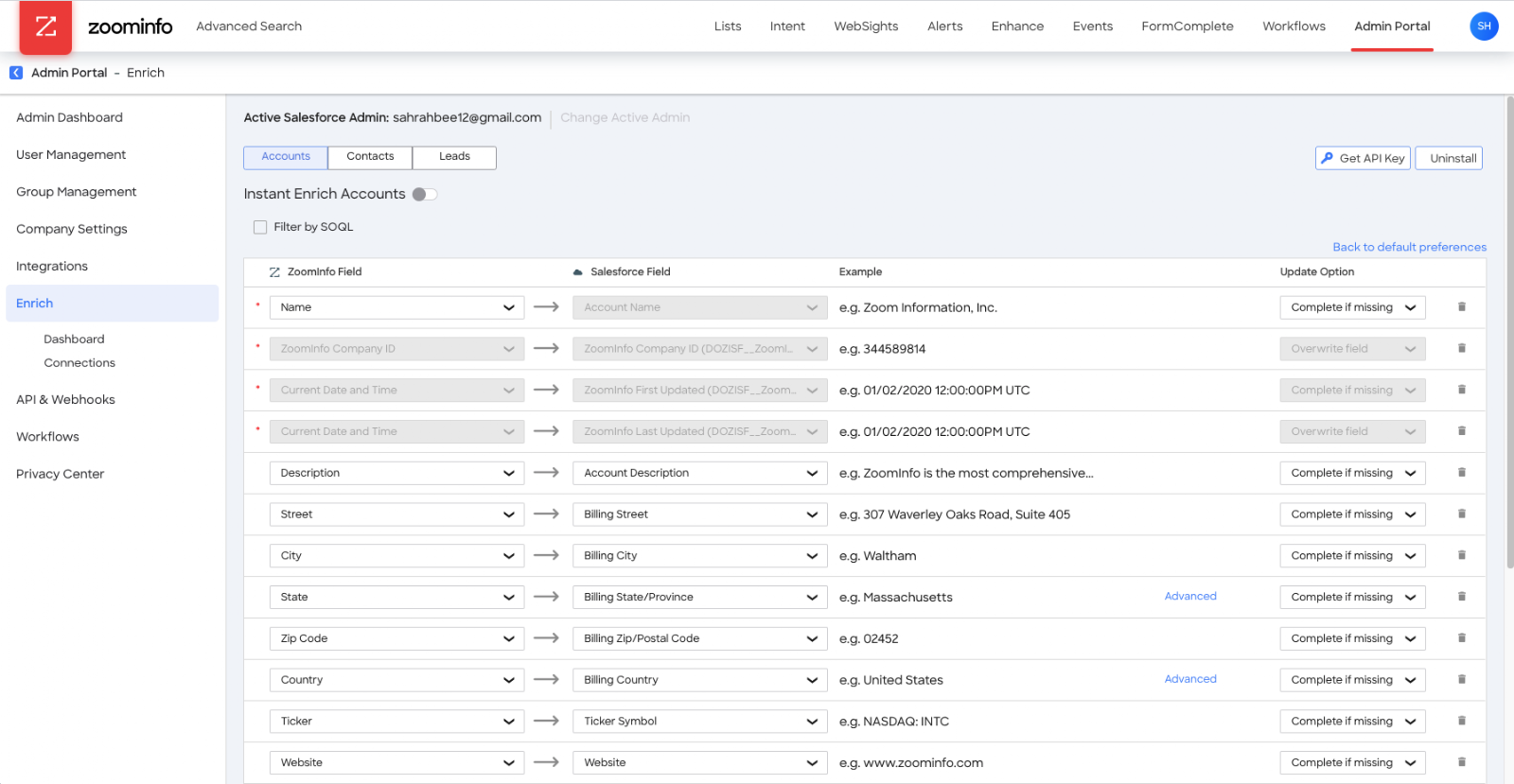
- Can you control which fields get written to (i.e. can you write directly to BillingCountry or only to the provider’s fields)?
- Can you choose to only fill-in data as opposed to overwriting in the case of a conflict?
- Can you view error/debug logs to understand why certain accounts aren’t being enriched?
Components
As mentioned above, providers tend to enrich a variety of data. What’s most important is the format they provide the data, how clean it is, and how frequently it changes. Below are some examples of where and how a provider would enrich data.
Related Records
In some instances, it may make sense for a provider to match your CRM’s data to theirs in order to enrich data related to the account but not necessarily fields on an account. Examples of this are HG Data’s technographic data. HG provides its customers with detailed information about the technology and apps a company uses.
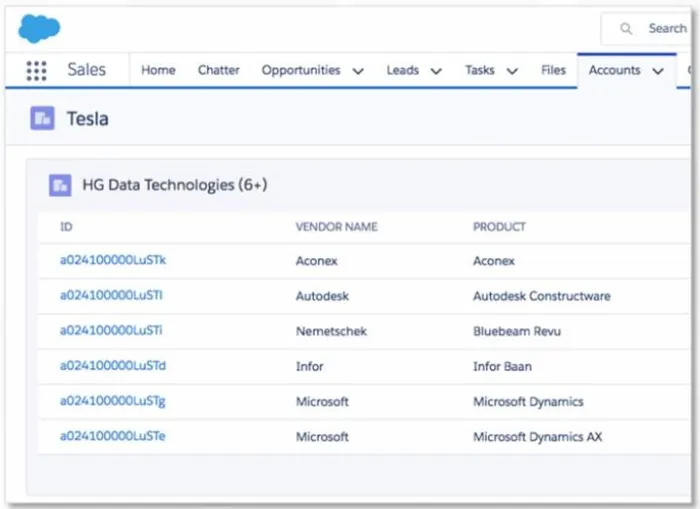
In the above screenshot, you can see that Tesla uses Autodesk as well as other tools. Each row above is a record in Salesforce related to the Tesla account. In addition to product name, each technology record includes a confidence score and other metadata about that particular technology.
Related records make sense in this case because there can be many technology records for a given account. If you needed this information on the account, you could build an automation to concatenate the names of each unique technology related to the account.
Standard and Custom Fields
What you’ll encounter with most firmographic data providers is directly writing data to the Account record or a one-to-one relationship record. Those updates could be written to a standard field like Account Name or Billing Address, as well as custom fields like ZoomInfo Number of Employees
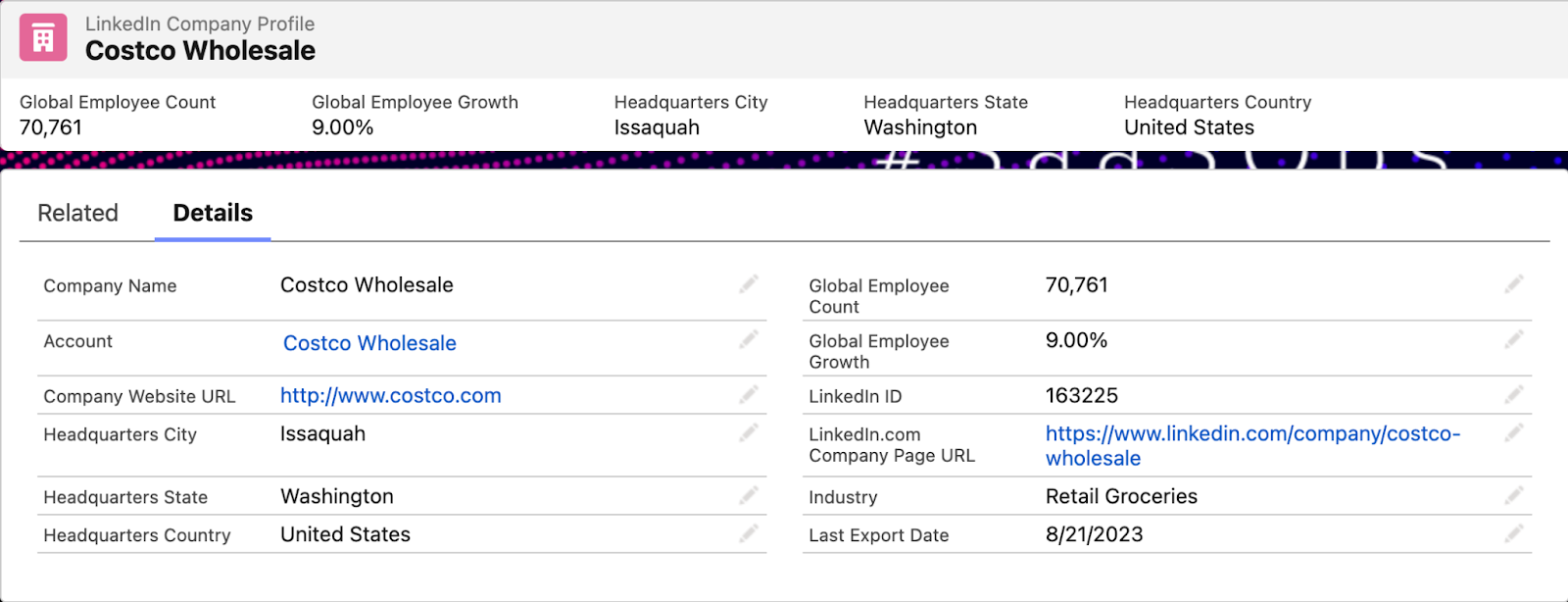
The above screenshot shows data from LinkedIn Sales Insights which has a 1:1 relationship with the Costco account record. These fields can easily show up on the account record itself through formula fields.
Here’s another example using ZoomInfo and showing how you can control which fields are written to:
Off Platform
In some cases, there may be far too much data to store in Salesforce or the data may otherwise not be a good fit for storage. In these cases, providers will usually include an iFrame on Account pages.
Automation
After a provider’s data set is matched with yours and data starts getting enriched, whether to custom fields or related records, it’s important to understand when that happens. There are a few different ways this can happen and each way can play an important role in how you handle data enrichment.
Trigger On Create
BoogieBoard recommends finding a provider that can enrich records as they are created. This can be hugely beneficial for catching duplicates, preserving your sales team’s time, and making sure leads are properly routed.
Providers that allow enrichment on create usually just require the person creating the record to provide some bare minimum of data. To get the best quality data, BoogieBoard recommends making “Website” a required field on record creation pages and in bulk upload requests. Depending on the provider, making address fields required as well could be helpful.
Trigger On Update
We do not think this is a necessary function for most providers since the data will usually be updated by some regularly recurring sync, but you may find that you want more real-time enrichment.
Schedule
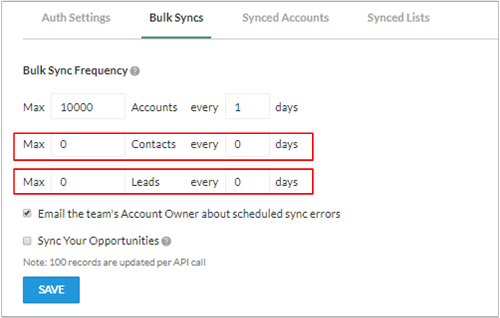
Most providers will allow you to set up a recurring scheduled sync to enrich records. This is a good practice for keeping information as up-to-date as possible. Syncs can be daily, weekly, or even more granular as seen in the below screenshot.
Ad-Hoc
Besides routine syncs from a scheduled job, or enrichment triggered from a record being created or updated in Salesforce, you’ll also want to make use of ad-hoc enrichments.
Some common use cases:
- A sales rep looking to find contacts with a particular title at an account in their territory
- An operations person trying to find new accounts matching an ideal customer profile
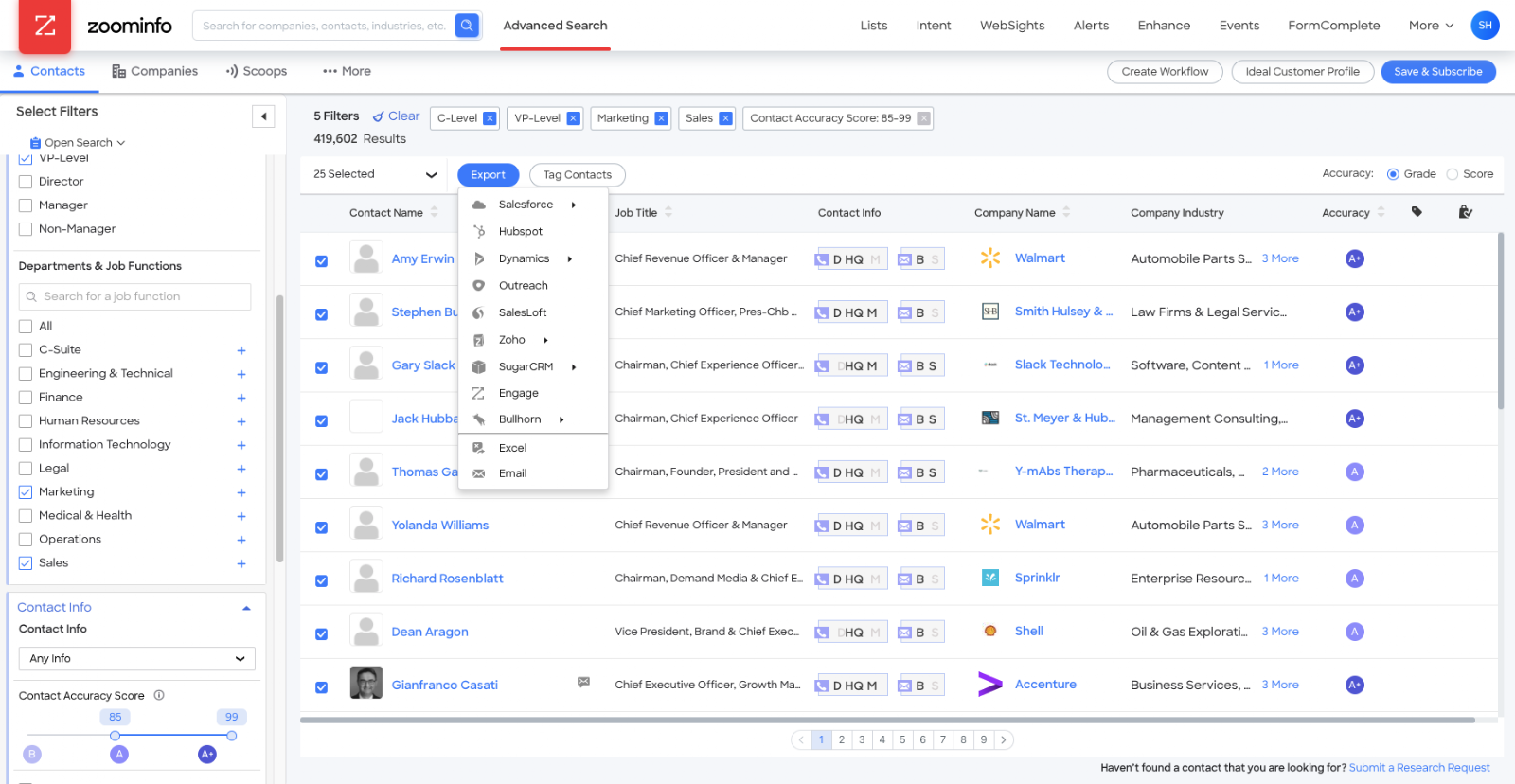
To that end, it’s important that your provider have a portal end users can log into, search records off-platform, see if they exist in Salesforce already, and if not be able to create those records with data enriched.
The below screenshot shows how that looks in ZoomInfo:
Policy Considerations
Now that we’ve talked through all of the various components for configuring enrichment, it’s worth reflecting on the needs of your business and the users in Salesforce on a day-to-day basis.
The following are important questions to ask that will ultimately inform any written policy you put in place:
- Who should be allowed to create accounts?
- What information should be required when creating an account? What information should only ever be automatically enriched vs. manually entered?
- What information can they update after an account is created?
- Configure your record creation pages, required fields, and validation rules accordingly.
- How are your providers charging for enrichment? Does that impact how frequently you choose to enrich records?
- Should providers enrich directly to a standardized set of fields or to a set of secondary fields for use at a later time?
- If you get the same kind of information from multiple sources, which is considered the “single source of truth”?
- Although outside of the scope of these recommendations, you should think about how data enrichment impacts account distribution.
- As mentioned in an example above, would frequent updates to employee counts cause an already owned record to change territories?
- Where does enrichment fit into your lead routing process?
- Once you make all of these decisions, how will you communicate the changes and ongoing policy to your sales team? BoogieBoard recommends putting a writeup of your policy wherever you store other systems/operational training materials.
- How will disputes be handled? Who will handle those requests? If you find that disputed information is correct, will you make an immediate change to the record or take some other action?